Update v20 - Exceptions on virtual user

Status
Not open for further replies.

123automatiserin

Silver Partner
Basic Certified
Joined
Feb 19, 2016
Messages
11
Reaction score
3
Hi @nikolascx

I was looking at the update version 20 and have a few questions.

We have some chains of veterinary practices.

Those practices have normal opening hours. And after that they share night shifts with different practices and vets.

We create a virtual user for this which we call NIGHTSTAND. This is where all the calls come in.
If this virtual user is set to available then a clinic is available. If the clinic is closed then the state goes to DND. We set this via the opening hours.
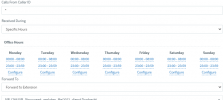
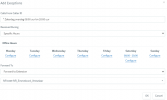
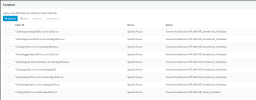
If the clinic is closed then a transfer must take place to a veterinarian on duty. For this we create another virtual user which we call SERVICE-ARTS. In this virtual user we create 7 different exceptions (1 for each day) so that you can set the duty doctor for each day one week in advance.

Now I read that these exceptions are going to disappear in V20. We have over 160 veterinary practices using this.

So we are starting to get pretty worried about this.
And we asking ourselfs whether 3CX will still be the right solution for us if these changes are comming.
 
  • Like
Reactions: Plains_JosephW
Another problem we experience is a gap from 1 minute when we use the exceptions..

If a veterinairian has a night shift from Monday 19:00 till Tuesday 08:00 hour there is a gap from 23:59 till 00:00 hour.
We already had some clients that received a urgent call but weren't available at that 1 minute.

And they must be available in matter of live and dead.

Hope you have a solution for this to.
 

Attachments

  • Schermafbeelding 2023-12-21 110426.png
    Schermafbeelding 2023-12-21 110426.png
    20.3 KB · Views: 14
Morning 123,

You can use the CFD to create this too we just recently did this for a customer with a 7 day schedual for the consignatiedienst ( cant remember the english word!)
We have the daily schedual in there Monday till friday wich routes to the daytime routingpoint.
After hours we have the mobile number of the person thats on duty that evening.

No exeptions or virtual users needed and quite simple to maintain once the initial schematic has been made.

I presume those duty vets are not willing to use the 3CX App looking at the config you are running now , but if they are ..then why not get them the app and put them all in a queue and have them be in the queue when they need to depending if they are on call or not.
 
Hi
Morning 123,

You can use the CFD to create this too we just recently did this for a customer with a 7 day schedual for the consignatiedienst ( cant remember the english word!)
We have the daily schedual in there Monday till friday wich routes to the daytime routingpoint.
After hours we have the mobile number of the person thats on duty that evening.

No exeptions or virtual users needed and quite simple to maintain once the initial schematic has been made.

I presume those duty vets are not willing to use the 3CX App looking at the config you are running now , but if they are ..then why not get them the app and put them all in a queue and have them be in the queue when they need to depending if they are on call or not.
Well its a little bit more difficult.
Every day there is another vet who's working the night shift and not everyday own of their own clinic.
So they work togerher with multiple clinics.

So it can happen that from 18;00 till 00:00 it routes to a virtual user with a mobile phone and from 00:00 till 08:00 it routes to another clinic.

Just a question. Youre customer is using the CFD themself after you configured it?
 
No we set it up weekly with in it a weekly schedual and then the 7 nightshifts next to it.
Every week we update the mobile numbers in the CFD according to the relayed work schedual.

The routing switching from mobile phone or directly to another clinic doesnt really matter in the case of CFD because you can route it to either depending on your need.
 
gap from 23:59 till 00:00 hour
I recall posts about that before, seems like 3CX should at least compare to 23:59:59 not 23:59:00.

re: schedule, I don't know if this is workable for your situation but we've had cases where someone needed an after hours contact. We set up an extension say "On Call" and then it gets added to the app on everyone's phone. Those people can check the box for that account under (three bars) > Accounts to connect or disconnect the extension. Or uncheck it to disconnect in the morning. It's a bit more manual but puts it in their control as well, without edits to 3CX. (note the app allows for only one active extension at a time, but it can have none)
 
So, we have on call engineers that we used to set up CFD for depending on the week in the month. It became too much of a task for us as admins to keep on top of this so we put it back to the customer to handle.

We have an on call queue with extensions in. Each extension is set to "ring my mobile simultaneously". They have someone who manages who's logged in to this queue.
 
So, we have on call engineers that we used to set up CFD for depending on the week in the month. It became too much of a task for us as admins to keep on top of this so we put it back to the customer to handle.

We have an on call queue with extensions in. Each extension is set to "ring my mobile simultaneously". They have someone who manages who's logged in to this queue.
Our roll-over on-call CFD would probably help you. It's much simpler.
 
Does it require any input from me? :D
If the schedule is fixed, nope. Even then, the schedule is stored in a JSON in a 3CX Parameter.

Oh wait you said hosted -_-
 
  • Haha
Reactions: TechnoPhreak
Hi Guys thanks for reporting

The issue of 1 minute is fixed in v20. Indeed you guys are correct. Fix is only in v20 however.

@123automatiserin can you give me an example of the exceptions you have to configure in v18. From what I understand, every week you need to go and enter a new config in the pbx correct?
I still see this as a problem that can be also addressed.

I think the solution here is a rest api - where you will have a portal, and you can update configuration inside 3CX remotely.
Then we are not "forced" to put every single little option exposed in the interface. This is where we struggle at the moment.

For sure these Vet clinics need to stay on V18 for now.
But let's work together to find out how we can offer a solution. The CFD idea of @JosIPVG actually does this.

Can someone send me example exceptions used in this case. thank you so much and looking forward to work with you guys in 2024.
 
Last edited:
  • Wow
Reactions: Plains_JosephW
Almost the same scenario here as 123automatiserin. Ours would be with 3 urgent care facilities. At night all calls ring a dummy extension. Then depending on the status of the dummy extension calls are forwarded to the proper urgent care that is open
Available Main Location Open
DND sends call to location 2
Away sends call to location 3
So I will no longer be able to do this on V20?
 
Hi Curtis,

I beleive that is indeed the case with the dummy extensions.
In this case CFD can also do this if the routing is static or changed weekly with a weekly schedual.
 
  • Like
Reactions: Evolute IT
Hi Guys thanks for reporting

The issue of 1 minute is fixed in v20. Indeed you guys are correct. Fix is only in v20 however.

@123automatiserin can you give me an example of the exceptions you have to configure in v18. From what I understand, every week you need to go and enter a new config in the pbx correct?
I still see this as a problem that can be also addressed.

I think the solution here is a rest api - where you will have a portal, and you can update configuration inside 3CX remotely.
Then we are not "forced" to put every single little option exposed in the interface. This is where we struggle at the moment.

We know that 3CX allowed many options before and these were used as workarounds (Dummy extensions, specific routing, etc etc). These create problems when they are used in non tested / non-intended ways. So we find the chance to remove them for the general public. (We do this to reduce the issues not to cause discomfort).

But then these workarounds for some installs become dependant (perfect example here) And this creates a friction / inability to upgrade.

For sure these Vet clinics need to stay on V18 for now.
But let's work together to find out how we can offer a solution. The CFD idea of @JosIPVG actually does this.

Can someone send me example exceptions used in this case. thank you so much and looking forward to work with you guys in 2024.
We use a dummy user as "Night Mode" this is where all calls come in.
On night mode we use clinic opening hours. During opening hours the calls go through to a Queue.

Outside opening hours the calls go through to the dummy user "Service-Arts". On this user we then create different exceptions per time plane. We actually do this for the whole day, so that there is always a transfer when the "night mode" is set to DND.

See some screenshots above
 
How many times do you update/change the numbers you route it to in the off hours?
 
How many times do you update/change the numbers you route it to in the off hours?
The Clinic does that on weekly base
 
Well if they can do that then they probably can also edit the mobile numbers in the callflow.

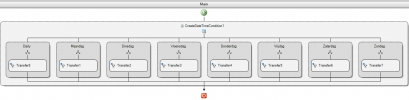
Here is an example of the simple flow we made for the during office hours and outside of office hours for the single DID for the emergency services for our customer.

The daily is to an internal number on the PBX with corresponding routing if they dont answer.
The rest is a direct transfer to mobile lines.
During transfer MoH is played too.

1704786221861.png
 
Thank you for the example. However there is probably a slim to zero percent chance, of our customers editing a cfd then uploading to the phone system. When now all they have to do is set a status to accomplish the same thing
 
  • Like
Reactions: Evolute IT
Almost the same scenario here as 123automatiserin. Ours would be with 3 urgent care facilities. At night all calls ring a dummy extension. Then depending on the status of the dummy extension calls are forwarded to the proper urgent care that is open
Available Main Location Open
DND sends call to location 2
Away sends call to location 3
So I will no longer be able to do this on V20?
You can do all this from within v20 as a department and its much easier to set because it can be done from any extension. Check out standard manual docs before taking conclusions.

You can absolutely use an extension and create rules for it. Its just that there are now better ways of doing it such as a call processing script. Any case i believe @123automatiserin you are using exceptions but these exceptions we're intended for caller ID but you have used a * to make it for all calls right?
Isnt it better to allow the receptionist to set the night doctor forward on a daily basis?
 
Last edited:
Status
Not open for further replies.

Forum statistics

Threads
111,973
Messages
590,079
Members
164,899
Latest member
mazet