Solved Upgrade from V15.5 Windows version to V16

Status
Not open for further replies.

perezarienbong

Bronze Partner
Advanced Certified
Joined
Jul 24, 2019
Messages
3
Reaction score
0
Hi!

One of our clients is looking to integrate 3CX with their O365. O365 requirements are met. However, for the 3CX, they are using V15.5 windows version. I've read about the manual upgrade but can we use the same existing license for the upgrade? it's V15.5Pro(annual)commercial)
 
Yes, you can upgrade using the existing license.

You need to do the following

  1. Backup the system (copy the files to non 3CX folder)
  2. Uninstall
  3. Reboot the system
  4. Install v16 using the backup from above.
 
  • Like
Reactions: perezarienbong
Yes, you can upgrade using the existing license.

You need to do the following

  1. Backup the system (copy the files to non 3CX folder)
  2. Uninstall
  3. Reboot the system
  4. Install v16 using the backup from above.


ok great! I will do it and provide feedback.
 
Hi @perezarienbong

If you have a valid annual commercial license you can indeed upgrade using the method Saqqara mentions.

Once you are on V16 the service packs will happen without needing to reinstall.
 
  • Like
Reactions: perezarienbong
Thank you for the verification. We will schedule the upgrade and I will get back to this thread for the results.
 
Complete upgrade process is about a 15 minutes
 
Hi!

One of our clients is looking to integrate 3CX with their O365. O365 requirements are met. However, for the 3CX, they are using V15.5 windows version. I've read about the manual upgrade but can we use the same existing license for the upgrade? it's V15.5Pro(annual)commercial)
Hi,
I have did the upgrade from v15.5 to v16 after I follow the procedure:

back-up
remove 15.5
reboot
install v16
installation completed

but I can not start the web interface also i can not start the 3cx services I got 1068...
if i try to reach the web interface bij the IP address I have to login with username and password which I don't have because its new installation...

who can help...
 
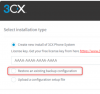
How did you install V16? Did you choose the option to install new system or restore from backup?

If you restored from backup, the password is the same as you had in V15.5, it will not change
 
How did you install V16? Did you choose the option to install new system or restore from backup?

If you restored from backup, the password is the same as you had in V15.5, it will not change
As I mention (new installation). I remove the v15.5 from the win server and installed the v16 and I tried to reach the 3CX phone system web inter face bij https:// IP addres:5001/
to open the web server and restore my back-up. but unfortunately i need the login username and password... I tried administrator / administrator but no way
 
you have to reuse your backup file to restore your config during reinstall, otherwise you start a completly new 3CX.

Hope you have always your backup ? if so restart from scratch and take care when asked for new pbx or restore an existing, don't next windows without reading ;)

what you've done was good except step in bold
back-up
remove 15.5
reboot
install v16
Restore backup during install
installation completed
 
Last edited:
  • Like
Reactions: JohnS_3CX
As mentioned above, please note that the backup cannot be restored after installation.

You have to choose restore during installation otherwise you will have to start from scratch as @aws2p described
 
you have to reuse your backup file to restore your config during reinstall, otherwise you start a completly new 3CX.

Hope you have always your backup ? if so restart from scratch and take care when asked for new pbx or restore an existing, don't next windows without reading ;)

what you've done was good except step in bold
back-up
remove 15.5
reboot
install v16
Restore backup during install
installation completed
Thank you for response.

I have the backup but :
the problem is that during the installation there is no option displayed asking to restore backup during the installation. I need the system back ASAP. any another suggestions.... I appreciated..
 
  • Like
Reactions: AWS2P
Never see this missing, option to restore is always here as @JohnS_3CX said above
 
Please note that after you install, the setup is not over yet. You do not go to your FQDN with 5001 port, you go with 5015 to launch the setup wizard in your browser. Have you done that step?

Not possible via team viewer, but can you post a screenshot at least of the options you see on your screen after installation?
 
Please note that after you install, the setup is not over yet. You do not go to your FQDN with 5001 port, you go with 5015 to launch the setup wizard in your browser. Have you done that step?

Not possible via team viewer, but can you post a screenshot at least of the options you see on your screen after installation?

after installation finish there nothing appeared to inform the installation completed.
i have tried to go to the 5015 by
https:/IP Address:5015 ( no connect)
IP address:5015 (no connect )
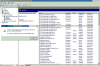
If check the services I see all 3CX services, see screenshot. that is all what I can see

11826
 
after installation finish there nothing appeared to inform the installation completed.
i have tried to go to the 5015 by
https:/IP Address:5015 ( no connect)
IP address:5015 (no connect )
If check the services I see all 3CX services, see screenshot. that is all what I can see

View attachment 11826
I am sure there is issue in installation the new version of 3CX V16.
I have download the previous version (15.5) which I had in our test lab, installed from new en I saw all steps you mention earlier, installation is running with success by choosing restore the back-up. Now I have completely v15.5 running as it was. so upgrade from 15.5 to v16 is not possible because the installation did not start the 3cx wizard tools.
thank you for your efforts. I hope somebody can look to this and let me know how to upgrade with success
 
What version of Windows are you running?
 
Windows server 2012 R2 standard
 
Status
Not open for further replies.

Forum statistics

Threads
112,313
Messages
591,841
Members
165,458
Latest member
Kayla Norris