- Joined
- Sep 15, 2007
- Messages
- 15
- Reaction score
- 5
Hi All:
I completed our upgrade from V16 to V18. (The Debian Linux ISO version)
When the upgrade completed, I could not access the Management Page at the original IP address. I had the MAC address loaded into the router DHCP reservation to stream line things
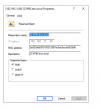
The IT team found that the MAC address reported from the machine changed to a much longer MAC - See the screenshot below.
The original MAC was "b8:ca:3a:86:39:d6" and as you can see, is still embedded in the "new" MAC.
Whilst we got it working by loading the new MAC into the DHCP reservation, can someone tell me what went wrong or is this standard operation going from V16 to V18?
BR,
Bill.
I completed our upgrade from V16 to V18. (The Debian Linux ISO version)
When the upgrade completed, I could not access the Management Page at the original IP address. I had the MAC address loaded into the router DHCP reservation to stream line things
The IT team found that the MAC address reported from the machine changed to a much longer MAC - See the screenshot below.
The original MAC was "b8:ca:3a:86:39:d6" and as you can see, is still embedded in the "new" MAC.
Whilst we got it working by loading the new MAC into the DHCP reservation, can someone tell me what went wrong or is this standard operation going from V16 to V18?
BR,
Bill.