


- Joined
- Nov 24, 2021
- Messages
- 34
- Reaction score
- 10
Hello,
We have just upgraded from V18 to V20 and restored the backup and currently we are testing inbound calls, we dial the number then hear the IVR then when we press the button to route the call to the queue, call fails immediately and revert back to the IVR because we have set "Destination if no answer" even though there are agents that are logged to the queue but the it seems that the call queue does not see if anyone is available to answer.
Another thing is that we even cant make internal call agent to agent and calls goes to the missed calls section.
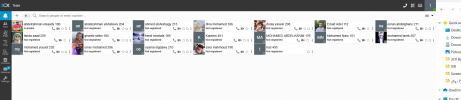
We noticed Also that in the "Teams Page" most of users is "not registered" and we don't know what does it means, we even created a new user and that user is logged to the queue we want to reach and is in "Available status" but no calls can reach it.
Also we got Error in the Event Log "A call placed by 0xxxxxxxxx@(Ln.10004@0xxxxxxx) was terminated due to a loop detected. Please verify call routing settings."
We have just upgraded from V18 to V20 and restored the backup and currently we are testing inbound calls, we dial the number then hear the IVR then when we press the button to route the call to the queue, call fails immediately and revert back to the IVR because we have set "Destination if no answer" even though there are agents that are logged to the queue but the it seems that the call queue does not see if anyone is available to answer.
Another thing is that we even cant make internal call agent to agent and calls goes to the missed calls section.
We noticed Also that in the "Teams Page" most of users is "not registered" and we don't know what does it means, we even created a new user and that user is logged to the queue we want to reach and is in "Available status" but no calls can reach it.
Also we got Error in the Event Log "A call placed by 0xxxxxxxxx@(Ln.10004@0xxxxxxx) was terminated due to a loop detected. Please verify call routing settings."


