Upgraded Systems Unable To Reach Phone Book

MarkCSUK

Bronze Partner
Basic Certified
Joined
Sep 30, 2020
Messages
61
Reaction score
6
Hi,

On Friday (11/10/2024) we upgraded two on-site systems from v18 to v20 (Version 20.0 Update 3 (Build 806 Release)). Both upgrades went smoothly and without issue.

This morning users of both systems are reporting the same issue. namely that they are unable to access the 3CX phonebook (contacts) on their desk phones (they dont use device or web clients).

System 1 is using Yealink T41S phones
System 2 is using Yealink T46U phones

I have confirmed all 3CX services are running, the phones are registered and provisioned correctly, all other functions are working.

I have upgraded the phones to the latest 3CX recommended/compatible firmwares.

I have turned off the SECURITY>TRUSTED CERTIFICATES>Only Accept Trusted Certificates on handsets on both systems, however this has not helped.

I'd be grateful for any other thoughts or insights.

Mark.
 
Last edited:
Are this phones are local to the pbx or remote?
 
  • Like
Reactions: MarkCSUK
on System 1 are a mix of local and connected via SBC, on System2 the phones are all pure local.
 
Did you try to open the phonebook url in your browser?
 
  • Like
Reactions: MarkCSUK
I have and it opens without issue on both systems.
 
Is the url for the phonebook https or http? Is there any firewall between the local phones and the pbx?
 
  • Like
Reactions: MarkCSUK
it is HTTPS, and there is no firewall between the phones and the PBX (which would only be the firewall on the PBX machines but they are completely disabled).

However I see that the network interfacess on both are showing as "public network" rather than "private network" so I have changed both to private and have asked the end users to test.
 
Did you configured split dns correctly?
 
  • Like
Reactions: MarkCSUK
Yes, the split dns is still in place, nothing has changed as regards that from when both were working as v18 systems - and all other functions of the system are working without issue - it is just accessing the phonebook from the handsets.
 
changing the network 'profile' from public to private has made no difference sadly.
 
Hmm.. than you need to check with wireshark. Restart a phone and you should see the request for the phonebook and any problems regarding this.
 
  • Like
Reactions: MarkCSUK
OK thanks, I'll get into that and see what I can fathom.

Thank you for your help :)
 
  • Like
Reactions: bitn2
I have turned off the SECURITY>TRUSTED CERTIFICATES>Only Accept Trusted Certificates on handsets on both systems, however this has not helped.
This is absolutely not necessary on those models when using a 3CX FQDN.

The phones are probably no longer provisioning (even though calls work fine).

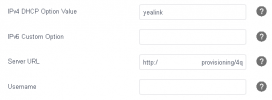
Take the provisioning link from one of the phones and compare it to the one in the admin console, see if the HTTPS port of 3CX changed for example from 5001 to 443. You can simply re-paste the new link and click save which should solve the problem.
 
  • Like
Reactions: MarkCSUK and bitn2
Hi,

Thank you.

The AP link within 3CX shows as http://client_name.3cx.uk/provisioning/4q1ie9nnjdl (no port at all)
the AP link on the phone shows the same.

The admin console for 3CX is https://client_name.3cx.uk/#/

should I change the URL on the phones to https:// instead of the http:// that the admin console gives me ?
 
Your provisioning link should be https.

if you're using DHCP option 66 ensure this is also correctly set to https.

are you using custom templates?

is the server that 3CX dedicated solely for 3cx?
 
  • Like
Reactions: MarkCSUK
Hi,
Thank you,

We don't use DHCP option 66,
We aren't using any custom templates.
The server is solely for 3CX
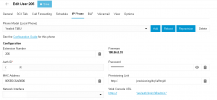
this is what I have in the User IP Phone tab
1728917031723.png

and the provisioning link on the phones points to the same place.
1728917151904.png
I'm wondering if our upgrade was not so smooth as we believe - perhaps we'd be better wiping it and reinstalling afresh with the pre-upgrade backup we took.
 
What happens if you try and remove/add the phone again?

also, if you go to phones > options have you got secure device prov enabled or not?
 
Ok change the "Network Interface" drop down for each phone and pick the FQDN.
If its empty it means that whatever interface they had in V18 no longer exists.
Since you have split DNS it should not be a problem to pick the FQDN.
Click save to apply the setting.

You will need to use the same link in the phone so that it can reconnect back to its provisioning server.
 
  • Like
Reactions: MarkCSUK
I haven't tried that yet.

I dont have an exentsion thats free for me to try at the moment, I'll have to wait for their offices to close, but will give that a try.

One office is 6 extensions which is very do-able - the other is nearly 200 which is looking a bit daunting.
 
You only need 1 to test the theory.
 
  • Like
Reactions: MarkCSUK

Forum statistics

Threads
111,955
Messages
589,925
Members
164,855
Latest member
parik24pro