Upgrading 3CX to a specific version

Status
Not open for further replies.

doncol

Silver Partner
Basic Certified
Joined
May 28, 2021
Messages
33
Reaction score
6
We have a few installs of 3CX PBX that are on older Raspberry Pi 3 B 1GB devices. They typically are running 3CX v16.0.6.655 and we are wanting to upgrade them to the last v16 version, as v18 is not possible on Pi 3 devices. How do we do an in place upgrade to a specific version of 3CX eg. v16.0.8.9 so as to at least get them as up to date as possible?

Thanks in advance.
 
Hi @doncol,

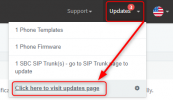
You should see the updates in the Upgrades section of the Management Console, from there you can update manually?

1634213718707.png
 
  • Like
Reactions: Evolute IT
Hi @doncol,

You should see the updates in the Upgrades section of the Management Console, from there you can update manually?

View attachment 25151

Thanks Vasilis for the obvious, but sorry, no. As I was alluding to in my original post v18 won't install on the Pi 3 devices. Is fine on Pi 4. This is why I want to be able to upgrade them to the last v16 version of 3CX, to get them as up to date as possible. The v18 upgrade indeed appears in the Updates list, but never installs. I have even tried to do it from the OS cli using apt, but alas it refuses to install there as well, even after upgrading everything else for the OS.
 
Thanks Vasilis for the obvious, but sorry, no. As I was alluding to in my original post v18 won't install on the Pi 3 devices. Is fine on Pi 4. This is why I want to be able to upgrade them to the last v16 version of 3CX, to get them as up to date as possible. The v18 upgrade indeed appears in the Updates list, but never installs. I have even tried to do it from the OS cli using apt, but alas it refuses to install there as well, even after upgrading everything else for the OS.
Hi there,

Did you check where my colleague pointed you to?
If indeed your 3CX is currently on V16 U6 (16.0.6.655) as you say, if you go there, you should see the option to install V16 U7, and after doing that if you go there again, the option to install V16 U8.

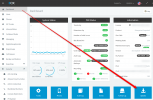
To clear things up, provide 2 screenshots:
  • One of your Dashboard by hiding sensitive information like your license key, FQDN, etc
  • One of the Update Page my colleague pointed you to.
    Go from here:
    1634304285307.png
 
Hi there,

Did you check where my colleague pointed you to?
If indeed your 3CX is currently on V16 U6 (16.0.6.655) as you say, if you go there, you should see the option to install V16 U7, and after doing that if you go there again, the option to install V16 U8.

To clear things up, provide 2 screenshots:
  • One of your Dashboard by hiding sensitive information like your license key, FQDN, etc
  • One of the Update Page my colleague pointed you to.
    Go from here:
    View attachment 25180
Hi there,

Did you check where my colleague pointed you to?
If indeed your 3CX is currently on V16 U6 (16.0.6.655) as you say, if you go there, you should see the option to install V16 U7, and after doing that if you go there again, the option to install V16 U8.

To clear things up, provide 2 screenshots:
  • One of your Dashboard by hiding sensitive information like your license key, FQDN, etc
  • One of the Update Page my colleague pointed you to.
    Go from here:
    View attachment 25180


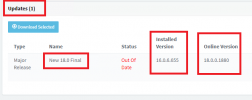
Nope. No option for 16.xx.xxx just 18, and on more than one installation as well.

Only_One_Update_Available.pngOnly_One_Update_Available.png
 
I'm not sure why you are seeing this exactly, but I can tell you for sure that this is wrong, so don't attempt to do it again, because even if it does go through, your 3CX will probably not start.

Please check some things for me:
  • Log into the Management Console and go to Settings --> Parameters and search for "DOWNLOADS_URL". what is the value?

  • Log into your RPi and run this command:
    Bash:
    cat /etc/apt/sources.list.d/3cxpbx.list
    Can you send a screenshot of the output?

  • Log into your RPi and run this command:
    Bash:
    cat /etc/apt/sources.list.d/3cxpbx-testing.list
    Can you send a screenshot of the output?

  • Log into your RPi and run this command:
    Bash:
    lsb_release -a
    Can you send a screenshot of the output?
 
I'm not sure why you are seeing this exactly, but I can tell you for sure that this is wrong, so don't attempt to do it again, because even if it does go through, your 3CX will probably not start.

Please check some things for me:
  • Log into the Management Console and go to Settings --> Parameters and search for "DOWNLOADS_URL". what is the value?

  • Log into your RPi and run this command:
    Bash:
    cat /etc/apt/sources.list.d/3cxpbx.list
    Can you send a screenshot of the output?

  • Log into your RPi and run this command:
    Bash:
    cat /etc/apt/sources.list.d/3cxpbx-testing.list
    Can you send a screenshot of the output?

  • Log into your RPi and run this command:
    Bash:
    lsb_release -a
    Can you send a screenshot of the output?


DOWNLOADS_URL
https://downloads-au.3cx.com/downloads/v160

cat /etc/apt/sources.list.d/3cxpbx.list
deb http://downloads-global.3cx.com/downloads/debian buster main

cat /etc/apt/sources.list.d/3cxpbx-testing.list
deb [arch=armhf] http://downloads-global.3cx.com/downloads/debian buster-testing main

lsb_release -a
No LSB modules are available.
Distributor ID: Raspbian
Description: Raspbian GNU/Linux 10 (buster)
Release: 10
Codename: buster
 
OK, this looks correct.
From the command line, could you also please run the following and tell me the output of this as well?
Bash:
apt update
apt policy 3cxpbx
 
apt update
Hit:1 http://downloads-global.3cx.com/downloads/debian buster-testing InRelease
Hit:2 http://downloads-global.3cx.com/downloads/debian buster InRelease
Get:3 http://archive.raspberrypi.org/debian buster InRelease [32.6 kB]
Get:4 http://raspbian.raspberrypi.org/raspbian buster InRelease [15.0 kB]
Get:5 http://archive.raspberrypi.org/debian buster/main armhf Packages [393 kB]
Get:6 http://raspbian.raspberrypi.org/raspbian buster/main armhf Packages [13.0 MB]
Fetched 13.4 MB in 15s (909 kB/s)
Reading package lists... Done
Building dependency tree
Reading state information... Done
18 packages can be upgraded. Run 'apt list --upgradable' to see them.


# apt list --upgradable

Listing... Done
3cxpbx/stable 18.0.1.237 armhf [upgradable from: 16.0.6.655]
debconf-i18n/oldstable 1.5.71+deb10u1 all [upgradable from: 1.5.71]
debconf-utils/oldstable 1.5.71+deb10u1 all [upgradable from: 1.5.71]
libc-dev-bin/testing 2.28-10+rpt2+rpi1 armhf [upgradable from: 2.28-10+rpi1]
libc6-dbg/testing 2.28-10+rpt2+rpi1 armhf [upgradable from: 2.28-10+rpi1]
libc6-dev/testing 2.28-10+rpt2+rpi1 armhf [upgradable from: 2.28-10+rpi1]
libpam-systemd/oldstable 241-7~deb10u8+rpi1 armhf [upgradable from: 241-7~deb10u4+rpi1]
libpython3.7/oldstable 3.7.3-2+deb10u3 armhf [upgradable from: 3.7.3-2+deb10u2]
libraspberrypi-bin/testing 1:1.20211007-2~buster armhf [upgradable from: 1:1.20210928-1~buster]
libraspberrypi-dev/testing 1:1.20211007-2~buster armhf [upgradable from: 1:1.20210928-1~buster]
libraspberrypi-doc/testing 1:1.20211007-2~buster armhf [upgradable from: 1:1.20210928-1~buster]
libraspberrypi0/testing 1:1.20211007-2~buster armhf [upgradable from: 1:1.20210928-1~buster]
linux-libc-dev/testing 1:1.20211007-2~buster armhf [upgradable from: 1:1.20210928-1~buster]
python3-debconf/oldstable 1.5.71+deb10u1 all [upgradable from: 1.5.71]
raspberrypi-bootloader/testing 1:1.20211007-2~buster armhf [upgradable from: 1:1.20210928-1~buster]
raspberrypi-kernel/testing 1:1.20211007-2~buster armhf [upgradable from: 1:1.20210928-1~buster]
systemd/oldstable 241-7~deb10u8+rpi1 armhf [upgradable from: 241-7~deb10u4+rpi1]
udev/oldstable 241-7~deb10u8+rpi1 armhf [upgradable from: 241-7~deb10u4+rpi1]


apt policy 3cxpbx
3cxpbx:

Installed: 16.0.6.655
Candidate: 18.0.1.237
Version table:
18.0.1.237 500
500 http://downloads-global.3cx.com/downloads/debian buster/main armhf Packages
18.0.1.234 500
500 http://downloads-global.3cx.com/downloads/debian buster/main armhf Packages
18.0.1.226 1
1 http://downloads-global.3cx.com/downloads/debian buster-testing/main armhf Packages
18.0.1.214 1
1 http://downloads-global.3cx.com/downloads/debian buster-testing/main armhf Packages
18.0.0.1886 1
1 http://downloads-global.3cx.com/downloads/debian buster-testing/main armhf Packages
18.0.0.1880 500
500 http://downloads-global.3cx.com/downloads/debian buster/main armhf Packages
16.0.8.9 500
500 http://downloads-global.3cx.com/downloads/debian buster/main armhf Packages
16.0.7.1078 500
500 http://downloads-global.3cx.com/downloads/debian buster/main armhf Packages
*** 16.0.6.655 500
500 http://downloads-global.3cx.com/downloads/debian buster/main armhf Packages
100 /var/lib/dpkg/status
16.0.6.641 500
500 http://downloads-global.3cx.com/downloads/debian buster/main armhf Packages


Curiously, another Pi 3 that was on 16.05.619 upgraded incrementally all the way to 16.08.9 without issue.
 
I'll send you a PM shortly.
 
Status
Not open for further replies.

Forum statistics

Threads
111,976
Messages
590,088
Members
164,904
Latest member
gdstratton