User Modification

Status
Not open for further replies.

Heath

Customer
Advanced Certified
Joined
Aug 12, 2017
Messages
287
Reaction score
3
In the management Portal there is something that I need to assign an extension user / root privileges and that I need to go to the user account in rights to set the user as system owner... Now when I go in to the user extension it says in the phone provisioning that I need to update the the authinication ID, Password, and webclient password to at least 10 charactors. Now I update them, and go to the right tab and set the system owner and hit OK.. But its not saving anything as it goes right back to the previous information... I try to just update the ID and 2 passwords, hit OK.. go back in to the user, and still doesn't save anything and go back to the previous information... Now when I hit OK, I'm not getting anything that there are any errors....
 
Same thing happening here.
After restoring a backup extension 10000 (which is named General by default) seems to receive system ownership. After a couple of days neither Admin, nor 10000 are assigned as system owner, just managers.
So, I'm unable to create, edit or delete any user. If I try, after hitting the OK button, nothing happens. No error messages, nothing. It seems like you are clicking on a functionless button.
Any ideas?
 
Does the user have an email address? that is now required.
 
Yep! I've noticed that missing the e-mail will generate an error saying that it is not possible to go forward without it.
What bugs me is the fact that after restoring the server, accessing https://<FDQN>.my3cx.com.br:5001 using extension 10000, I was able to create, delete and edit users. Two days latter, extension 10000 can do nothing and It's role is manager.
How am I supposed to give it a System Owner role if neither Admin, nor 10000 can edit or change anything into any extension?
And why extension 10000 was allowed temporally the rights to do root tasks?
 
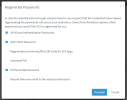
If you select a user and regenerate, this problem will go away:
1679992562442.png

You can regenerate just the following ticked options:
1679992617743.png
 
Yesterday I created the 3CX server on AWS again.
This time I noticed the message from PbxConfigTool after restoring the backup file, saying that 3CX assigns automatically System Ownership to extension 10000. To be sure I exported the users to CSV and in fact ext. 10000 was flagged as System Owner.
Again I was able to delete a couple of users but I noticed something odd. After creating an user on ext.11122 I was unable to create and edit anything else. So, the issue seems to be unrelated to rules and rights.
So I started to re-think everything. On February 3rd, 3CX updated to 18V6 and after that 3CX was unreachable. AWS Instance was up and fine but no access to 3CX management console or anything. At the time I launched a new AWS instance and restored the backup, no questions asked. After that nothing else was the same. Yesterday I found some similar cases that happened about the same date and people said it was related to Postgre issues on release 6 update. Now I remember that there were some extensions that were available but I could not use without a reason, but now I believe that my DB was messy before the update, but because of this mess Postgre crashed. Since this issue did not happen to every 3CX installation, the lucky ones like mine may have a dirty DB.
Does anyone know a tool or procedure to check and fix 3CX's Postgre DB issues?
I'll be moving this issue to another forum since it seems to be unrelated to user rights.
Thanks for all the help here!
 
Yesterday I created the 3CX server on AWS again.
This time I noticed the message from PbxConfigTool after restoring the backup file, saying that 3CX assigns automatically System Ownership to extension 10000. To be sure I exported the users to CSV and in fact ext. 10000 was flagged as System Owner.
Again I was able to delete a couple of users but I noticed something odd. After creating an user on ext.11122 I was unable to create and edit anything else. So, the issue seems to be unrelated to rules and rights.
So I started to re-think everything. On February 3rd, 3CX updated to 18V6 and after that 3CX was unreachable. AWS Instance was up and fine but no access to 3CX management console or anything. At the time I launched a new AWS instance and restored the backup, no questions asked. After that nothing else was the same. Yesterday I found some similar cases that happened about the same date and people said it was related to Postgre issues on release 6 update. Now I remember that there were some extensions that were available but I could not use without a reason, but now I believe that my DB was messy before the update, but because of this mess Postgre crashed. Since this issue did not happen to every 3CX installation, the lucky ones like mine may have a dirty DB.
Does anyone know a tool or procedure to check and fix 3CX's Postgre DB issues?
I'll be moving this issue to another forum since it seems to be unrelated to user rights.
Thanks for all the help here!
It might be a good idea to scrap the VM and redeploy it. This way you will not not have any leftovers from before and you will be certain that your deployment is clean.
 
Absolutely! I've used a new AWS instance every time. Thanks for your help.
 
Absolutely! I've used a new AWS instance every time. Thanks for your help.
Ok that's a good start, but can you tell us exactly how you deployed on AWS?

- Did you use our marketplace image for example following this guide?
https://www.3cx.com/docs/pbx-amazon-aws-marketplace/

- Or did you perhaps install a generic Debian 10 image and then did everything manually?

- And were all the services running at the time of the issue or were the machine specs perhaps a bit too low, causing some services to stop?

Give us some more detail on how you did everything
 
I repeated this restore process 5 times, using the backup files from before the system crash.
I used the marketplace image on a t3.small instance with a GP3 50 GiB 3000 IOPS 125 throughput volume and I opened the SSH port. With the server up I uploaded the backup file using SCP.
I executed PbxConfigTool as ROOT, answered the questions, pointed the path to the backup file, 3CX informed that my extension 10000 would be assigned as System Owner and the process finished ok.
Then I entered console manager as admin, the message about assigning an extension as System Owner always appeared and I could not create, delete or edit users and their attributes.
Logging in as extension 10000 the message was gone and I could delete a couple of users, created one new user but after that I could not create another or edit any user attribute. There were some extensions that I could not see it's attributes because when I clicked on them nothing happened.
I remember seeing this kind of behavior on system development tests where some key information related to some users were missing or corrupted, so for the system the user existed but since there were some missing/corrupted data for that user, when asking the system for that user's attributes some screens and/or fields were blank/not available or not reachable and some buttons that needed to read the missing/corrupted data were useless, and clicking on them nothing appeared to happen but on the background it was probably returning some error about missing data or something.
 
When I try to add a new extension my browser responds with this:
vendor.874548bbc461f7e3.js:1 TypeError: t is not iterable
at Pr (main.1093fcefb5c5cbe6.js:1:1535548)
at t.invalidateObjectData (main.1093fcefb5c5cbe6.js:1:1538308)
at t.invalidateObject (main.1093fcefb5c5cbe6.js:1:1545110)
at main.1093fcefb5c5cbe6.js:1:218032
at nt (vendor.874548bbc461f7e3.js:1:620392)
at vendor.874548bbc461f7e3.js:1:620549
at ut.$digest (vendor.874548bbc461f7e3.js:1:626518)
at ut.$apply (vendor.874548bbc461f7e3.js:1:628648)
at Ur (vendor.874548bbc461f7e3.js:1:595747)
at hn (vendor.874548bbc461f7e3.js:1:598955) 'Possibly unhandled rejection: {}'
(anonymous) @ vendor.874548bbc461f7e3.js:1
(anonymous) @ main.1093fcefb5c5cbe6.js:1
ut @ vendor.874548bbc461f7e3.js:1
$digest @ vendor.874548bbc461f7e3.js:1
$apply @ vendor.874548bbc461f7e3.js:1
Ur @ vendor.874548bbc461f7e3.js:1
hn @ vendor.874548bbc461f7e3.js:1
Zn.onload @ vendor.874548bbc461f7e3.js:1
We @ polyfills.09518f173976ae4b.js:1
invokeTask @ polyfills.09518f173976ae4b.js:1
onInvokeTask @ vendor.874548bbc461f7e3.js:1
invokeTask @ polyfills.09518f173976ae4b.js:1
runTask @ polyfills.09518f173976ae4b.js:1
invokeTask @ polyfills.09518f173976ae4b.js:1
Z @ polyfills.09518f173976ae4b.js:1
N @ polyfills.09518f173976ae4b.js:1
F @ polyfills.09518f173976ae4b.js:1
load (async)
Q.t @ polyfills.09518f173976ae4b.js:1
scheduleTask @ polyfills.09518f173976ae4b.js:1
onScheduleTask @ polyfills.09518f173976ae4b.js:1
scheduleTask @ polyfills.09518f173976ae4b.js:1
scheduleEventTask @ polyfills.09518f173976ae4b.js:1
(anonymous) @ polyfills.09518f173976ae4b.js:1
Xe.o.set @ polyfills.09518f173976ae4b.js:1
(anonymous) @ vendor.874548bbc461f7e3.js:1
Zn @ vendor.874548bbc461f7e3.js:1
pr @ vendor.874548bbc461f7e3.js:1
nt @ vendor.874548bbc461f7e3.js:1
(anonymous) @ vendor.874548bbc461f7e3.js:1
$digest @ vendor.874548bbc461f7e3.js:1
$apply @ vendor.874548bbc461f7e3.js:1
(anonymous) @ vendor.874548bbc461f7e3.js:1
dispatch @ vendor.874548bbc461f7e3.js:1
si.handle @ vendor.874548bbc461f7e3.js:1
invokeTask @ polyfills.09518f173976ae4b.js:1
onInvokeTask @ vendor.874548bbc461f7e3.js:1
invokeTask @ polyfills.09518f173976ae4b.js:1
runTask @ polyfills.09518f173976ae4b.js:1
invokeTask @ polyfills.09518f173976ae4b.js:1
Z @ polyfills.09518f173976ae4b.js:1
N @ polyfills.09518f173976ae4b.js:1
F @ polyfills.09518f173976ae4b.js:1

When I try to edit a extension which was assigned to an IP phone this error is returned:
polyfills.09518f173976ae4b.js:1 POST https://xxx.my3cx.com.br:5001/api/ExtensionList/set 403
X @ polyfills.09518f173976ae4b.js:1
scheduleTask @ polyfills.09518f173976ae4b.js:1
onScheduleTask @ polyfills.09518f173976ae4b.js:1
scheduleTask @ polyfills.09518f173976ae4b.js:1
scheduleMacroTask @ polyfills.09518f173976ae4b.js:1
Le @ polyfills.09518f173976ae4b.js:1
(anonymous) @ polyfills.09518f173976ae4b.js:1
Ee.o.<computed> @ polyfills.09518f173976ae4b.js:1
(anonymous) @ vendor.874548bbc461f7e3.js:1
Zn @ vendor.874548bbc461f7e3.js:1
pr @ vendor.874548bbc461f7e3.js:1
nt @ vendor.874548bbc461f7e3.js:1
(anonymous) @ vendor.874548bbc461f7e3.js:1
$digest @ vendor.874548bbc461f7e3.js:1
$apply @ vendor.874548bbc461f7e3.js:1
(anonymous) @ vendor.874548bbc461f7e3.js:1
dispatch @ vendor.874548bbc461f7e3.js:1
si.handle @ vendor.874548bbc461f7e3.js:1
invokeTask @ polyfills.09518f173976ae4b.js:1
onInvokeTask @ vendor.874548bbc461f7e3.js:1
invokeTask @ polyfills.09518f173976ae4b.js:1
runTask @ polyfills.09518f173976ae4b.js:1
invokeTask @ polyfills.09518f173976ae4b.js:1
Z @ polyfills.09518f173976ae4b.js:1
N @ polyfills.09518f173976ae4b.js:1
F @ polyfills.09518f173976ae4b.js:1


When I try to create extension 10001
polyfills.09518f173976ae4b.js:1 POST https://xxx.my3cx.com.br:5001/api/edit/save 522
X @ polyfills.09518f173976ae4b.js:1
scheduleTask @ polyfills.09518f173976ae4b.js:1
onScheduleTask @ polyfills.09518f173976ae4b.js:1
scheduleTask @ polyfills.09518f173976ae4b.js:1
scheduleMacroTask @ polyfills.09518f173976ae4b.js:1
Le @ polyfills.09518f173976ae4b.js:1
(anonymous) @ polyfills.09518f173976ae4b.js:1
Ee.o.<computed> @ polyfills.09518f173976ae4b.js:1
(anonymous) @ vendor.874548bbc461f7e3.js:1
Zn @ vendor.874548bbc461f7e3.js:1
pr @ vendor.874548bbc461f7e3.js:1
nt @ vendor.874548bbc461f7e3.js:1
(anonymous) @ vendor.874548bbc461f7e3.js:1
$digest @ vendor.874548bbc461f7e3.js:1
$apply @ vendor.874548bbc461f7e3.js:1
(anonymous) @ vendor.874548bbc461f7e3.js:1
dispatch @ vendor.874548bbc461f7e3.js:1
si.handle @ vendor.874548bbc461f7e3.js:1
invokeTask @ polyfills.09518f173976ae4b.js:1
onInvokeTask @ vendor.874548bbc461f7e3.js:1
invokeTask @ polyfills.09518f173976ae4b.js:1
runTask @ polyfills.09518f173976ae4b.js:1
invokeTask @ polyfills.09518f173976ae4b.js:1
Z @ polyfills.09518f173976ae4b.js:1
N @ polyfills.09518f173976ae4b.js:1
F @ polyfills.09518f173976ae4b.js:1
 
If I try to re-assign the IP phone to the extension which I cannot edit:

POST https://xxx.my3cx.com.br:5001/api/PhoneList/assignToExtension 403
X @ polyfills.09518f173976ae4b.js:1
scheduleTask @ polyfills.09518f173976ae4b.js:1
onScheduleTask @ polyfills.09518f173976ae4b.js:1
scheduleTask @ polyfills.09518f173976ae4b.js:1
scheduleMacroTask @ polyfills.09518f173976ae4b.js:1
Le @ polyfills.09518f173976ae4b.js:1
(anonymous) @ polyfills.09518f173976ae4b.js:1
Ee.o.<computed> @ polyfills.09518f173976ae4b.js:1
(anonymous) @ vendor.874548bbc461f7e3.js:1
Zn @ vendor.874548bbc461f7e3.js:1
pr @ vendor.874548bbc461f7e3.js:1
nt @ vendor.874548bbc461f7e3.js:1
(anonymous) @ vendor.874548bbc461f7e3.js:1
$digest @ vendor.874548bbc461f7e3.js:1
$apply @ vendor.874548bbc461f7e3.js:1
(anonymous) @ vendor.874548bbc461f7e3.js:1
dispatch @ vendor.874548bbc461f7e3.js:1
si.handle @ vendor.874548bbc461f7e3.js:1
invokeTask @ polyfills.09518f173976ae4b.js:1
onInvokeTask @ vendor.874548bbc461f7e3.js:1
invokeTask @ polyfills.09518f173976ae4b.js:1
runTask @ polyfills.09518f173976ae4b.js:1
invokeTask @ polyfills.09518f173976ae4b.js:1
Z @ polyfills.09518f173976ae4b.js:1
N @ polyfills.09518f173976ae4b.js:1
F @ polyfills.09518f173976ae4b.js:1
 
I exported some users so we can check how they are configured:

NumberManagementAccessMAC_0InterfaceIP_0UseCTIVoipAdminSysAdminPhoneModel14PhoneSysAdmin
10000​
3​
0​
1​
1​
1​
10106​
0​
XXXXXXXXXXxxx.my3cx.com.br
1​
0​
0​
Intelbras TIP125
0​
10111​
0​
YYYYYYYYYYYxxx.my3cx.com.br
0​
0​
0​
Intelbras TIP125
0​
11001​
0​
1​
0​
0​
0​

10000 is the System Owner
10106 is the one which I cannot edit. It was assigned to an IP phone but now it was supposed to be free. This shows that it is still assigned and that is not the case. The phone is showing on the system as free.
10111 is another extension that I cannot edit and it is really assigned to an IP phone.
11001 is an extension assigned to a softphone and I can edit it.

The only differences between them were the admin rights and UseCTI (I don't know what it is).
This fact that the extension was released from that telephone and is still assigned is odd.
 
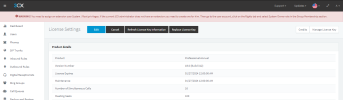
And logging in as Admin:

1680099896971.png

This message is still showing even though extension 10000 is already the System Owner.
 
The version and license type1680100075721.png
 
a) Are you sure you haven't left another machine running somewhere? The FQDN IP you be updating and you could actually be logging to another PBX with the same backup restored on it. We've seen this a few times.

b) Also, do not SSH into the machine please. Just follow the guide as you see it here, and configure 3CX using the web wizard:
https://www.3cx.com/docs/pbx-amazon-aws-marketplace/

You can actually upload the backup from the web wizard without risking changes on the linux permission and ownership. That can cause the PBX to behave very erratically as it will lose write access to its own filesystem.
 
Yep, before creating a new instance I always terminate the current one and I always delete the GP3 volumes. I tried to restore other backup files too and it was always the same.
I'll try using the guide to see if something changes .
Thanks again for helping!
 
Great news!
Following JohnS_3CX's tip, on my last restore I used the Web Interface instead of command line's PbxConfigTool and now everything seems to be working fine.
Admin and extension 10000 are now able to perform System Owner tasks with no problems.
The only annoying thing when logged in as Admin is the red message on the top of management console warning about the need to give an extension System Owner rights, which is still on. Maybe it is normal or maybe it is a bug, I don't know. The thing is 3CX is up and fine.
Living and learning. Nowdays different developers are assigned to design different interfaces to do the same task but each one work without meeting the other. The result, 2 ways of doing the same task with different results. I was skeptical at the time but after reflecting over what JohnS_3CX wrote it made complete sense. As a point of improvement, maybe 3CX should remove or bulletproof the use of PbxConfigTool by adding to the documentation a full script on how to run it the right way, so others will not be trapped the same way.
Since 3CX returned no messages saying that the task could not be performed because of internal access rights to files or resources, it would take me forever to figure it out by myself.
But thanks to JohnS_3CX's tip the mistery is solved.
Just for the record, before entering this forum, I've spent almost 2 months researching the web without an answer. I've even talked to a 3CX partner about hiring him to maintain the system on a regular basis after helping me fix this issue but he stopped to returning my messages.
Now I should thank him because posting on this forum made me learn a lot, I received a lot of help from good people who spent their time to give tips and advices so I could reach JohnS_3CX who pointed me the solution.
Thanks to everyone who tried to help and a special thank to you JohnS who nailed it!
 
  • Like
Reactions: jed and JohnS_3CX
Great news indeed :)

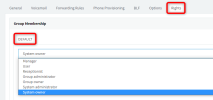
By the way, if you edit your extension 1000 and set them as System Owner the red banner should go away:
1680252931100.png

Press OK to Save, then try Ctrl+Shift+R on your browser to reload the session (just as a precaution) and you should no longer see the red banner message.
 
  • Like
Reactions: jed
Status
Not open for further replies.

Forum statistics

Threads
111,974
Messages
590,081
Members
164,899
Latest member
mazet