User status

Status
Not open for further replies.

lbonjean

Customer
Basic Certified
Joined
Dec 8, 2021
Messages
19
Reaction score
3
Hi,

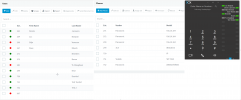
I try to understand why users Dennis (261) and Luc (264) are Green. They don't have any phones registered. Users stijn and dave are 'Red' (gray in the dialer).
Stijn and Dave look correct to me.
In their current 'available' state, they have no push enabled.
This is annoying eg if they are the last users in a queue.
Is this expected behaviour?
1639155709429.png
 
Hi,

I try to understand why users Dennis (261) and Luc (264) are Green. They don't have any phones registered. Users stijn and dave are 'Red' (gray in the dialer).
Stijn and Dave look correct to me.
In their current 'available' state, they have no push enabled.
This is annoying eg if they are the last users in a queue.
Is this expected behaviour?

View attachment 26535
If they have the mobile app registered, that's what it does. It'd be green but no entry in Phones.
 
  • Like
Reactions: VasilisV_3CX
Hi,

I try to understand why users Dennis (261) and Luc (264) are Green. They don't have any phones registered. Users stijn and dave are 'Red' (gray in the dialer).
Stijn and Dave look correct to me.
In their current 'available' state, they have no push enabled.
This is annoying eg if they are the last users in a queue.
Is this expected behaviour?

View attachment 26535

If they have the mobile app registered, that's what it does. It'd be green but no entry in Phones.
The app is not registered. eg. smart phone is off.
It only turns red when I disable push in the provisioniong of the extension, but by doing so, push never works.
 
Even if the app is off the extensions appear registered so they can receive push notifications. That is why when you disable push the extensions turn red. Extensions that had an app registered to them in the last 7 days will appear as registered so push can work.
This is normal behavior.
 
  • Like
Reactions: Evolute IT
I would expect they turn red also when the push is disabled on the smartphone itself.
 
How exactly are you disabling the push on the smartphone? Are you on iOS or Android?
 
Hi,

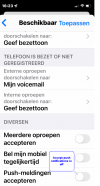
This is what I did on my iphone.
On Android the result is the same. UI is in Dutch.
1639409231575.png
 
That will not force the extension to deregister from the PBX. That will only disable the phones ability to receive push messages.
To deregister the users or log them out of the queue you have 2 options. The first is to deactivate the account on the smartphone. That will deregister the extension in the PBX. The other solution is to have the users switch status so they switch to Away or DND and enable the option " Log out from queues" for that status. This will stop them from receiving calls and will log them out of the queue.
Hope this helps.
 
Status
Not open for further replies.

Forum statistics

Threads
111,974
Messages
590,083
Members
164,901
Latest member
Silent_Guru