Using a Microsoft Office 365 account for the customer/partner site

Status
Not open for further replies.

Marari

Silver Partner
Advanced Certified
Joined
Sep 16, 2007
Messages
340
Reaction score
90
When logging into the customer/partner portal at https://customer.3cx.com/login.aspx you are given the option to sign in with a Microsoft account (Office365 for example).

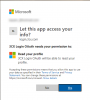
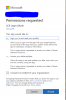
When linking the account, it shows that one of the permissions requested is "Access your data anytime". Further expanding that to better understand what you are supposedly agreeing to shows that it allows the app to see and update my data even when I am not using the app and that doesn't sound like a responsible IT thing to do ....

Can you please explain why that permission is requested/required?
 
/bump.

Nothing?
 
/bump again.

Still waiting for an answer. @YiannisH_3CX can you direct me to someone who can answer this?
 
Tbh I don't use MS OAuth to sign on, but I tried to see where you are getting this. I tried logging onto https://customer.3cx.com using the "Sign in with Microsoft" option, and I was only asked for this permission, which seems pretty standard:
upload_2018-12-5_11-55-42.png

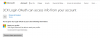
I also checked on the MS site to make sure there are not other hidden permissions and got this:
upload_2018-12-5_11-56-6.png

What exact steps did you follow to get to the permissions you are mentioning?
 
Tbh I don't use MS OAuth to sign on, but I tried to see where you are getting this. I tried logging onto https://customer.3cx.com using the "Sign in with Microsoft" option, and I was only asked for this permission, which seems pretty standard:
View attachment 9105

I also checked on the MS site to make sure there are not other hidden permissions and got this:
View attachment 9106

What exact steps did you follow to get to the permissions you are mentioning?


I selected my office 365 account.

See attached.

Capture.PNG
 
So, apparently I was getting different permissions requested of me because I was using an old Hotmail account I had.

When you are logging in with an Office 365 account, these are indeed the permissions. Apparently though, in order to get the OAuth Refresh Token to work correctly, this is the only permission that allows you to do so.

I can state that we do not read anything while you are logged out, the OAuth is only used for the purpose of logging in.

For the reason explained above, this cannot be changed, at least not for the time being.
 
@NickD_3CX

Thank you for looking into this for me. I appreciate it.
 
Status
Not open for further replies.

Latest Posts

Forum statistics

Threads
111,901
Messages
589,638
Members
164,768
Latest member
Eagle Man