Unsupported Using Openscape CP700 handsets with cloud 3cx and local SBC

totallytechuk

SMB User
Joined
Jan 15, 2026
Messages
1
Reaction score
0
Hey Guys,
I've got a couple of Unify Openscape CP700 handsets. I've been using the web management system to set up my handsets.
The 3CX console shows the SBC is online and when I add a Generic Handset I see the settings, however I cannot get my handsets to actually connect.
There are only a few bits of info online - but can anyone suggest anything please?

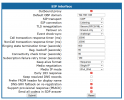
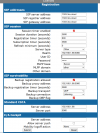
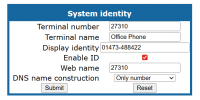
I've attached the screen grabs of the different screens I've been trying to change to get them to connect.
 

Attachments

  • Screenshot 2026-01-15 191948.png
    Screenshot 2026-01-15 191948.png
    31.3 KB · Views: 6
  • Screenshot 2026-01-15 191959.png
    Screenshot 2026-01-15 191959.png
    126.2 KB · Views: 6
  • Screenshot 2026-01-15 192029.png
    Screenshot 2026-01-15 192029.png
    147.4 KB · Views: 6
There are only a few bits of info online - but can anyone suggest anything please?
Register the phones using the SBC IP, not the 3CX FQDN.

I don't know how the CP700s behave. We still have a few OpenStage 40 / 60 units with 'the right' firmware in use. All of them very unsupported by 3CX and you have to manually configure everything on each phone - bad solution:
  • System Identity
    your Terminal Number may be correct (3CX user extension number), may be you have to uncheck Enable ID
  • SIP Interface
    Media Negotiation may be ANAT and IP Mode = IPv4, ymmv
  • Registration
    use SBC IP, User ID = 3CX SIP user Auth ID, Password = 3CX SIP user password, MLPP Base = Local, MLPP Domain = dsn+uc,
    I think CSTA will not work
No need to set <IP:SIP-port> for standard SIP port.

Because it's a 3CX SMB, the necessary tool (packet capture) isn't available. You might be able to use tcpdump / tshark on the SBC as a workaround. We haven't had to try that yet.
 
Last edited:

Members Online Now

Forum statistics

Threads
111,831
Messages
589,277
Members
164,660
Latest member
RJenkinsROCK