v16.0.2.910 Instance Manager missing

Status
Not open for further replies.

dandenson

SOHO User
Joined
Aug 4, 2009
Messages
404
Reaction score
52
I have one install where the instance manager is missing from settings. Can't seem to find any other examples on this.

This is an install on a raspberry pi3 btw, if that has any bearing.
 
By instance manager do you mean chat ?

If so, you need to enable it - Settings - General Settings , tick 'Allow Chat'
 
uh...no, by instance manager I mean quite literally 'instance manager'
 
My mistake

Instance manager is only for partners - not end users
 
An I am (use a different email here) and have dozens of other installs setup perfectly. Only this one doesn't even show the instance manager config in settings.
 
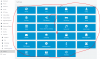
12249

it's missing here.
 
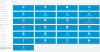
Here is another system on the same version:
12250

Why is this install missing this? Same exact version. Both have my reseller ID entered in.

The only difference here is that the second picture is from an EC2 install and the first is on a raspberri pi 3.
 
I've seen weirdness before like this that required a backup, uninstall, reinstall, restore before.

Notably when v15 came out and the hotel module button was missing.
 
Gotta me some solution that doesn't involve starting over.

I should add, this system was installed as v16 and only has had 1 upgrade.
 
I read before that even though the Pi is Debian that instance manager doesn’t work on it.
 
Was that by a 3CX employee? I don't see that comment in a search anywhere.
 
  • Like
Reactions: dandenson
That solves it. Not available on non-x86 hardware right now.
 
That solves it. Not available on non-x86 hardware right now.

We use Brentt G's https://pbxmonitor.net/ product to monitor our clients that want active monitoring. Works with all 3CX platforms (Windows/Linux/Raspbian/v16/v15.5). Amazing tool.
 
Gotta me some solution that doesn't involve starting over.

I should add, this system was installed as v16 and only has had 1 upgrade.
I'm glad you got the answer above. You should know, this process that I had recommended is a 15 minute process with no data loss. For your own needs, you should know how to do it - it's been required in the past and it is the same process to move to a new box/host.
 
the instance manager is not shown in the following cases

when it is not installed on linux
and is not v16 or higher
and must not be configured in failover mode
or (it is hosted and hosting admin mode is enabled - then only the hosting admin can do it)
 
the instance manager is not shown in the following cases

when it is not installed on linux
and is not v16 or higher
and must not be configured in failover mode
or (it is hosted and hosting admin mode is enabled - then only the hosting admin can do it)

I'm not seeing the raspberry pi on this list, but it was on the comment in the linked thread. What's the official statement on this and if the raspberry pi should be showing it, how can I enable it?
 
should have used "Stock Debian" over Linux
raspbian |= Debian
so no it is not showing there
 
  • Like
Reactions: Evolute IT
I installed from 3CX own instructions. Seems an odd recommendation to not use the published installation guide.
 
there is nothing odd, for PI there is no instance manager, nor on windows.
 
  • Like
Reactions: Evolute IT
Status
Not open for further replies.

Forum statistics

Threads
112,360
Messages
592,109
Members
165,535
Latest member
bosdorf