V18 Alpha 4: App Auto Selects Best Codec

I thought the production release was earlier also.

Apr 19, 2021Apr 19, 2021
Manuskysurfeur said:
Hello 3CX team,
Do you have an idea when will the V18 be available for production uses ?
Regards,
We can't give you a hard date right now as we are still working hard to put in the finishing touches, but it should be really soon.
 
  • Like
Reactions: N_G
Hello !

I hope the webclient will change in future. I know the " flat " and " empty " design are fashion, but IMHO, the client is more sexy in v16 vs v18.
Firstly, maybe you can make a sidebar for the menu collabsable?
Secondly, maybe you could add a " dashboard " instead of just user list ? ( ie : 1621495026867.png )
Maybe it could become modulable with managing widgets, expand list of widget with " modules ", ... ?
 
@Merrick edit the extension and uncheck the Click2Meet option.
That disables the WebMeeting icon on the Windows app but still able to do an audio conference, the WebMeeting icon still works on the WebClient, but gets a message indicating Video conference is disabled. Still able to schedule a meeting and conference from the Android app (though it doesn't specify audio or video. Is there a way to disable all conferences audio or video (either independently or both)? I assume the number of participants is dependant on the license SC. I don't want an employee setting up a conference and using all SC, effectively blocking the system for other users.
 
Hello 3CX Team,

At my compagny, we are waiting the v18 in order to migrate 2000 users from Alcatel to 3CX. We won’t start the migration using v16....

Alpha 4.....How many version Alpha or Beta will you offer before releasing a production version ?

Regards,
We cant say how many more alphas or betas but what i can say is that i am very confident that you can deploy this alpha, its very stable. Its going to be infinitely better than alcatel :) Realistically we will release in June. We are going beta and final after this and we are feature complete.
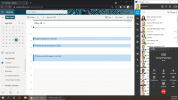
 
MS365_Calendar_On_Call.png

The new webclient will run in a browser or as a native windows app (same way whatsapp or teams does it) and the idea is not that you use it as a tab in a browser but rather on the side of your desktop as shown above.

In this way, the client is much more accesible and you can easily keep it alongside your main work space being office, crm or whatever. This is the idea of the new "web client" design.
 
View attachment 22090

The new webclient will run in a browser or as a native windows app (same way whatsapp or teams does it) and the idea is not that you use it as a tab in a browser but rather on the side of your desktop as shown above.

In this way, the client is much more accesible and you can easily keep it alongside your main work space being office, crm or whatever. This is the idea of the new "web client" design.
The intention is excellent. Just, maybe a midway between old design and that flat design that nobody currently likes?

I get that's it's early but if that's the main look, it needs refining.

The desktop app is gonna be lit!
 
  • Like
Reactions: FridayIT
@Frederick Marcoux "nobody likes" what crystal ball do you have to magically know what 5 million 3Cx users like or not? :) Please borrow it to me so i can see the ethereum and bitcoin price in 6 months
 
@Frederick Marcoux "nobody likes" what crystal ball do you have to magically know what 5 million 3Cx users like or not? :) Please borrow it to me so i can see the ethereum and bitcoin price in 6 months
LOL. What I mean is the feedback on this post is not the best.

As long as you take the feedback and use it tho, I have no problem with evolving software.

By the way, you probably have no idea either of exactly what 5M users want ;) We are all just guessing here lol
 
I can assure you I am not "just guessing" :cool: . Thats your job :cool:

Based on my experience in software product development and marketing, i will leave you with this qoute by John Lydgate:

“You can please some of the people all of the time, you can please all of the people some of the time, but you can’t please all of the people all of the time”.”
 
Last edited:
v18 does seem like it's taking a bit but most quality products go on a 6 month feature release and 6 month bug fix schedule in my opinion. When they go agile it's great we get new features all the time but usually it's bug prone. Microservices tend to fix that problem to minimize blast radius of buggy things. But also add much complexity over a monolithic app. Coming from running multi-billion dollar SaaS products where competition is fierce and demands are fast paced and it's agile with thousands of microservices I will opt for stability in communication products. That or 3CX needs to do different release tiers to get analytics on data as each release group gets updates from a massive blue/green perspective to release quicker.

I do like hiding the Q button. I have trained my users to leverage the O365 calendar integration to automate status and also have them using status changes to logout of the Q. In v16 my users sometimes hit the big Q and wonder why they no longer get calls. I've explained what the Q does but they forget so it's easier to work presence/status. So I have wished I could hide that button. I also get on the opposite side if people are accustomed to that button then it's reverse my view ;)

Since this will be like a PWA/Electron application will you be able to have presence/status set based on computer activity? I do have some users that wish the web components did that today and I have to tell them a browser just doesn't have that capability yet. I also kept my users away from the windows 32 app as it would confuse the hell out of people to have too many options which I know does that. I honestly hate that feature since it never works and or your never always clacking your keys or clicking your mouse. But gotta have options.

Dark theme option possibility?

One last thing I get beat up on is reporting. Reports have lots of good data but the biggest complaint from my management is business hours for more than one day in a schedule. Like they want a weekly or Monthly snapshot of extension call details for global and extension based hours only. Not any calls from outside of those hours. Also they would like to see on queue calls a report if agents are working on abandoned calls and who was working them etc from a correlation perspective. Maybe that will come with the contact center piece in v18?

Final two things - can we please allow us to choose custom colors for the custom statuses. The lighter green on some weak color gamut displays looks like available as well as the other custom status looks busy. I would make those like purple or blue instead... I have people getting in trouble when they come back from lunch and they think there status is set to available and it's not so there not taking any calls. I could always get them a pantone certified display and that might help. Also maybe some additional custom options for flipping push notifications away from cell phones. Since the pandemic my users will forever work on a come and go schedule to the office. So when it's there turn in the office I need a nice easy way to have them select an available status with push notifications disabled and visa versa for when they go home to enable it. The other custom status are already used for what they were labeled on install so I can't use those. And my users complain about there cell phone app, extension, deskphone all ringing when there in the office.

Sorry for what would be a feature request on some of those things, but I figure they could be small and if your upending the whole webclient it might be a good time to see what can be done.

Thanks for all the great work. V18 is looking like it's shaping up nicely.
 
Last edited:
@aschildmeyerSTR Thanks for the feedback. I think its OK to have a few alphas and betas over a 5 month period for a major release (considering Xmas and corona lock downs as well)

Re Queue button - yes linked to status is good but the function is also in the drop down menu. But we undersatnd that some users want it there as a button as well.

Re Reports - feedback taken and we are working on this.

Re Dark theme - absolutely we are going to do this

Re computer activity setting to away - I dont think users are tied to a desktop anymore - user could still take calls or have his mobile with him/her independent whether they are logged on to the machine or not?

Additional status will certainly be considered..... And maybe showing current status more clearly....
 
Is it the intention of replacing the windows app with the webclient? If so there are a few missing things in webclient that users would like to have that it currently doesn't have, the most important of these are the BLF. I also have mac users that only have the webclient and they see that they do not have a BLF to use feel somewhat short changed. Will a BLF be a part of the webclient??
 
Is it the intention of replacing the windows app with the webclient? If so there are a few missing things in webclient that users would like to have that it currently doesn't have, the most important of these are the BLF. I also have mac users that only have the webclient and they see that they do not have a BLF to use feel somewhat short changed. Will a BLF be a part of the webclient??

Agree with the need to have BLF within the Webclient, We often deploy systems using Shared Parking, often using a selection of handsets and softphones. Being able to have a customisable BLF where we can add these buttons within the Web Client would be very helpful and needed if the Windows client is being phased out.

We have also had issues with call quality on the web client, particularly if a user's PC is getting low on resources or the browser is being heavily used for other applications so we will quite often encourage users to use the windows client as the softphone tends to be a bit more stable, is there any changes on how the browser softphone works in V18

But otherwise V18 looks to be coming on well, I like the idea of the client being used as a native windows app, is this available now on the current Alpha? (I already use the current web client as a shortcut which opens in a separate borderless window)
 
Hello Nick,
First i have to say that new v18 is perfect and i am looking forward for future of 3CX.

1) The new interface of 3CX Webclient - if is possible give chance to run old and new. after SP4 i have to uninstal one trial CC for 150 users. Customers first reaction. your example with screen is perfect idea, but i have to explain to end users.
2) I am realy disapointed about decision to stop support Czech translation of webclient. I did 5 years translation (text, prompts) free for 3CX and i do not understand what aditional costs you pay to use xml document in web interface. If is possible to change decision, i am ready to support with my department. On this feature depens one year of implementation in Czech Vodafone for One Net (60 sales man, 40 implementators, 50tsd companies with old ISDN voice). Please change your mind in this topic, i dont want to stop project with this strange cheapest feature. For example MS Teams are in CZ. i started cooperation with freshdesk (in CZ lang) and MS Dynamics CRM(in CZ lang) and other applications.
3) IP adress of SIP trunk could be automaticaly in Whitelist
4) Is it possible to get some "manager" interface for new NFT tables implementation?
5) if is possible - for version on premise and cloud with SDWAN - some local DHCP implementation? isc-dhcp for example. it helps to be competetive against GS,Yeastar and other ast clones.
 
@aschildmeyerSTR Thanks for the feedback. I think its OK to have a few alphas and betas over a 5 month period for a major release (considering Xmas and corona lock downs as well)

Re Queue button - yes linked to status is good but the function is also in the drop down menu. But we undersatnd that some users want it there as a button as well.

Re Reports - feedback taken and we are working on this.

Re Dark theme - absolutely we are going to do this

Re computer activity setting to away - I dont think users are tied to a desktop anymore - user could still take calls or have his mobile with him/her independent whether they are logged on to the machine or not?

Additional status will certainly be considered..... And maybe showing current status more clearly....
Thanks @Nick Galea I'm super excited with all the answers provided and look forward on seeing those changes. As for the one question see below.

Re computer activity setting to away - I dont think users are tied to a desktop anymore - user could still take calls or have his mobile with him/her independent whether they are logged on to the machine or not?

I feel this way about not being tied to a desktop anymore as well and I personally use the webextension and mobile app. But my users disagree with me as when they are away they want to be away and not taking any calls. The majority of my calls are around services so I get that if there on break, busy, lunch or off work that they want to be fully checked out and not taking calls. I even have some that refuse to install the mobile app for that exact reason. So they do in fact treat there desktop as that line between work and not. Maybe call centers would do this as well? I get your point of view on it though.
 
BLF within the Webclient, We often deploy systems using Shared Parking
For reference, it works to create an extension (any number), named SP0, set to forward to number "SP0" and then it can be dialed or calls forwarded to it. We found a need for that on the mobile app which also doesn't have direct shared parking. The down side is one can't see which SP is in use so this is probably more useful for smaller companies.
On the web client one can also use the Switchboard to park/unpark.
 
  • Like
Reactions: Mercuris
3CX Team - thank you for all the hard work on keeping up with all that makes this a great solution for us and our clients.

In my view, users seldom get access to alpha releases, so appreciate having the opportunity for everyone to test and give feedback. The feedback and responses in these alpha threads has been fantastic.

I love how the new Web Client runs like an application. I still run the Windows app, just so I can get hotkeys to dial the highlighted number - hopefully that can be added to the web client.

The new small icons is a a good option, but it should not be the default. Make it like the Management Console, where users can collapse the left navigation menu if desired.

Removing the Q button from the top bar will eliminate some support calls for us, so I'm not entirely opposed to moving it. Or, add a prompt when the user logs out ("Do you really want to logout of queues?") and possibly give them an option to not ask again so those who know what they are doing can use just one click.
 
I cannot really recommend using the webclient as it falls way short of the Windows App. The windows app works well and has most everything users need, the webclient, on the other hand, in its current state, is not really fit for purpose when compared to the web app. It feels clunky and awkward to use. As a new use/customerr to 3CX the Windows app (and costs) is what really attracted me to it, the webclient on the other hand is a disappointment. I only have a very few Apple Mac users and the web client is a disappointment and unfortunately there isn't a Mac app, unfortunately for these users their opinion of 3CX is not great and will probably resort to using their mobiles which again isn't as good as the windows app. I would like to be proven wrong but my testing of the webclient to date supports my thoughts. Please do not kill the Windows App until the webclient replicates it 100%.
 
Hello all.
I personally like the apperance changes, I was testing the codec settings, not working yet... cant force to use g729 on the web client or the ios app.
Webmeetings: They "look" to be running on premise, but still running on 3CX servers. Really looking forward for on prem MCU

Other than that, we should be thankfull for been able to have access to alphas....
 
@NeilSmith_UBT - Point taken about BLF. We see the status view a replacement to some extent but you are right this does not resolve Parking, we will look into this. In terms of audio quality this is improved in v18 with default to G711.

The webclient will not replace the windows app, the webclient capsulated within electron will. SO it will have look and feel of a native app. Just like Ms Teams does it btw.

@Juan Marriott iOS will default to G729 when on Wifi, it will only use it when on mobile data. yes onboard MCU is not available yet but 80% of the work is done and its on the roadmap....

@accentlogic Thanks for the headsup! The windows app will come soon in the beta, which will be up next. Fair point about the collapsible menu...

@SteveITS Thanks for the tip about parking - yes this is something we should add in the web/windows client to make it easier to park calls.

@aschildmeyerSTR I will look into the desktop function as its nice to have of course for those that want it....

@StepanBuranyc Thanks for your feedback. Maintaining a separate language is a lot of work for us and unfortunately the czech market is small. We will review though again in a few months
 
Last edited:

Forum statistics

Threads
111,973
Messages
590,078
Members
164,896
Latest member
sameage