V18 Alpha 5: New Native Desktop App

Status
Not open for further replies.
Oh, sorry. You can get that from the web client if you click the Windows icon
test.png
 
  • Like
Reactions: Evolute IT
Thanks. I see now why I didn't see this. I'm running the web client on Linux. I switched to Windows and can download and install. Love to see an AppImage version at some point so can run on Linux. MS Teams allows for this now.
 
Will it also be possible to provision the new Windows App independently from the webclient? Currently it is only possible with a webbrowser with access to the webclient. Our customers with thinclients are not able to access these and it could happen that we need to have a config file, like it is attached to the invitation mail. With this file it is currently only possible to provision the 3CXphone for windows, but not the new Windows App.
 
Hi,

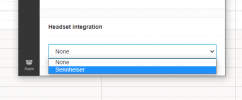
Please tell me if i'm missing something, but it would appear that Plantronics headset integration. it seems that Sennheiser is avaiable in the drop down list. Is this something that will be included going live.

Cheers,
Brian
 
Hi,

Please tell me if i'm missing something, but it would appear that Plantronics headset integration. it seems that Sennheiser is avaiable in the drop down list. Is this something that will be included going live.

Cheers,
Brian
Sorry, could you please elaborate your question about Plantronics?
 
Hello @timmbo ,

We are already in contact with Jabra team in regards to headset integration. Even for Jabra team the headset integration with the use of WebHID is also something new, but we are working toward the direction of making it feasible.
Hi

All our customers use Jabra and rely on the base ringing etc. Without the integration the Desktop APP is unusable and they will have to stay on v16.

Also can we please have a coice of ringtones, or at least maybe just a ringing wav instead of the one were stuck with.
 
i know its a silly question, but its one question I get asked by everyone........ is there a way to add giphy keyboard to chat?
 
Mac OS is in our plans but we want to have a bulletproof Windows version first
Any update to the Mac App now that the windows version is in beta?
 
  • Like
Reactions: Evolute IT
Hi
Will the v18 be able to install on a terminal environment running on windows server 2012? We only plan to use it to view incoming calls etc. but the calls will be picked up via DECT phones.
Thanks
V
 
@vvis718 you mean the client? yes this should be no problem....
 
@vvis718 you mean the client? yes this should be no problem....
Hi Nick

Yes, the clients use remote desktop connection to connect to the terminal server to do their work.

Would I be able to install v18 on the terminal server which is running on windows server 2012 to let the clients have some sort of call information on screen?

For example, when they receive a call a window will pop up to show who is calling and they can answer the call from their cordless phones.
Another use case for this would be setting up presence via the application such as active or sick or leave etc.

Currently, I have been advised by our suppliers to use chrome browser until v18 releases.

Thank you
V
 
@vvis718 Internal tests were done on Windows Server 2016. Latest version of Windows Server is the 2019.

You can install the 3CX Desktop App for Windows on a terminal server and users will provision with their accounts when they connect via remote desktop. After that they can interact with the application as usual.
 
@vvis718 Internal tests were done on Windows Server 2016. Latest version of Windows Server is the 2019.

You can install the 3CX Desktop App for Windows on a terminal server and users will provision with their accounts when they connect via remote desktop. After that they can interact with the application as usual.
Great.

Can I install v16 on windows server 2016 as well?

Thank you for your response. :)

Cheers
V
 
  • Like
Reactions: vvis718
Sorry, could you please elaborate your question about Plantronics?
HI NickD_3CX,

yes, i cannot use call control with the plantronics headset when testing the new v18 Beta - there is no option to select Plantronics as an integrated headset, see image attached.
1626880448157.png

Could this be becuase I have it setup with the old v16 windows app?

Cheers,
Brian
 
With Office 365 Contacts sync setup. The Office 365 contacts don't show up when the client view is set to "All Contacts", you have to go to the "Microsoft 365" view to see the contacts.
 
Is this deployable administratively? Our 600+ roaming staff accounts (could use many PCs per day - we have 650 staff, 5500 students and 2500 PCs & Macs) would need this deployed and provisioned automatically (we currently export config files and then a login script auto provisions the Windows app if it's not already). Having them do it would be a nightmare and they'd end up just using Teams instead. Don't under-estimate how much help we need to give staff with things like this in education. In many cases we have to literally do 1:1 support for well over 200 people with major changes. (Note we can't use O365 integration with 3CX as we have to split each school in to their own extension range.)

Does this play nice with other apps such as Teams in terms of audio devices?

Exciting to see new developments, please don't take my comments as negative but these are real, genuine, major, significant issues for us.
Biggest issue is not having a 3CX app for MacOS, the web phone is ok but still not the same as having a solid app than can run in the background. Out of 150 staff maybe 50 are using it, 150 staff are using MS Teams ‘just saying!!’ It would be great to know the script to launch the Web Phone using JAMF for MacOS given it’s the only choice.
 
Status
Not open for further replies.

Forum statistics

Threads
111,980
Messages
590,104
Members
164,908
Latest member
FarizQasimov