V18 Alpha 5: New Native Desktop App

Status
Not open for further replies.
Does the 3CXDesktopApp.exe have command arguments? For example to initate a outgoing call to a specific number?
3CX Desktop App will not support command arguments. Hot Keys support will be added in the near future.
 
  • Like
Reactions: Evolute IT
Thats something we do really miss in the current browser extension too.
It would be nice from applications to triggert a outgoing call (like ERP/CRM etc.).
 
Thats something we do really miss in the current browser extension too.
It would be nice from applications to triggert a outgoing call (like ERP/CRM etc.).
Desktop App already supports CallTo and Tel protocol.
 
  • Like
Reactions: Evolute IT
Thats something we do really miss in the current browser extension too.
It would be nice from applications to triggert a outgoing call (like ERP/CRM etc.).
something like this will be added very soon via a REST API, but as giannos said you can already do that now if the crm or erp can make their number with the tel protocol as many do
 
Oh great! That would be perfect, thanks :)
 
something like this will be added very soon via a REST API, but as giannos said you can already do that now if the crm or erp can make their number with the tel protocol as many do
Are we gonna see an early limited version of that API in one of the betas or initial release of V18? Maybe just a MakeCall API to make a lot of people happy... :)
 
THANK YOUUUUU 3CX team. Will there be a Mac app as well?
 
  • Like
Reactions: Reformed-JB
So glad to see MMS added.

Spun up a v18 machine the other day to play/test the dial by name, webclient, app and MMS.

I am going to keep testing but did see occasional delays with MMS being received on cell phone. SMS is working as expected.
 
So glad to see MMS added.

Spun up a v18 machine the other day to play/test the dial by name, webclient, app and MMS.

I am going to keep testing but did see occasional delays with MMS being received on cell phone. SMS is working as expected.
MMS delays on mobile phones are totally normal. The file needs to be processed by the carrier and then downloaded to your phone through 3G (since only data uses LTE and MMS somehow never seem to use it.)
 
  • Like
Reactions: VoIPTools
That maKes sense. It just seemed longer than I thought.

It took about 30 minutes to arrive.
 
Is Jabra integration on the roadmap?
 
  • Like
Reactions: JohnMooreCC
@dbradt Jabra is planning to support our API yes but it is something that has to be done and supported by Jabra.
 
@dbradt Jabra is planning to support our API yes but it is something that has to be done and supported by Jabra.
@Nick Galea
Thanks for your reply. Our company mainly sales Jabra headsets. Do you guys have any clue on the roadmap @jabra?
 
Good morning.

I opend a Ticket at Jabra, to get faster done.
so Jabra answerd me today, and they told me, they don't know what has changed in V18 so, it has to be done at 3CX.
Here the original Mail in German:

Your Jabra ticket number #ES01....

Guten Morgen Herr ......,

vielen Dank für Ihre Anfrage.

Uns liegen leider keine Informationen zur V18-Version vor.
Die Integration muss auf der 3CX-Seite erfolgen.

Bitte wenden Sie sich für weitere Informationen direkt an 3CX, oder auf unsere Doveloper-Zone:
https://developer.jabra.com/site/global/home/index.gsp

Mit freundlichen Grüßen | Best regards | Lep pozdrav

Ofelia Stojanova | Jabra Support Specialist | Group phone: +49 8031 2651 72 | Group mail: [email protected]
GN Audio Germany GmbH | Jabra Support Enterprise (EMEA) | Hochstrass Sued 7 | D-83064 Raubling | jabra.com


Bye
Timm
 
Hello @timmbo ,

We are already in contact with Jabra team in regards to headset integration. Even for Jabra team the headset integration with the use of WebHID is also something new, but we are working toward the direction of making it feasible.
 
The new desktop app is a fantastic start. BLFs not being present is a problem for my users right now. Would be slightly eased if call pickup worked from the presence tab…. Incidentally, I much preferred yellow - in-use and flashing red - ringing. In a sea of yellow, it’s hard to spot the ringing user.

I just noticed the callee number is displayed on the presence tab - a lovely and welcome addition
 
The new desktop app is a fantastic start. BLFs not being present is a problem for my users right now. Would be slightly eased if call pickup worked from the presence tab…. Incidentally, I much preferred yellow - in-use and flashing red - ringing. In a sea of yellow, it’s hard to spot the ringing user.

I just noticed the callee number is displayed on the presence tab - a lovely and welcome addition
The upcoming Beta release will include BLF
 
Nevermind...I see there is a plan for a Mac Version
 
Transferring calls / Line keys:

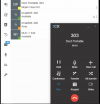
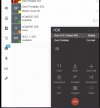
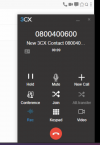
With the V18 Desktop App, attended transfer calls are working as expected. Only thing is, one can not toggle between Line 1 and Line 2. The second line is only visible while dialling the transferring number, once connected the line option disappear. From here, one can either transfer the call or hang up. It is not possible to switch/swap between the two active calls. This is possible with the current Windows V16 phone

1. Talking on Line1 to 303 | 2.Click Att.Transfer & enter destination| 3. only new destination is visible
Screen Shot 2021-07-08 at 1.54.07 PM.pngScreen Shot 2021-07-08 at 1.55.24 PM.pngScreen Shot 2021-07-08 at 1.55.34 PM.png

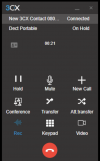
Two lines are only visible when a new + New Call is made. But from here one can not connect/join Line1 with Line 2. Although in this scenario, one can switch Hold from Line 1 to Line 2, just not transfer them together, grrr.

Screen Shot 2021-07-08 at 2.01.20 PM.png
 
  • Like
Reactions: Natthapon
Status
Not open for further replies.

Forum statistics

Threads
111,981
Messages
590,112
Members
164,908
Latest member
FarizQasimov