v18 cannot be installed on Windows Server 2012?

Status
Not open for further replies.

Gregpearce

Free User
Joined
Sep 21, 2015
Messages
13
Reaction score
0
Hi All,

Dows anyone have the v16 download file, or know if it can be reinstalled?

We have removed v16 in preparation for upgrading, but have no just found out that we are unable to install v18 on our Server 2012 instance.

Is there anyway to 'trick' the install file so it works on Server 2012?

any help greatly appreciated, we have no phone system currently.

regards,
Greg
 
Hi @Gregpearce ,

This is correct, the supported Operating Systems that V18 can be installed on are listed here:
https://www.3cx.com/docs/manual/phone-system-installation-windows/#h.rpbyof1d94m1

Is there anyway to 'trick' the install file so it works on Server 2012?
No.

Dows anyone have the v16 download file, or know if it can be reinstalled?
You can find the V16 installer here:
https://downloads-global.3cx.com/downloads/3CXPhoneSystem16.exe

Note that this version will only be able to activate your key for a few more days, so restore your system for now, but make sure you upgrade to V18 asap after this now that you are aware of the Operating System requirements:
https://www.3cx.com/blog/releases/fqdn-endpoint-change/

Alternatively, considering making a switch to Debian.
 
  • Like
Reactions: Evolute IT
Hi all, thanks very much for the help.

I have the v16 installer, but we are having the same issue with compatibility with Server 2012..

The previous install must have been v15 upgraded to v16.

Does anyone have any ideas? Installing 3CX on another PC will be a major headache as we have older Cisco 7940 SIP phones. (Im hoping that these are still compatible with v18)
 
Ok, have found the v15 installer, but this now has the problem

Product cannot be activated because license key is for a previous version. Upgrade license key or purchase maintenance from

I'm stuck. Any help would be greatly appreciated.
 
The only path from v15 to v16 was to uninstall v15, and run the v16 installer

What is the error you get when running v16 installer

Try rebooting the server before installing v16

If the server a standalone machine or a virtual machine
 
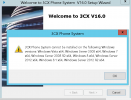
Thanks Saqqura, this is the message we receive. (this is the same message for v18 too).

I'm worried that if we go to v18 the Cisco phones will no longer function and we wont be able to revert to v16 as the license will be upgraded.

Changing phones and retraining staff will be a major undertaking..

3cx.png
 
Thanks Saqqura, this is the message we receive. (this is the same message for v18 too).

I'm worried that if we go to v18 the Cisco phones will no longer function and we wont be able to revert to v16 as the license will be upgraded.

Changing phones and retraining staff will be a major undertaking..

View attachment 28447
Your Cisco phones should still work in v18. Just upgrade before your systems stop working.

Also, really consider going Linux so that you don't have to deal with Windows license and versions again.
 
Thanks for all your help everyone. I'm going to setup a new server and hopefully be able to migrate the Cisco phones across. Luckily its a public holiday here on Monday so no one will be there.

I should be able to keep the existing DCHP and TFTP server in place but copy across the phone configuration files from the new server (which should have the new IP).

These are my thinking out loud steps;

[ ] Install 3CX v18 on new server
[ ] Restore backup from old v16 server. Check IP has changed to new server
[ ] Regenerate phone configuration files on new sever
[ ] Copy phone configuration files to existing TFTP sever
[ ] Check internal phone calls work
[ ] Change firewall configuration from old server to new server IP
[ ] Check PBX system is registered with phone provider

Regards,
Greg
 
Thanks for all your help everyone. I'm going to setup a new server and hopefully be able to migrate the Cisco phones across. Luckily its a public holiday here on Monday so no one will be there.

I should be able to keep the existing DCHP and TFTP server in place but copy across the phone configuration files from the new server (which should have the new IP).

These are my thinking out loud steps;

[ ] Install 3CX v18 on new server
[ ] Restore backup from old v16 server. Check IP has changed to new server
[ ] Regenerate phone configuration files on new sever
[ ] Copy phone configuration files to existing TFTP sever
[ ] Check internal phone calls work
[ ] Change firewall configuration from old server to new server IP
[ ] Check PBX system is registered with phone provider

Regards,
Greg
If you have a the setup and the phones pull their config from a TFTP, then this should work.

Also before restoring the backup on your V18, remember to disable the SIP Trunks on your V16 if they are Register-based (I usually add a '1' at the end of the Registrar to invalidate it...).

One more thing, make sure you run the Firewall Checker on the new Server to make sure Firewall settings were done correctly.
 
If you have a the setup and the phones pull their config from a TFTP, then this should work.

Also before restoring the backup on your V18, remember to disable the SIP Trunks on your V16 if they are Register-based (I usually add a '1' at the end of the Registrar to invalidate it...).

One more thing, make sure you run the Firewall Checker on the new Server to make sure Firewall settings were done correctly.
Thanks Nick.

I have already uninstalled the v16 server as I didn't realise I wouldn't be able to out v18 on it. I only took a backup prior and didn't disable anything.

Is this going to be a problem?
 
As you already uninstalled v16, you won't need to worry about duplicate SIP trunk registration
 
  • Like
Reactions: NickD_3CX
Status
Not open for further replies.

Forum statistics

Threads
111,974
Messages
590,083
Members
164,901
Latest member
Silent_Guru