- Joined
- May 6, 2022
- Messages
- 51
- Reaction score
- 4
When performing an Attended Transfer, you are unable to switch between
the two callers, as is possible on the Mobile app and previous version.
The only option is to select 'Join' which will put the callers together
as expected. Although if you need to go back to the original caller, the
only way to do this is to hang up on line 2 and retrieve the caller on
line 1.
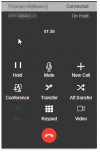
Another option is to make a 'New Call' which does allow you to switch
between callers (as shown below) but then there is no 'Join' function
available to place them together.
the two callers, as is possible on the Mobile app and previous version.
The only option is to select 'Join' which will put the callers together
as expected. Although if you need to go back to the original caller, the
only way to do this is to hang up on line 2 and retrieve the caller on
line 1.
Another option is to make a 'New Call' which does allow you to switch
between callers (as shown below) but then there is no 'Join' function
available to place them together.