V18 Dynamics CRM

Status
Not open for further replies.

LEAD

Customer
Joined
Jan 5, 2021
Messages
52
Reaction score
10
Anyone else having issues with V18 Dynamics CRM Integration?

Looks like it is not properly retaining the EntityID for contacts or leads. When it is creating the post request. It adds everything but the regardingobjectid and partyid. This is causing it to fail since the partyid is a required field.

Looking at this part of the XML. I see it has changed in V18. I have tried both the V16 and V18 entries and neither work.

<Value Key="[email protected]" If="[EntityType]==Contact" Passes="0" Type="String">/contacts([EntityId])</Value>
<Value Key="[email protected]" If="[EntityType]==Lead" Passes="0" Type="String">/leads([EntityId])</Value>
<Value Key="[email protected]" If="[EntityType]==Account" Passes="0" Type="String">/accounts([EntityId])</Value>
<Array Key="phonecall_activity_parties">
<Object>
<Value Key="[email protected]" Passes="0" Type="String">/systemusers([SystemUserId])</Value>
<Value Key="participationtypemask" If="[CallType]==Inbound" Passes="0" Type="String">2</Value>
<Value Key="participationtypemask" If="[CallType]==Missed" Passes="0" Type="String">2</Value>
<Value Key="participationtypemask" If="[CallType]==Outbound" Passes="0" Type="String">1</Value>
<Value Key="participationtypemask" If="[CallType]==Notanswered" Passes="0" Type="String">1</Value>
</Object>
<Object>
<Value Key="[email protected]" If="[EntityType]==Contact" Passes="0" Type="String">/contacts([EntityId])</Value>
<Value Key="[email protected]" If="[EntityType]==Lead" Passes="0" Type="String">/leads([EntityId])</Value>
<Value Key="[email protected]" If="[EntityType]==Account" Passes="0" Type="String">/accounts([EntityId])</Value>
<Value Key="participationtypemask" If="[CallType]==Inbound" Passes="0" Type="String">1</Value>
<Value Key="participationtypemask" If="[CallType]==Missed" Passes="0" Type="String">1</Value>
<Value Key="participationtypemask" If="[CallType]==Outbound" Passes="0" Type="String">2</Value>
<Value Key="participationtypemask" If="[CallType]==Notanswered" Passes="0" Type="String">2</Value>
 
Last edited:
I see nothing else wrong but here's what to do:

1. Put the system in verbose mode
2. Make a test call
3. Check the 3CXSystemService.log to see what the PBX is sending to Zoho and if any errors are occurring.

Also, make sure you clean contacts everytime to change the template as the EntityId and EntityType are stored in the contact object in the phonebook.
 
Hello @TeKNacion,

It seems you're not using the standard template we provide for Zoho, is this correct? If you're using a custom template, please note that in v18 we've been doing some changes to be able to add support for Chat Journaling, and also reducing the number of invocations to the CRM API. The most important change regarding this is that you can't use anymore the variables starting with Contact:: that you used to have in v16. Those variables were used to get data from the contact lookup scenario into the Call Journaling scenario. Now in v18 you have 2 variables that you can return in the Contact Lookup scenario, which are EntityId and EntityType. The values that you specify for those variables during contact lookup / contact creation, are added to the contact in 3CX Contacts. This way, when the Call Journaling is executed, no CRM lookup is needed because we already have this information in 3CX Contacts. Then, in the Call Journaling and Chat Journaling scenarios you have the variables EntityId and EntityType.

As a result, you might need to re-structure your custom template a bit considering this.

Using the latest CRM Template Generator tool for v18 you can also test this with the tool, without needing real calls, so your testing will be faster.

If you're still having issues, please copy here the full template, so we can take a look.
 
  • Like
Reactions: Evolute IT
Hello @TeKNacion,

It seems you're not using the standard template we provide for Zoho, is this correct? If you're using a custom template, please note that in v18 we've been doing some changes to be able to add support for Chat Journaling, and also reducing the number of invocations to the CRM API. The most important change regarding this is that you can't use anymore the variables starting with Contact:: that you used to have in v16. Those variables were used to get data from the contact lookup scenario into the Call Journaling scenario. Now in v18 you have 2 variables that you can return in the Contact Lookup scenario, which are EntityId and EntityType. The values that you specify for those variables during contact lookup / contact creation, are added to the contact in 3CX Contacts. This way, when the Call Journaling is executed, no CRM lookup is needed because we already have this information in 3CX Contacts. Then, in the Call Journaling and Chat Journaling scenarios you have the variables EntityId and EntityType.

As a result, you might need to re-structure your custom template a bit considering this.

Using the latest CRM Template Generator tool for v18 you can also test this with the tool, without needing real calls, so your testing will be faster.

If you're still having issues, please copy here the full template, so we can take a look.
Thank you for your help. After reviewing and correcting the letter case in all instances of the variables the call journaling worked for incoming calls.

Now, outgoing calls is a problem. 3CX is searching for match using "+1" when the number for the contact is stored without the "+1". Therefore, not finding a match.
 
Now, outgoing calls is a problem. 3CX is searching for match using "+1" when the number for the contact is stored without the "+1". Therefore, not finding a match.
It's always recommended that you store the number in E164 format in your system, because your SIP Trunk will probably need this format. This way all the numbers have the same format everywhere.

If you're using a custom template, and you only have US numbers, then you can adjust your template and instead of using the [Number] variable you can use the following expression to remove the +1 from the beginning:
[[Number].Replace(&quot;+1&quot;,&quot;&quot;)]
 
  • Like
Reactions: Evolute IT
I'm having this same problem too, I opted for looking for the contact again in call journaling but it drops the convinience of [Number] being reduced to X Digits.

Now this might be a dumb question but is there any documentation on how everything works? There is a "tutorial" here but the "example xml" is not even updated as it still uses the [Contact::Variable] format.
 
I'm having this same problem too, I opted for looking for the contact again in call journaling but it drops the convinience of [Number] being reduced to X Digits.
This is something that you can control from the 3CX Console > Advanced > Contacts > Options > Match exactly.

Now this might be a dumb question but is there any documentation on how everything works? There is a "tutorial" here but the "example xml" is not even updated as it still uses the [Contact::Variable] format.
You should also check the document describing the details of the XML:
https://www.3cx.com/docs/server-side-crm-template-xml-description/

The document you mention has been updated for v18, I don't see any mention to the old [Contact::Variable] format. Please, can you tell me where you see this so we update the documentation?
 
  • Like
Reactions: Evolute IT
The document you mention has been updated for v18, I don't see any mention to the old [Contact::Variable] format. Please, can you tell me where you see this so we update the documentation?

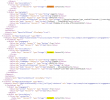
Yep, in that tutorial there is a reference to "example CRM Template" that takes you here and there are still a lot of references to that

1629916899536.png


You should also check the document describing the details of the XML:
https://www.3cx.com/docs/server-side-crm-template-xml-description/

Thanks! I'm going to check it out :)
 
  • Like
Reactions: edossantos
Yep, in that tutorial there is a reference to "example CRM Template" that takes you here and there are still a lot of references to that
Thanks for pointing this out, we will fix the documentation.
 
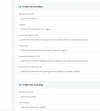
I just upgrade to V18 and seem to have broken my call journaling (and chat journaling not working either).
Im using the standard integration and per some of the convo above removed Contact:: ... still not seeing calls being journaled or chats for that matter

1631234161994.png
 
I just upgrade to V18 and seem to have broken my call journaling (and chat journaling not working either).
Im using the standard integration and per some of the convo above removed Contact:: ... still not seeing calls being journaled or chats for that matter

I'm pretty sure we would need to see your XML code to understand where is the problem. The easy way out of this is downloading the new CRM template wizard and following it thru.
 
I'm pretty sure we would need to see your XML code to understand where is the problem. The easy way out of this is downloading the new CRM template wizard and following it thru.
When I test the integration on 3cx, I see all the fields come thru for the given phone number. Inbound calls also seem to be querying the CRM as I see caller ID and my browser extension pulls up the right leads. The journaling see to be broken,

Im using the default template from the build in Zoho connector:

I just downloaded the CRM template wizard not sure what to put in for all the fields
 
So I removed the integration and downloaded version 20 and tried again.

This time I get a generic call journal:

06:23 PMCall added-3CX PhoneSystem Call

No additional details

I also see no SMS journaling
 
Hello @socalcodingschools,

I'm a bit confused. The title of the thread mentions Dynamics, and you're referring to Zoho? Are you using the standard Zoho template? Please, when you want to ask a totally new question, create a new forum thread instead of asking on an existing unrelated thread, otherwise we get confused...

If you're using a standard template, then no need to use the CRM Template Generator tool. This tool is used to create new custom template for CRMs that we don't support out of the box.

If you're having problems with Call Journaling or Chat Journaling, you need to enable verbose logs from the 3CX Console > Dashboard > Activity Log > Settings, then make a test call to reproduce the issue, and finally check the 3cxSystemService.log file, where you will see all the interactions with the CRM. Also, please note that Chat Journaling is activated when you click "Dealt with" for the chat conversation in the Web Client. Until then, the conversation is not logged in the CRM.
 
Status
Not open for further replies.

Latest Posts

Forum statistics

Threads
112,323
Messages
591,896
Members
165,474
Latest member
costionofrei