V18 Release Candidate 2 Now Available

Status
Not open for further replies.
has the 3cx groups been depreciated in version 18? we can still manually get to it by pasting "#/app/groups" at the end of our URL, but we use extension groups to route 911 calls based on physical location on some systems.
 
has the 3cx groups been depreciated in version 18? we can still manually get to it by pasting "#/app/groups" at the end of our URL, but we use extension groups to route 911 calls based on physical location on some systems.
You find the groups from the users page.
 
  • Like
Reactions: ChrisC_3CX
too bad MS Teams is only available in the ENT editions
Seriously? If you have money for Teams Phone System licenses, an Enterprise license shouldn't be a problem.
 
  • Like
Reactions: CentrexJ
Seriously? If you have money for Teams Phone System licenses, an Enterprise license shouldn't be a problem
This not a good argument. It makes an already expensive option even more expensive. It really should be included in a pro license. All the other microsoft 365 integrations are. It just creates more confusion.
 
This not a good argument. It makes an already expensive option even more expensive. It really should be included in a pro license. All the other microsoft 365 integrations are. It just creates more confusion.
We'll agree to disagree.

IMO, if you wanna use the expensive Teams, I don't think the small difference between Pro and Enterprise becomes a problem. If it is, then just don't sell it or use any 3rd-party Teams integrations.
 
  • Like
Reactions: [email protected]
We upgraded ourselves to RC2/final this weekend to test things out (Debian self-hosted in our data center). For at least two of us today, if we dial *777 using the new Desktop app, it cuts off the beginning and/or end of words like it's aggressively gating the syllables. A third person says they aren't hearing that and others are out on location. I just tried in the browser client (Chrome) and it happens there, but not in the old Windows client (which I have installed but have fully exited). Phone calls seem fine to/from all three extensions and external so it seems specific to the *777...? All three of us have the same Sennheiser headset, and I know I have the Headset Integration set to None.
 
Excited for the Yealink headset integration! Yealink is all we use so this will be a HUGE selling point.
 
We upgraded ourselves to RC2/final this weekend to test things out (Debian self-hosted in our data center). For at least two of us today, if we dial *777 using the new Desktop app, it cuts off the beginning and/or end of words like it's aggressively gating the syllables. A third person says they aren't hearing that and others are out on location. I just tried in the browser client (Chrome) and it happens there, but not in the old Windows client (which I have installed but have fully exited). Phone calls seem fine to/from all three extensions and external so it seems specific to the *777...? All three of us have the same Sennheiser headset, and I know I have the Headset Integration set to None.
By the time it is only to *777, I would worry too much as the mechanism of this service is very rudimentary. it simply ping-pongs audio packets back to the sender.

I would though suggest to check ti a bit further by simply setting up one more extension and asking a colleague of yours to use it and test an actual call between these 2 extensions.

You could always also adjust the Codecs in Settings --> Codecs. If most of your users are remote and bandwidth is not an issue for them, you could consider moving PCMU and PCMA to the top of the list and moving G729 further down.
 
Anyone else has no audio issue with webclient and windows desktop app after latest upated ?
 
Anyone else has no audio issue with webclient and windows desktop app after latest upated ?
Where is your 3CX installed and is your WebClient/Windows app on the same LAN as the 3CX server?
If you dial *777 do you hear any audio?

Also make sure in your WebClient/Windows app that you have selected the right Audio Devices from the Settings menu.
 
Hi Guys

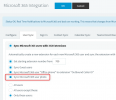
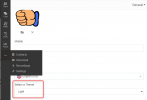
Where can I find "Picture import from O365" and also "Night mode visual in chrome ext or app"
 
Where can I find "Picture import from O365"
This would be under Settings --> Microsoft 365 --> User Sync tab:
1628585366339.png


...and also "Night mode visual in chrome ext or app"
For the time being, only the "Light" theme is available, but in the WebClient/Windows app, in Settings --> General, we have a placeholder drop-down that we will populate with at least one more option at some point :) :
1628585601409.png
 
  • Like
Reactions: N_G
This would be under Settings --> Microsoft 365 --> User Sync tab:
View attachment 23459


For the time being, only the "Light" theme is available, but in the WebClient/Windows app, in Settings --> General, we have a placeholder drop-down that we will populate with at least one more option at some point :) :
View attachment 23460
Thanks Nick

The latter was for the forced out of office indicator
 
  • Like
Reactions: Evolute IT
Where is your 3CX installed and is your WebClient/Windows app on the same LAN as the 3CX server?
If you dial *777 do you hear any audio?

Also make sure in your WebClient/Windows app that you have selected the right Audio Devices from the Settings menu.
!oh
changes on fw. please disregard my report.
 
  • Like
Reactions: NickD_3CX
Thanks Nick

The latter was for the forced out of office indicator
Sorry, my bad. The Night Mode Indicator was pushed back for V18 U1. We currently have no ETA for U1, but it won't be a very long wait.
 
  • Like
Reactions: N_G and Evolute IT
Status
Not open for further replies.

Forum statistics

Threads
111,992
Messages
590,171
Members
164,929
Latest member
Cloudstar