Can you join with your audio and video enabled from the launch pad, and let me know if sharing still produces the same issue? We are aware that there is an issue, and we're working on a fix for this.
I can confirm the behaviour. If I start with audio and video enabled, the screen sharing works fine. If I start with audio enabled and video disabled, it uses the shared screen as webcam video.
In the interim until this issue has been resolved, you'll need to join the meeting with the audio and video enabled from the launch pad (where you enter your name and such) in order to have it share correctly.
As I mentioned, this is a known issue and is being investigated.
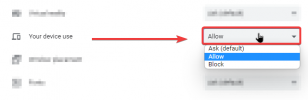
I was able to replecate this issue and identify a possible fix. in your google chrome site settings, please check if the "your device use" setting is set to allow, if it is set to ask or block I noticed that the screen sharing breaks.