Our system was set up by an employee who has since left. I have read documentation on this but I'm unclear and do not want to create any more issues.
Based on these instruction:
https://www.3cx.com/docs/upgrading-pbx/
2) I believe we are hosted on 3cX, but I do not know if it is a "cloud" server. I would assume since it is hosted by 3cX it should have no issues.
If your system is hosted by 3CX, this does not concern you.
3) I do not see the option for "departments" in V18. I am not sure how to do this before changing to V20. Is "department" the same as "group"?
The group has been renamed to department.
The most important thing is that you have WebClient access on an extension with the System Owner role. 90% of complaints come from there.
Always, before proceeding with the update, plan to get the new application on Windows via the Windows Store. Install it in advance; you can even start using this app on 3CX V18. The URL you will need is that of the WebClient v18. I’ve done it, and it works well.
SIP Trunk Provider.
If you are using a supported provider, you should not have any problems.
However, if you are using a gateway, such as an FXO, consider having a plan B just in case.
While it should continue to work, since it is not tested by 3CX, prepare for the worst.
If you have scheduled call reports, also prepare for the worst. Some reports are not available on V20, such as those with graphs. Inform the relevant people that it is a work in progress.
Ensure that the email addresses for the extensions are unique; there should not be two identical email addresses throughout the system.
Make sure your email address is set up in the system notifications. This way, you can be easily informed about the status of the update (whether it was successful or failed).
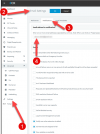
Finally, go to the "Phone" page and, I strongly recommend taking screenshots of what is "connected." Normally, they should reconnect automatically after the update, but if you take screenshots of the "connected" phones, it will be easier for you to identify what is in a normal state after the update.
If you do not have an SBC, plan on getting one.
If your operations are critical and a failure would cause significant trouble, several 3CX Partners offer their services for a fee to assist you in the operation. You will have to spend some money, but sometimes it's worth paying for peace of mind.
The update takes time, so be patient—it could take 10 minutes or more for your system to update.
Check your emails; you will receive an email notifying you whether the update was successful or failed.
Final recommendation:
 The definition of "panic" is: To suddenly feel overwhelmed with fear or anxiety, which often causes wildly unthinking behavior.
The intention isn't to scare you, but it's often a good idea to work with an experienced 3CX partner. Just saying. 


