- Joined
- Dec 16, 2021
- Messages
- 6
- Reaction score
- 4
The changes in Update 5 to SMS routing at very disappointing and completely break our 3CX workflow.
We used to have our main DID go directly to an IVR, and SMS would route to a call queue.
Despite the fact that we still can't send SMS from a call queue, at least receiving SMS to a call queue allowed us to use SMS in the way we needed to.
With the new SMS implementation in Update 5 we now have to choose between having calls go to our IVR or having SMS work. I saw it was suggested to use a different number for SMS, but all of our users and clients already know and use our main DID for SMS. It would be completely impractical and confusing to change it.
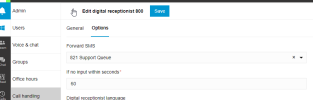
We tried the workaround to transfer from the call queue to the IVR after 15 seconds but it's completely unprofessional for an incoming caller to have to wait 15 seconds with on-hold music before the IVR picks up. We really need the ability to route SMS differently from incoming calls, like it was in previous versions. It's really disappointing that this functionality was removed.
We used to have our main DID go directly to an IVR, and SMS would route to a call queue.
Despite the fact that we still can't send SMS from a call queue, at least receiving SMS to a call queue allowed us to use SMS in the way we needed to.
With the new SMS implementation in Update 5 we now have to choose between having calls go to our IVR or having SMS work. I saw it was suggested to use a different number for SMS, but all of our users and clients already know and use our main DID for SMS. It would be completely impractical and confusing to change it.
We tried the workaround to transfer from the call queue to the IVR after 15 seconds but it's completely unprofessional for an incoming caller to have to wait 15 seconds with on-hold music before the IVR picks up. We really need the ability to route SMS differently from incoming calls, like it was in previous versions. It's really disappointing that this functionality was removed.