v20 Automated Recording Archiving not working, manual does

johnporteous

Premier Customer
Advanced Certified
Joined
Sep 29, 2022
Messages
58
Reaction score
9
Since moving to v20, we've found that the automated call archiving no longer runs as it used to in v18; now it must be done manually by clicking Move to Archive.

We auto archive all call recordings older than 1 day to Google Cloud and this ran smoothly until v20 was released. The manual action shows the connectivity and settings are correct, and the auto clean is off. Has anyone any idea why this happens now?
 
Been through all that. As mentioned, the settings are correct, and it works manually; it's just that the auto archiving schedule doesn't run.
 
Hi,

Just gathering info:

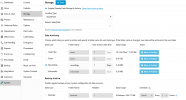
Is the scheduling set up here (since you mention manual works, I assume it is):
1753687059466.png

If it is set but not triggering, then that needs to be looked up.
Did it work after the initial move to v20? Any entries in the log showing an error?

KS.
 
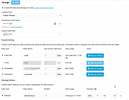
Yes, as per this below. So when click Move to Archive, that works.

Has never auto archived since moving to v20.

Nothing shows in the logs, error or success. Cross checked on a v18 still running (migrating this coming weekend) and that doesn't show success/failure but it works. Logs only show backup successful, which incidentally are in the same Google Cloud Storage buckets, thus even more bemusing.

1753687958054.png
 
I would suggest turning debug logging on for a day to see if anything shows up. Any indication on google of an attempt being made?
 
Ok I will, however I just ran a test of a manual archive and nothing shows up in the logs weirdly but it ran successfully. Google shows nothing untoward but currently digging deeper to make sure I've not missed anything.
 
  • Like
Reactions: KyriacosS_3CX
Yes, as per this below. So when click Move to Archive, that works.

Has never auto archived since moving to v20.

Nothing shows in the logs, error or success. Cross checked on a v18 still running (migrating this coming weekend) and that doesn't show success/failure but it works. Logs only show backup successful, which incidentally are in the same Google Cloud Storage buckets, thus even more bemusing.

View attachment 48778
You will need to change the Recordings "Auto-archive older than" setting to 0 days for immediate archiving of recordings.
 
It's not necessarily immediately required. I've tried 1, 2, 3 etc and left it be but regardless the auto archive does not run. I did read that it runs 'at will' i.e. not on a schedule of say 00:01 but rather based on the recordings timestamp. Either way, changing the older than setting still doesn't make the auto archive run.
 
  • Like
Reactions: Evolute IT
By the way, this is not an isolated issue....it's happening on 4 of my v20 PBXs
 
Not sure why a recreated JSON file will resolve this, as manual archiving works and the same JSON file is being used on the v18 3CX that works, as on the v20's that don't auto archive.
 
There is a need for the JSON file to be recreated some times, and the system should be giving a warning notice in these cases. But trying this on one system to check if it resolves it might be worth it, even without the warning showing.

If it does, then we need to see why the warning didn't pop up.
 
Ok understood. I'll give it a try no problem, and get back to you. Thanks for all the advice/suggestions until now.
 
  • Like
Reactions: KyriacosS_3CX
Download and filter 3CXSystemService.log by RecordingCleanup. It should show something if your activity logs level was at least Medium.
Also check event log for event 50023 for any errors during archiving process.
 
  • Like
Reactions: KyriacosS_3CX
BTW, check if all the systems affected have slash (/) at the end of the Recordings folder and try removing it.
 
BTW, check if all the systems affected have slash (/) at the end of the Recordings folder and try removing it.
Thanks. They don't, and the archiving works manually so the slash would not allow that manually or automatically I'd have thought.
 
Download and filter 3CXSystemService.log by RecordingCleanup. It should show something if your activity logs level was at least Medium.
Also check event log for event 50023 for any errors during archiving process.
I will set to Medium and see what is logged.
No 50023 events logged.
 
There is a need for the JSON file to be recreated some times, and the system should be giving a warning notice in these cases. But trying this on one system to check if it resolves it might be worth it, even without the warning showing.

If it does, then we need to see why the warning didn't pop up.
I've created a new service account in Google with the permissions in your guide, a new JSON key, assigned to PBXs and tested a manual upload. I'll have to wait until tomorrow to see if it works using auto archive.
 
Thanks. They don't, and the archiving works manually so the slash would not allow that manually or automatically I'd have thought.
Hmm, from the screenshot the Recordings does have a slash after 2025. If after your last changes it fails, see if removing that slash is the key.
 

Forum statistics

Threads
112,293
Messages
591,745
Members
165,420
Latest member
x1515