V20 Call logs missing call-queue-divert-to-external calls

Status
Not open for further replies.

PatrickS

Customer
Joined
Sep 25, 2017
Messages
54
Reaction score
11

Summary:​

Calls are missing from the call log in V20 of 3CX Cloud when diverted to an external number due to all agents being unavailable. This behavior was correctly logged in V18 but is absent in V20.

Description:​

In the latest version (V20) of 3CX Cloud, calls diverted to an external number when all agents are unavailable do not appear in the call log. In version 18 (V18), such calls were logged, and the details could be retrieved, including through scheduled call reports. However, in V20, this information is missing, making it impossible to track these diverted calls.

Steps to Reproduce:​

  1. Configure a call queue in 3CX Cloud V20 with a diversion to an external number when all agents are unavailable.
  2. Ensure all agents are unavailable and place a call to the queue through a SIP trunk, aka, external call-in.
  3. Check the call logs and scheduled call reports for details of the diverted call.
  4. call logs in the SIP trunk provider show incoming and outgoing calls.

Expected Behavior:​

The diverted call should be logged, and details should be available in the call logs and scheduled reports, similar to the behavior in V18.

Actual Behavior:​

The diverted call does not appear in the call logs or scheduled reports, making it impossible to track or retrieve details about the call.

Impact:​

The absence of call logs for diverted calls in V20 affects the ability to monitor and report on all call activities, particularly for calls diverted due to unavailable agents. This creates a gap in call tracking and reporting capabilities that were present in V18.

This functionality is critical for understanding why an agent was not available to pick up calls, whether due to a network issue, an incorrect Do Not Disturb (DND) status, wrong office hours, or any other reasons. Without log it's impossible to troubleshoot.

Environment:​

  • 3CX Cloud Version: V20
  • Previous Working Version: V18

Additional Notes:​

This issue significantly impacts our call tracking and reporting process. A resolution or workaround to ensure that diverted calls are logged and included in reports is needed.
 
I apologize if I'm posting in the wrong section, whether it should be "self-hosted" or "on-premise." It seems the forum classifies my 3CX license under the on-premise section, which may have been a mistake when I first registered the system. If possible, could someone guide me on how to change that classification?

I've held a 3CX license for several years but can't recall why it was classified as "on-premise." If this change needs to be handled by a forum administrator, I would appreciate any assistance.

Thank you!
 
Can you please clarify what is the exact difference in the report?
 
Hi @TheodorosG_3CX

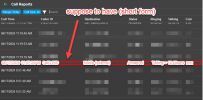
Thank you for your prompt response. Here are a few screenshots; hopefully, I can explain the issue. Please let me know if there are any ambiguities

2024-06-17_15-35-46.PNG
(Figure 1: V20 missing calls)

Checking our SIP trunk service provider reveals that we do have calls, as shown in Figure 2. It shows two simultaneous calls: one inbound and one outbound. The inbound call was intended to enter our call queue, but it somehow bypassed all the internal steps within 3CX and was immediately diverted to an external mobile number.
2024-06-17_15-35-06.PNG
(Figure 2: SIP trunk call log shows we have calls pass through 3CX)


Previously, in V18, we had a concise call log (an example is shown in Figure 3 below) that could be expanded by running 'scheduled reports' to display detailed call routing steps

snag_2521f69c-png.31696

(Figure 3: V18 call log example)

The expanded report (Sorry, we don't have screenshots at the moment) included information on which agent was 'not available,' the extensions to which the call was forwarded, and why it was eventually forwarded to an external number. Basically, the detailed reports show 3-5 rows of such logs, explaining each step in which the call was processed inside 3CX.

Today's case:
This morning, we encountered a call penetrating through the call queue flow directly to the last step, mobile backup. Unfortunately, our IT department is currently unable to determine the cause. This lack of information has led to serious questioning by our manager, who is concerned about our inability to understand and explain the incident.
 
Last edited:
Just to clarify here, the fact that you did not see this information in the report does not mean that there is issue with the report.
In this case you need to identify the call routing first. Are you able to replicate such scenario from your side?
 
Just to clarify here, the fact that you did not see this information in the report does not mean that there is issue with the report.
Thanks for pointing that out. I agree.

In this case you need to identify the call routing first. Are you able to replicate such scenario from your side?
Yes. We set up a test call queue and put every agent into 'unavailable' mode; it penetrated the call queue flow and eventually arrived at mobile forwarding, and it does not have a log entry in admin/reports/call-log.

New findings:
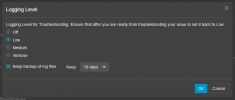
We noticed the above happened when the log level was 'Low'.
2024-06-17_16-58-28.PNG

If we switch the log to verbose mode, it does show the last step of forwarding in call-log:
2024-06-17_16-48-04.PNG

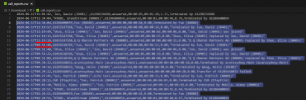
In the SIP trunk log we have the corresponding pattern:
2024-06-17_16-50-51.PNG

For now, we will leave it in verbose mode for subsequent calls.

Unfortunately, we cannot retrieve the missing call logs from the past. I sincerely hope that we may have overlooked something and that the information is stored somewhere in the PBX, as it is crucial to identify what really happened. In our scenario, it seems highly unlikely that every agent would be unavailable, and we are puzzled as to why the call passed through every step.

Any suggestions to help investigate this issue would be greatly appreciated. Thank you for your time.
 

Attachments

  • 2024-06-17_16-48-04.PNG
    2024-06-17_16-48-04.PNG
    18.9 KB · Views: 5
Last edited:
Can you please also export the report to a csv file?
Is the information included there?
 
I tried exporting to CSV, the content is the same as displayed in the 3CX management console

The missing call around 11:07 a.m. and a few others by the test setup were not shown either.
2024-06-17_21-45-20.PNG
 
Hi @PatrickS
If the call is in your database, then we might be able to help you figure out what happened with the specific call.

You will need to get a trial key and install JEDWare on your 3CX Server: Just click "Start a 14 days free trial" from here: https://customer.jed-ware.com/Pricing, and install following this guide: https://jed-ware.com/how-to-install-jedware-integration-v5-on-debian/

Hereafter, please contact us at [email protected], with any info you have for the specific call (date, time, last destination), and I will have a developer look into your call flow and data for this call.

You will be able to uninstall JEDWare after the troubleshooting, by following this guide:https://jed-ware.com/how-to-install-jedware-integration-v5-on-debian/
 
Hi @jed,

Thank you for your detailed response and the links. It's great to have something to try in my situation. Would JEDWare work on a clone copy of our 3CX server, even if the server is not activated?

It's eye-opening for me to know there are such cool reporting facilities dedicated to 3CX.
 
  • Like
Reactions: jed
Hi @PatrickS

JEDWare will not be able to work on a clone copy, as we need an active server with an FQDN and a valid Certificate. Furthermore, we need the 3CX License to be either PRO or Enterprise.

That said, you will not be able to install JEDWare on a 3CX Hosted by 3CX, as 3CX will not allow you to have root access. You can install JEDWare on any other hosted systems, where you or your partner have the root access.

If you are running on a 3CX Hosted by 3CX, then you can make a backup of your system, and send this to us, and our developemnt will look into the issue, and hopefully they can find the cause for those strange calls.
 
  • Like
Reactions: Evolute IT
Hi @jed

Thank you for offering to look into the issue; I really appreciate it. However, after proposing the plan to our manager, I received a message stating that we are not allowed to send backup files containing information that is not permitted to be sent overseas.

They may look into JedWare and let us know whether to use it on our production server.

For now, our incident was marked as "observing" tentatively. In other words, we were asked to pay close attention to similar cases should they occur again. Hopefully, the verbose mode of logging will save us somehow.


Hi, @TheodorosG_3CX. Thank you for your guide and hint; it means a lot during our difficult time.
 
Last edited:
  • Like
Reactions: jed
You are welcome ;)
 
  • Like
Reactions: jed
@PatrickS
You are welcome, we fully understand in regard to the data but it is the only way we will be able to dive down to the calls. You are welcome to contact us if you need our help :)
 
Status
Not open for further replies.

Latest Posts

Forum statistics

Threads
111,948
Messages
589,880
Members
164,841
Latest member
erre