v20 Call Report for multiple users

George_WB

Premier Customer
Advanced Certified
Joined
Feb 27, 2019
Messages
47
Reaction score
8
Hello, from v18 we were able to include a list of users and create a single Call Report for all of them. For V20 we are not able to reproduce this kind of report as we are able to only choose a single user from the dropdown menu. Can this functionality replicated otherwise?

Thank you!
 
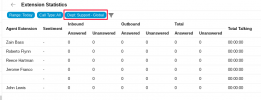
@George_WB the easiest way to replicate this type of call report in V20 would be to create a new Department and add all of the extensions that you want to include in the report. Then when you run an Extension Statistics report, you can click on the Dept button and choose this new Department and you should have the data you need.
1742458398520.png
 
  • Like
Reactions: PaulC_3CX
@George_WB the easiest way to replicate this type of call report in V20 would be to create a new Department and add all of the extensions that you want to include in the report. Then when you run an Extension Statistics report, you can click on the Dept button and choose this new Department and you should have the data you need.
View attachment 47061
It is possible to do the same for Call Logs report? This was doable on previous version. To see a list with all calls from chosen extensions and on the right side to be able to click to get the recording.
 
It is possible to do the same for Call Logs report? This was doable on previous version. To see a list with all calls from chosen extensions and on the right side to be able to click to get the recording.
The current Call Logs Report does not include this. Please stay tuned as we are developing our new Reporting 2.0 which will include much greater reporting capabilities and the opportunity to export data to PowerBi and Granfana to create any type of reports necessary.
 

Latest Posts

Forum statistics

Threads
111,964
Messages
590,003
Members
164,869
Latest member
hpgitsupport