- Joined
- Nov 20, 2023
- Messages
- 3
- Reaction score
- 1


Lastly, can anyone recommend any third party reporting companies that work with 3CX? Know that 3CX can not be perfect at everything so if anyone knows some companies that produce nice reports, that would be great.

Do we at least know what data it will offer and if it will be real-time into Grafana? Aka useful for live wallboards and such.No ETA on the arrival of that. It is being worked on, and is one of the features even us internally are very much looking forward to.
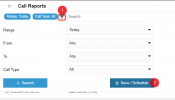
When you go to create a report...
View attachment 43903
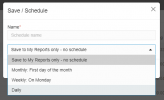
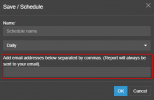
... you can define a schedule. On this page you will be able to define the multiple email addresses.
View attachment 43904
We are working on a Grafana integration where you will use the data from the PBX to create any number or type of report you wish. No ETA on the arrival of that. It is being worked on, and is one of the features even us internally are very much looking forward to.
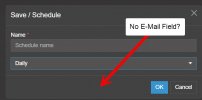
Yeah, I don't have this field either. Also don't have schedule time area.Very strange. Our "Save / Schedule" field looks different from yours. Ours does not have that last option. Believe our e-mail is setup properly as we did receive a test message. Am I missing something else?
View attachment 43917

Re: "always sent to your email"...that is the email of the logged in user? So, us, if we create a report? That means we either need to auto-delete those report emails (we might get quite a lot each day), or still log in as the desired user to create the report...On this page you will be able to define the multiple email addresses
A user can create the reports and define the recipients. Then they could filter out the emails for the reports they dont need. Of course with the Grafana integration they would be using their own platform.Re: "always sent to your email"...that is the email of the logged in user? So, us, if we create a report? That means we either need to auto-delete those report emails (we might get quite a lot each day), or still log in as the desired user to create the report...
Very strange. Our "Save / Schedule" field looks different from yours. Ours does not have that last option. Believe our e-mail is setup properly as we did receive a test message. Am I missing something else?
I feel I should apologise for a slight misstep.
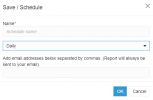
In update 2, the emails will be sent on a schedule to the user that creates the reports on a schedule, and in Update 3, they can also be sent to multiple emails as well.
Mistakenly I logged in to my test Update 3 system instead of my Update 2.
This one is on me, my bad.
If you look at the last field box under "Daily", you can see the field where you add the e-mail recipients. Unless you're looking for something else and I misread your question.
Thanks for this!You can send reports to any email you wish. You do not need to have each person creating their own reports anymore. The method is shown by my colleague above.
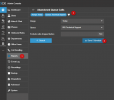
You can define the time the reports are created and sent from the System options
View attachment 43580
In Update 3 this will be migrating to its own tab
View attachment 43581


Founded in 2005, when VoIP was an emerging technology, 3CX has gone on to establish itself as a global leader in business communications.