V20 Call Reporting send to email gone

francisco.techpro

Forum User
Basic Certified
Joined
Nov 20, 2023
Messages
3
Reaction score
1
Hi Everyone,

Can someone here guide me on where to setup scheduled recurring reports that will be sent to email in html format? I find no more options to set this up in V20.
 
  • Like
Reactions: Exxolia
Scheduled reports are currently not available in V20.
 
When do you plan to reinstate the feature?
 
I can see where the confusion comes from. I would normally expect a release candidate to be fully functional, not missing several important functions (hot desking is the one that made me raise my eyebrows the most). To compound that, the update page also makes it look like you're going to V20 (no mention of release candidate on there, it simply says "Version 20 is now available. Before upgrading, take a full backup of 3CX and save it outside of the instance. This upgrade will also upgrade Debian from 10 to 12."). There is also no link to the corresponding blog post (as you usualy see for an update).

It would be very easy for someone to read that and update without realising there are potentially some very bad outcomes for their install.

In fact, the only reason I didn't upgrade is that I've been burnt by this sort of thing before (an upgrade took out pretty much our entire install because our phones were made end of life which you wouldn't know unless you read the blog posts).
 
Hello, we have self hosted V18 we plan to upgrade to V20 but I read about missing Scheduled call mail report, that we currently use. Did the update 1 actualy re-introduced this functionaity?

Thanks,
Roberto
 
Hello we upgraded to V20
I found the "Schedule" option in reports, but not the option to send the generated report in mail (that we used in V18)
Is this option still missing?

EDIT: i think i found how it works now in V20: is the user itself that configure report, and will receive mail at his emaill address.
But I see that it require "manager" role to let user access the report module, this role too high for my needs.
Is there a way to configure report in mail centrally from an admin without have to rise their role?

Thanks
Roberto
 
Last edited:
  • Like
Reactions: Exxolia
Roberto, hi.

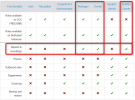
So reports in V20 can be scheduled be the user with the roles below:

1717657795169.png

At current time, the logic is that the report will be sent to the email of the user who schedule the report and you don't have the option where you can add another email of someone else.
 
Is there any plan to support custom roles?
I meean if I could clone the "receptionist" role with basic receptionist authorizations plus the report i could solve my issue
I cant rise him to manager role cause is unlocks to many functions I wan't allow him
Roberto
 
At the current stage of V20, the roles are not customizable, and their options are fixed.
 
As the administrator of the system on behalf of my users, they ask me to schedule reports for them. I don't want the reports ... they do. It is useless to send the report to me. I want it to go to the user who requested the report. This was the functionality before V20. Please put it back.
 
See this post we had another day.
 
Hello I upgraded to Version 20.0 Update 2 (Build 715 Release) and I don't see option for Scheduling reports, someone mentioned above that its under Reports but I cant see it, how can i schedule reports?

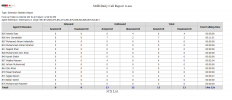
Or how can I just to get reports which shows summary of how many calls each extension made, total minutes, etc.


1723108963591.png
 
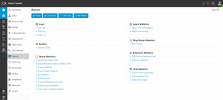
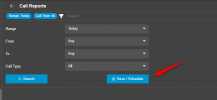
Go to the report you want to create and you will see the option there:

1723109542053.png
 
Go to the report you want to create and you will see the option there:

View attachment 43064

Thanks for such quick response, but i think Im lost, from the screen i shared above where should I go? Basically i need a report like the one below which i used to get on V18. Thanks

1723109867127.png
 
Are you looking for the below?

2024-08-08_12h39_23.png
2024-08-08_12h39_39.png
 
Hi,
We are trying to set up reporting in our V20 3CX and we cannot seem to get the options to choose the time at which the reports get sent?
In V18, as in the below screenshot (removed email for Privacy), we can set the time.


1724334270014.png

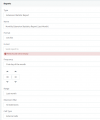
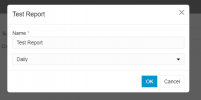
However, in V20, we cannot see this, only the option marked as "Daily". Even when you submit the report and edit it, there are still no options for this.
Is there a setting to change this, or is this planned in a future update?
1724334421757.png
Ideally, we would need to know before upgrading this 3CX instance as we rely on the reporting heavily.

Thanks!
Aidan
 
  • Like
Reactions: Vkiwi2
I am here for the same reason. The ability to define time and email in Scheduled reports should come back. I don't want to give manager role to everyone. In V20, manager role has the right to create, delete, edit users and this is not acceptable.
 
  • Like
Reactions: Vkiwi2
You can send reports to any email you wish. You do not need to have each person creating their own reports anymore. The method is shown by my colleague above.

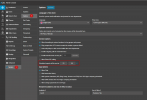
You can define the time the reports are created and sent from the System options

1725260287671.png

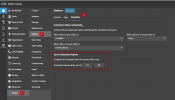
In Update 3 this will be migrating to its own tab

1725260349578.png
 

Latest Posts

Forum statistics

Threads
111,962
Messages
589,978
Members
164,864
Latest member
SCarpenter@fifthavenue-la