v20 Forward calls for user from admin panel

Status
Not open for further replies.

CounterTrade

SMB User
Basic Certified
Joined
Nov 18, 2019
Messages
4
Reaction score
0
The guide on forwarding calls that 3cx has published is instructions for end users on how to set their own forwarding. How do we as admins from the new crappy end user gui admin section change the forward settings for other users? I can go and set all the forward options but how do I enable forward on all calls to that extension?
 
Hi @CounterTrade

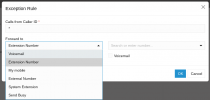
To forward any call received to a specific extension to any other destination you navigate from the Admin Console >> Users >> Open the user >> Call Forwarding tab >> Exceptions >> Click the + icon to add an exception and on the Caller ID add the * symbol like the screenshot below. By adding the * any call from any number or extension will be forwarded to the destination you have chosen.

1708458063735.png
 
  • Love
Reactions: tao4mike
Hi,
Where can i set the hours of the exceptions?
Or is this automatically all hours since the V20?

Thanks
 
The specific hours are included in the Update 1 Beta version.
 
  • Like
Reactions: Evolute IT
Status
Not open for further replies.

Forum statistics

Threads
111,953
Messages
589,913
Members
164,847
Latest member
mike.carter.991