V20 how to send welcome email

Status
Not open for further replies.

WorthyJoker

Free User
Basic Certified
Joined
May 30, 2023
Messages
2
Reaction score
0
Hi all,

Probably a stupid question but before the v20 upgrade I could click on a user and then "send welcome email".
Where is this feature in V20?

 
The Welcome Mail is send automatically when you configure a new user. After that there is only the reset password function for you.
 
  • Like
Reactions: RichardGH
You can also find a reset password button under the users settings within the admin console.

When used will send out a what is now the new type of welcome email which has a password reset link.
 
  • Like
Reactions: D Bedford and bitn2
Is there anyway to disable the welcome/new user email from going out like you could in v18? When programming the system, I don't want users getting the welcome email until we are ready to deploy phones. This could be a week or two out before we are set for go live.
 
Is there anyway to disable the welcome/new user email from going out like you could in v18? When programming the system, I don't want users getting the welcome email until we are ready to deploy phones. This could be a week or two out before we are set for go live.
Hi Jason,

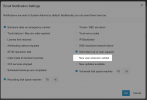
Dashboard > Notifications > Untick this:
1703061048077.png

You can then import / create your extensions and nobody will get an email.
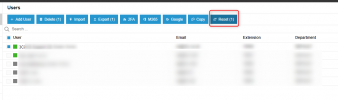
To send the email later though, select all users you want and click the Reset button and they will receive their email regardless of whether the option above is ticked or not.
 
Thanks @JohnS_3CX . I posted about this in another thread. Even though the information you posted above is clear, I *still* found it hard to find the "Notifications" button! I was like, 'oh damn - it's all the way over there, hiding in the Event Log area.... really guys?!"

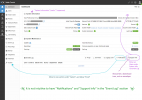
Sure, some events and some notifications *may* overlap, but there's really no strong correlation at all - in fact it's very weak. For example, my importing contacts and then have emails flying out to users has nothing to do with the event log at all. Ditto for System Information. That would be better placed up top with a "download" icon instead of envelope, and "Notifications" would be better moved under "System" just below "Email" (rename "Email" to "Email Server"). Please see my suggested improvements to the Dashboard here:

Dashboard Feedback.png

Don't get me wrong though - I am super happy with all the interface changes in v20 vs v18. I think this will make an already good interface that much better. Thanks.
 
Glad to help! Thanks for your feedback, the UI is still being revised :)
 
  • Like
Reactions: Gavino
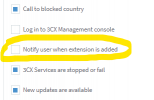
I should also note that whoever tinkered with the wording for that option, they actually made it inaccurate. In v18, that item, I am pretty sure corresponds to this option in v18:
Notify user v18.png

But now it has now unfortunately been changed to:
New user extension added v20.png

Changing the wording to "New user extension added" makes it seem like a notification would be sent to the System Admins (plus additional emails provided on that page) and NOT to the users. You're going backwards here since the new wording is patently misleading.

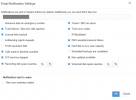
Even on v18, that one is an anomaly, as it's the only one which I can see that doesn't go to System Admins (plus additional emails) but to the users themselves. It should therefor be in its own section at the bottom like this which I have just mocked up:

Notifications dialog improvement.png

I hope the UI designers can take this feedback onboard. Thanks again. :)
 
I looked all over for it and never saw that button, thank you for pointing it out. I think it should still be under the email section like it was in V18.
 
  • Like
Reactions: Gavino
I looked all over for it and never saw that button, thank you for pointing it out. I think it should still be under the email section like it was in V18.
Agreed, it would be great if as many things could be kept in the same place as possible for a smoother transition to a new interface.

:confused:
 
Agreed, it would be great if as many things could be kept in the same place as possible for a smoother transition to a new interface.

:confused:
Even if they move, having the same label would help.
 
  • Like
Reactions: gaselec
i couldn't find it either before reading this
 
  • Like
Reactions: gaselec
i couldn't find it either before reading this
Ditto. I searched high and low and never found this until reading it here. The current location is not intuitive and I hope the developers will move it someplace that makes more sense.
 
  • Like
Reactions: NCIA
You can also find a reset password button under the users settings within the admin console.

When used will send out a what is now the new type of welcome email which has a password reset link.
Hi Charles,

just an FYI, that when the welcome email is sent, it instructs to login use their email address and the password they created. this does not work as the user id requires the extension number not the email address.
 
Hi Charles,

just an FYI, that when the welcome email is sent, it instructs to login use their email address and the password they created. this does not work as the user id requires the extension number not the email address.
The login should work with email or extension. I dont use extension at all.
 
For the email login to work, you need to have an email defined on the extension and it must be unique (no other extensions can have the same email).
 
I feel like I should comment here that we usually always deactive the welcome upon user creation (like in the screenshot from John), as this way we can prepare a 3CX without all the users getting an email (which might not yet have been informed about the new phone system or are not yet supposed to play around with their extension).
This now makes this very inconvenient to then send the welcome mails to all users when we are ready to do so, unless that is what "reset" does in the user overview? If that is the case, then "reset" is the wrong word to use here i think.
 
  • Like
Reactions: Charles_3CX
This now makes this very inconvenient to then send the welcome mails to all users when we are ready to do so, unless that is what "reset" does in the user overview? If that is the case, then "reset" is the wrong word to use here i think.
Yes, reset ist the way todo it. The wording is correct, because you reset the password.
 
Yes, reset ist the way todo it. The wording is correct, because you reset the password.
This is under the user's section section; select the user or users, then press reset.

1710950490941.png
 
Status
Not open for further replies.

Latest Posts

Forum statistics

Threads
111,972
Messages
590,066
Members
164,888
Latest member
Tim Cook