- Joined
- Aug 1, 2019
- Messages
- 15
- Reaction score
- 2
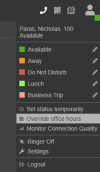
had a client on v20 call today that out of office override wasn't working, so, we investigated...
after reading this thread:
https://www.3cx.com/community/threads/dial-code-641-or-642-dont-work-v20-upgrade-on-primes.127727/
it seems the claim is that #64 options -- #640 #641 #642 -- no longer work in v20. (even though dialing those codes clearly still plays a message telling the caller that the options ~are~ still working.)
this is completely unsustainable for many of our clients. not all of our clients use the webclient, or, even have devices that they can access the web client from.
MANY of our clients, in fact, we would hazard a guess to say that the MAJORITY of our clients, only use their desk phone or the mobile app to call #64x and set global in- or out-of-office overrides for their offices every. single. day. in fact, SEVERAL clients have #640/#641/#642 set up as hotkeys on their deskphones for ease of use/immediate access at the press of a button.
can these long-running, frequently-used, and client-expected features please be restored? if fact, the feature could even be improved in v20! dialing #640/#641/#642 could still just override the default/in/out status of ALL calls like it normally does. but then, depending on which group you belong to, NEW codes could be added (like #643/#644/#645) to set just the caller's group call routing to default/in-/out-of-office settings.
again, this all comes down to the fact that clients have relied on this feature for years; that they can use it from their phones only/from anywhere with just a phone, they don't need a web browser, a PC device, or even a webclient "login." (we even have some clients that do HAVE web browsing capabilities but explicitly DON'T want their employees using it for various reasons: security concerns, don't have the time and/or desire to spend resources training their staff on it, etc.)
or, at very least, the global and group overrides need added to the mobile app. (but, again, this still leaves clients just using desk phones completely lacking!!)
thoughts all? thank you for your consideration!!!
after reading this thread:
https://www.3cx.com/community/threads/dial-code-641-or-642-dont-work-v20-upgrade-on-primes.127727/
it seems the claim is that #64 options -- #640 #641 #642 -- no longer work in v20. (even though dialing those codes clearly still plays a message telling the caller that the options ~are~ still working.)
this is completely unsustainable for many of our clients. not all of our clients use the webclient, or, even have devices that they can access the web client from.
MANY of our clients, in fact, we would hazard a guess to say that the MAJORITY of our clients, only use their desk phone or the mobile app to call #64x and set global in- or out-of-office overrides for their offices every. single. day. in fact, SEVERAL clients have #640/#641/#642 set up as hotkeys on their deskphones for ease of use/immediate access at the press of a button.
can these long-running, frequently-used, and client-expected features please be restored? if fact, the feature could even be improved in v20! dialing #640/#641/#642 could still just override the default/in/out status of ALL calls like it normally does. but then, depending on which group you belong to, NEW codes could be added (like #643/#644/#645) to set just the caller's group call routing to default/in-/out-of-office settings.
again, this all comes down to the fact that clients have relied on this feature for years; that they can use it from their phones only/from anywhere with just a phone, they don't need a web browser, a PC device, or even a webclient "login." (we even have some clients that do HAVE web browsing capabilities but explicitly DON'T want their employees using it for various reasons: security concerns, don't have the time and/or desire to spend resources training their staff on it, etc.)
or, at very least, the global and group overrides need added to the mobile app. (but, again, this still leaves clients just using desk phones completely lacking!!)
thoughts all? thank you for your consideration!!!
Last edited: