v20 Permissions

Status
Not open for further replies.

georgewillow

Premier Customer
Joined
Apr 13, 2012
Messages
42
Reaction score
8
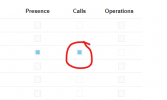
I guess what I'm trying to do is not possible. I want the users in a department to be able to see each other's calls in the Panel but not be able to perform operations on them. I thought this was sufficient:
1710866305517.png

Looking into it further I see they have to be a Receptionist role to be able to see group/department calls.
https://www.3cx.com/docs/manual/access-roles/

I'd prefer not to set all 25 people in the department to Receptionist role because that gives additional permissions and seems counter-intuitive to have 25 Receptionists. Am I missing something? I just want them to be able to see the other calls going on in the department.

Thanks!
 
  • Like
Reactions: MayurPatel
When I set my users to "User" in the dept the "call" check box is checked so I'd imagine that would show group calls. Is this not the case? I know the table says receptionist but im not sure how up to date that is.
 
Doesn't work on ours. It will not show group/department calls in the panel to User role members of the department. They can see their team members and presence only. Not the calls. It seems this is intended behavior from the documentation. I just was wondering if there was a granular way to let them see each other's calls.
 
  • Like
Reactions: MayurPatel
It’s limited to the roles.
 
So I guess the guidance in this case would be to make everyone a Receptionist?
 
@georgewillow
In case that permission is required, then you could choose the correct role for that.
 
Our users have been requesting this same info. To be able to see the calls in the panel and I don't want to give them the full receptionist role. It would be good to be able to edit functions within the role.
 
  • Like
Reactions: MayurPatel
For the time being the permissions for roles are not customizable in the same way they used to in V18, and now they are fixed, as we have introduced additional roles there.
 
  • Like
Reactions: Evolute IT
In V18 we were able to give users listen permissions for training new employees. It looks like the only way to do that now would be to make them a Manager or Owner, which is not wanted for a new employee. Are there plans to update this in the future or allow new roles to be created and customized?
 
  • Like
Reactions: MayurPatel
For now, we don't have information on this matter and if more options will be in that direction. As you can see V20 is a massive break though with many new ideas, redesign and room to grow.
 
  • Like
Reactions: Evolute IT
What is the process for giving the calls quality assurance department access to only reporting and recording?

I'm granting the user's manager access, at which point user management becomes fully accessible.

Reporting access option in v18 is preferable to v20. Please keep in mind the duties of the users. The some users can only access the reporting, recording, and both off-board features. Quality assurance or call centres must produce reports, but we won't provide access to the entire manager access.


Thank You
 
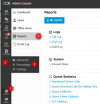
So the minimum role you can have is a Manager. Manager will be able to see the reports in its Admin console 1, 2
as well as the group recordings in 3, 4

1718165383050.png


Other roles are Owner and System Owner.
 
The customer requests just certain user reports and recording access for reporting purposes; as a result, we chose the manager role and all users are displayed.
 
So the minimum role you can have is a Manager. Manager will be able to see the reports in its Admin console 1, 2
as well as the group recordings in 3, 4

View attachment 41895


Other roles are Owner and System Owner.
The customer requests just certain user reports and recording access for reporting purposes; as a result, we chose the manager role and all users are displayed.
So the minimum role you can have is a Manager. Manager will be able to see the reports in its Admin console 1, 2
as well as the group recordings in 3, 4

View attachment 41895


Other roles are Owner and System Owner.
The customer requests just certain user reports and recording access for reporting purposes; as a result, we chose the manager role and all users are displayed.
 
We must find a solution; this is a mandatory issue.
 
  • Like
Reactions: microtekau
We are looking into this, the ability for a manager or a system owner to specify multiple email addresses so people with no reporting access can receive the CSV file for analysis (but not access the reporting admin console)
 
All right.Though it isn't possible, we will speak with customers.We never have this option, thus we advise to them that your QC department close.
 
We are looking into this, the ability for a manager or a system owner to specify multiple email addresses so people with no reporting access can receive the CSV file for analysis (but not access the reporting admin console)
Hello thank you for your response,

But in our situation please guide us what shall we do, please let us know asap.
Also it's not us alone facing this issue we don't understand why this role was taken off from the current version of v20. There should be options to facilitate more user friendly options rather than fixed option like right now 3CX has on v20?.
 
Also, the option to select queues you want to have reported back to you like in version 18 was friendly.
There are hardly any situations a manager is in charge of every part of the company.

in v20 I have to create endless departments (re-adding timezones, re-adding users, queues, etc. to these departments), JUST to make reports that aren't clouded by extreme amounts of information not useful for that specific manager.

I don't see why selecting the queues was removed and we got these very limited options back instead.

I 'kind of' get it for a quick view during the day.
I see no reason for e-mail scheduled reports.

We went back in time with this functionality (or the lack thereof)
 
I just found out in a very painful way that perms in V20 are not department-specific but system wide,
is there any way I can give the Manager role to only 1 department?

I would greatly appreciate the ability to create at least 1 custom role and to have roles restrictable to a single department and not system-wide. specifically the, recordings, barge and reporting access.
 
Status
Not open for further replies.

Latest Posts

Forum statistics

Threads
111,953
Messages
589,916
Members
164,851
Latest member
DrunkeMeister