V20 - Queue Members not receiving calls

Nuckin Futs

Premier Customer
Advanced Certified
Joined
Aug 19, 2022
Messages
27
Reaction score
4
Hi,

Over the last 2 weeks i have had two users not able to receive calls despite being members of and logged into the said queues. This hasn't been an issue before, only very recently.

I have tried logging them out and back in queues however their extensions remain silent. I have just just about all else but to no avail. Watching the queue, the affected extensions aren't being selected at all, it's like 3CX thinks they are logged out but they are logged in.

So far the fix has been to delete the user/ext. and recreate from scratch and then it worked again.

Any ideas?

Cheers.
 
Using the Panel as a Manager of the Department/Queue, you will be able to confirm if the agents are in fact logged into the queues. I've found that sometimes while the client shows the "Logout" button, implying that they are logged in, but it's not all queues.

https://www.3cx.com/blog/unified-communications/call-queues-managers/

Also look at the configuration of the Statuses to make sure that Online and Away for the queues ensure they're automatically logged back in when they return from breaks etc.

https://www.3cx.com/blog/unified-communications/web-client-status-profiles/
 
Yes, this was the first things i checked and yes, they are logged into the relevant queue's and online.
 
Do they have desk phones?

If so, try signing them in to mobile app/web app to see if they're called there.
 
No but i did try the extension on iOS and no change.

FWIW, the users DID and direct EXT works fine, its just queues that are the problem.

I really think there is a bug in V20.
 
Try upping verbose logging and review the QueueManager.log to see if it gives any info on why they're not being polled.
 
No but i did try the extension on iOS and no change.

FWIW, the users DID and direct EXT works fine, its just queues that are the problem.

I really think there is a bug in V20.
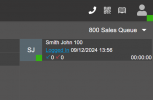
In the panel, do you see them as logged in when you select the queue?

1733745416893.png

Its VERY important that this is showing them as logged in.

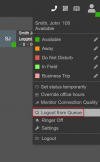
1733745531303.png

This is showing the agents as logged in, but if you see in the background, he is actually logged out.

Think of my first screenshot as a fuse in a circuit, and the 2nd screenshot as a light switch.

You can turn the light switch on intil you wear out the plastic, but if there is no fuse in the circuit, no bueno.
 
Hi,

Yes, i 100% confirmed the users were logged into the queue. I have however solved the issue by rebooting the 3CX instance, once this was done the extensions now ring as expected so certainly something was going on in my instance.
 
We've had something similar happen in both v18 and v20 a few times. Appeared logged in, but could see in the logs that that ext wasn't polled. In our case removing the user from the queue, saving and then re-adding them and saving was enough to fix it each time (didn't have to reboot or recreate users).

I never nailed down a cause, best guess I had was from messing around with polling strategies between skills based and non skills based but never confirmed it.
 
I did try to remove and re-add the user to the queues but that did not help. I guess whatever the cause is, it's buried deep within some code. It's certainly odd, never had that issue on V18.

Appreciate everyone's help.
 
It could be tied to their status and the log in status.

If in your forwarding rules you have the "DND" status to log them out from the queues, you will NOT be able to log them in to the queue.
 
I tried everything Nicholas, i'm not Advanced Certified for nothing haha.

It's all good, as mentioned, rebooting 3CX solved the issue so i'm a happy camper.
 
I've seen this 3 times since v20 upgrade.
Restart of the Queue Manager Service fixes it, if you don't want to restart the box.
 
Thanks, noted. I'm glad it's not only me that has experienced this issue.
 
I've seen this as well a couple of times in the last couple of weeks. Both systems v20. Other similarity is queues on both systems were Ring All.

The 1st system was too busy to restart, and I had tried everything else with the extension. As said, deleting and recreating extension solved it.

2nd system today, not as busy. Restarted services, immediately started receiving queue calls.

Only two, not much data to go on, but my brain was thinking maybe an issue with ring all and queue manager, for some reason, thinking that extension wasn't available.
 
Bringing back a dead thread. Just wanted to see if anyone was still seeing these issues. Recently updated a client to V20U5 and having constant issues with queues at this location not ringing agents that are logged in and available. Restarting Queue Manager service only seems to fix it for a few hours. I'm going to push to U6 RC tonight to see if the issue clears up.
 
I would stick it in verbose logging and then review the QueueManager.log file
 
Also, ensure that the machine is properly specced. Usually when a machine is underspecced it will struggle to keep up, and cause issues.
 
Bringing back a dead thread. Just wanted to see if anyone was still seeing these issues. Recently updated a client to V20U5 and having constant issues with queues at this location not ringing agents that are logged in and available. Restarting Queue Manager service only seems to fix it for a few hours. I'm going to push to U6 RC tonight to see if the issue clears up.
Same here, we've several costumers complaining about this behavior. VMs a properly specced.
Deleting and re-adding user, recreating the affected queue etc. doesn't fix the issue. only a restart of queue manager does (or even restarting the whole 3cx).
can anyone explain how to check the QueueManager.log file? verbose logging done, but can't find the QM.log file.
 
The log file should be in the support file when you download it from your dashboard. FYI updating to the latest RC has worked for me to fix the issue.
 
  • Like
Reactions: MLAI

Latest Posts

Forum statistics

Threads
112,283
Messages
591,694
Members
165,405
Latest member
ARKC