


- Joined
- Apr 16, 2020
- Messages
- 23
- Reaction score
- 9
Hi All,
I have noticed a few times that some fields in 3cx will change language until I F5 the page.
Here is an example of the language being wrong. It should be in English UK.

After pressing F5 it changes to the below

This only affects some sections as most remains in English.
Also, since the Admin console and webclient are the same now, there doesn't seem to be a way to force users to re-auth (most likely to make it easier for people who work exclusively in the web client).
The default lifetime of the token appears to be 2 months, below is a brand new auth token.
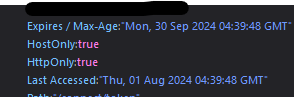
Is there a way to control the lifetime or force administrative users (system owner at least) to auth more frequently?
I am aware you can manually kill a token under the 'Active Connections' section, the problem is that a stolen auth token is valid for a very long time.
I have noticed a few times that some fields in 3cx will change language until I F5 the page.
Here is an example of the language being wrong. It should be in English UK.
After pressing F5 it changes to the below
This only affects some sections as most remains in English.
Also, since the Admin console and webclient are the same now, there doesn't seem to be a way to force users to re-auth (most likely to make it easier for people who work exclusively in the web client).
The default lifetime of the token appears to be 2 months, below is a brand new auth token.
Is there a way to control the lifetime or force administrative users (system owner at least) to auth more frequently?
I am aware you can manually kill a token under the 'Active Connections' section, the problem is that a stolen auth token is valid for a very long time.


