V20 U10 Extending Our AI Lead: Improved Agents, MCP, and Local Transcription on a Mac

You updated 3CX in the last ~20 hours or so? (not sure of the exact release time of that kernel, but prior to that it won't be installed)

Of our Debian 12 (non-3CX) VMs not all had the symptom by this morning so it's unclear to me what triggers it, nor why it takes a few minutes to many hours to occur.
 
You updated 3CX in the last ~20 hours or so? (not sure of the exact release time of that kernel, but prior to that it won't be installed)

Of our Debian 12 (non-3CX) VMs not all had the symptom by this morning so it's unclear to me what triggers it, nor why it takes a few minutes to many hours to occur.
i did my 3cx VM on-prem this morning. All 3 separatel U10, 3cx Ai, and then the Debian Security.
 
If you wait long enough I expect you’ll see it…

If you have ssh [edit: or console] access you can run uname -r to see your running kernel version, though.
 
Last edited:
If you wait long enough I expect you’ll see it…

If you have ssh [edit: or console] access you can run uname -r to see your running kernel version, though.
We do what 3cx has in console. Our current kernel after this mornings u10, 3cxAi, and Debian updates direct thru 3cx console is: 6.1.0-54-amd64. And appears the -55 is the issue kernel. So this seems to be with users using the non 3cx Debian build and are on -55.
 
  • Like
Reactions: N_G and SteveITS
Im not finished with my analysis yet, but its looking like it depends on whether the lightsail instances uses 3cx repos or debian repos. That seems to possibly depend on when the system was installed and what version of 3cx was initially installed on it. This is a working theory right now. It would explain why some lightsail instnaces are affected and others arent.
 
Im not finished with my analysis yet, but its looking like it depends on whether the lightsail instances uses 3cx repos or debian repos. That seems to possibly depend on when the system was installed and what version of 3cx was initially installed on it. This is a working theory right now. It would explain why some lightsail instnaces are affected and others arent.
This is one reason we stick within 3cx repos and their approved/tested updates. Also, having a LAB system to test these patches on before doing in a production environment.
 
Admin Console restrictions appear to limit MCP tool functionality when using external tools such as ChatGPT/Codex. Is there any way to work around that?

1794958064442.png
 
That option was selected when authorizing the connection.
It appears that if console restrictions are enabled, the ChatGPT only sees 20 tools exposed.

However in some further testing, IF I disable console restrictions, authorize the tool, it sees all 41. I can then re-enable console restrictions, and the tool continues to work with the additional "admin" tools...


1795010888105.png
 
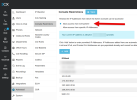
One question; when you say "I can then re-enable console restrictions", can you be explicit and explain how you are doing this, possibly with a screen grab for added clarity?
 
One question; when you say "I can then re-enable console restrictions", can you be explicit and explain how you are doing this, possibly with a screen grab for added clarity?

1795099792097.png
 
That's a different paradigm, really.

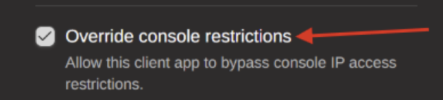
When you create an MCP connection, and invoke this:
1795101391957.png
...you are setting the "access parameters" to the access/refresh tokens that are tied to the MCP session - this is an intrinsic part/side-effect of how Oauth-style connections work.

The page you are showing is about generic access - which is OUTSIDE the context of MCP connections.

If you have created an MCP connection and provided it with a larger range of tools that you wished (by enabling the "Override console restrictions" checkbox, and you decide to restrict it, you would need to delete that MCP connection from the list, and prepare a new one with the correct access parameters.
 
  • Like
Reactions: N_G and Evolute IT
Maybe I am seeing this backwards?

Default security posture is Console Restrictions enabled.
-> When setting up a MCP connection, and clicking the Override Console Restrictions; my logic would say that we are bypassing/over writing the Admin Console Restriction; thus gaining access to the "additional" tools.

However what happens; even with checking the Override Console Restrictions in the pairing dialog, it does not appear to override.
We get the limited list of 20 tools.
In order to gain access to all 41 tools, one has to disable the Admin Console Restrictions in the admin console under Settings -> Advanced -> Console Restrictions.
This does not appear to be documented anywhere, from what I could tell.
 

Forum statistics

Threads
112,549
Messages
593,175
Members
165,760
Latest member
malo