V20 U2 Release - OpenAI, Teams and More Control

I will push to block this. Because this is not correct. And we are not accepting arguments about this.
Do we play songs on servers? Of course not. Do you let someone login to your servers and run a script to play a song without an audio driver installed?

So we dont make calls on servers either.
Tell the user to use servers for server work and clients apps on client operating systems.
They dont make the call on the server. They use the server to control (csta) the yealink deskphones which are local..... as advised by 3CX employee. I totally understand you standpoint on audio over a remote server.
 
They dont make the call on the server. They use the server to control (csta) the yealink deskphones which are local..... as advised by 3CX employee. I totally understand you standpoint on audio over a remote server.
Are you installing a 3CX client software on an OS which is windows server 2019?
 
Hi @sam.phillips
We assure you, we're not delaying this for fun. The feature will be included in Update 3.

Keep in mind that we rolled out an entire Admin Console Site. So, while you may have more than five extensions to manage, you now have a single site to oversee, which was our initial priority.

After addressing stability fixes and preparations in Updates 1 and 2, we're now ready to include this feature in Update 3.
Nikolas...any other sneak peak of items coming in Update 3? I thought I had seen a ways back where Grafana reporting would be introduced? Is that still on roadmap? Thanks!
 
Love the new update 2 - especially we are thrilled to see the Open AI integration for transcription.
However I have a question. It seems the access to sentiment and summary is only available in the admin console - recording section. Which is a bit of an issue:
the Recording section in the Admin console is only available to System Owners and up.
Can the sentiment , summary also made be available in the non Admin - 3dot - Recording section?
 
Love the new update 2 - especially we are thrilled to see the Open AI integration for transcription.
However I have a question. It seems the access to sentiment and summary is only available in the admin console - recording section. Which is a bit of an issue:
the Recording section in the Admin console is only available to System Owners and up.
Can the sentiment , summary also made be available in the non Admin - 3dot - Recording section?
It's in the call reports too... check the AI Reports section.
 
It's in the call reports too... check the AI Reports section.
Thank you for the hint that - is a good workaround for the moment.

Still my question is if it would be possible to also display that in the 3dot - recordings section. Or was that intentionally left out there, and if so why? Just trying to understand

Thank you
 
@Mijal
It is done automatically.
in update 3 we will have support for 2 way syncing.
We also need to think to allow the profiles to be editable.. Because currently we have a hardcoded mapping which does not satisfy everyone.. We are working with the community on this.
It is not working, Do we have to make any changes other than MS365 integration and enabling Update presence from 3CX Apps to Teams Clients.
 
  • Like
Reactions: nikolascx
I have a note that Hot-Desking was not released and that Call Flow apps were an issue. Is that still the case with U2?
Note: We host on Windows Server.
 
@Nick Galea What is the process of switching from Pro to Enterprise?
In the original post about v20 it was stated that upgrade to Ent from Pro would be free for the remainder of the license period. This was also discussed here in the forum numerous times
We asked our 3cx partner and they don’t know anything about it
Today we contacted 3cx customer support about this and they also told us that they have no idea what are we talking about ?
We do understand the reason behind forcing Ent for all Windows users. We are not exactly thrilled about this, but we will deal with this when our license will expire, but for now we are forced to upgrade to v20 to keep push support but at the same time 3cx can’t provide us with the proper license.


Please see here 3CX V20: Telephony Re-engineered
  • Currently V20 is available on Linux only: A Windows installer will come at a later stage and will require an enterprise edition. We’ll upgrade any PRO editions running Windows to Enterprise for the duration of the subscription. More information to follow.
 
Last edited:
Are you installing a 3CX client software on an OS which is windows server 2019?
I'm guessing this is an RDS environment, which I believe is the reason 3CX released the multi-user TAPI feature. I'd imagine there are many large environments that still use this.
 
It is not working, Do we have to make any changes other than MS365 integration and enabling Update presence from 3CX Apps to Teams Clients.

Currently, the integration supports one-way synchronization between 3CX and Teams. However, with Update 3, two-way synchronization can be configured.

Please refer to the updated guide for detailed instructions on the additional steps required.

If you are still experiencing issues, here are some troubleshooting tips:
  • Verify that all steps in the documentation have been followed correctly.
  • Try disabling the integration and reconfiguring it from scratch.
  • Keep in mind that some settings in Azure may take time to propagate, so patience might be necessary.
We have tested this extensively and achieved excellent results, so following these steps should help resolve any issues.
 
@Nick Galea What is the process of switching from Pro to Enterprise?
In the original post about v20 it was stated that upgrade to Ent from Pro would be free for the remainder of the license period. This was also discussed here in the forum numerous times
We asked our 3cx partner and they don’t know anything about it
Today we contacted 3cx customer support about this and they also told us that they have no idea what are we talking about ?
We do understand the reason behind forcing Ent for all Windows users. We are not exactly thrilled about this, but we will deal with this when our license will expire, but for now we are forced to upgrade to v20 to keep push support but at the same time 3cx can’t provide us with the proper license.


Please see here 3CX V20: Telephony Re-engineered
  • Currently V20 is available on Linux only: A Windows installer will come at a later stage and will require an enterprise edition. We’ll upgrade any PRO editions running Windows to Enterprise for the duration of the subscription. More information to follow.
Hi,

The blog refers to Windows installations. Currently, you can upgrade to V20 even if you have a PRO edition (Windows). We will notify you of any changes in due course. For new customers wanting to use Windows OS, please quote the ENT edition.

I hope this helps :)
 
Hi,
In version 20.0U1-Build731, it was possible to import a custom SIP trunk provider onto a "hosted" server. Now, in 20.0U2-Build715, this is no longer possible. Will this option return ?
 
Hi,

The blog refers to Windows installations. Currently, you can upgrade to V20 even if you have a PRO edition (Windows). We will notify you of any changes in due course. For new customers wanting to use Windows OS, please quote the ENT edition.

I hope this helps :)
Hi,
what about this part?

We’ll upgrade any PRO editions running Windows to Enterprise for the duration of the subscription.
This means 3CX will upgrade PRO license to Enterprise License, right?

Thanks.
 
Hi,
In version 20.0U1-Build731, it was possible to import a custom SIP trunk provider onto a "hosted" server. Now, in 20.0U2-Build715, this is no longer possible. Will this option return ?
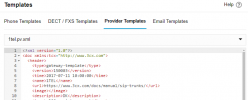
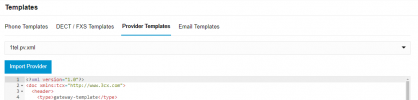
Its now in templates; Advanced > Templates > Provider templates > Import
 
  • Like
Reactions: N_G
Hi, nice update and already hype with U3 with multi-edit haha

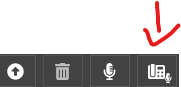
I have one question for message records, in user side we have this option to record by a ip phone
1720771242858.png

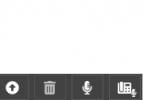
But in the admin side we have only the record by microphone PC, is there a chance to have on the both side ?
Customers are used to do it like that and it's really useful for holidays message.

Thank you !
 

Attachments

  • 1720771224106.png
    1720771224106.png
    2.9 KB · Views: 5
Hey thats good news.
But there is a problem between version update 2 and , hopefully you can fix this problem.

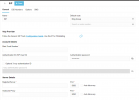
We can not find the option in the SIP trunk (Register/Account Based authentication). The option is not displayed.

Thanks
 

Attachments

  • SIP problem.png
    SIP problem.png
    34.7 KB · Views: 19
Hey thats good news.
But there is a problem between version update 2 and , hopefully you can fix this problem.

We can not find the option in the SIP trunk (Register/Account Based authentication). The option is not displayed.

Thanks

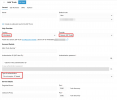
Depends what trunk you added, take a look at the below option if you were looking for a generic trunk:

1720784483863.png
 
  • Like
Reactions: pantronic
I have a note that Hot-Desking was not released and that Call Flow apps were an issue. Is that still the case with U2?
Note: We host on Windows Server.
Hot Desking and CFD are available on V20 Update 2 Windows Server
 
  • Like
Reactions: Evolute IT
Its now in templates; Advanced > Templates > Provider templates > Import

I don't see the "import" option on a hosted server :

1720788480528.png


On a self-hosted server, the option is present :

1720788600521.png
 
  • Like
Reactions: Ronald Lysmont

Latest Posts

Forum statistics

Threads
111,991
Messages
590,167
Members
164,929
Latest member
Cloudstar