V20, Update 3 Makes it to Release Candidate

Status
Not open for further replies.
Hi, I have something witch muti-edit user : View > Feature Call. If i save and recheck again it not enable.
If edit 1:1 it Work T_T.

Thank You.
 
Thanks for sharing your settings @YiannisH_3CX

Initial tests appears to be good - There must be something in our provider file which hasn't imported between v18 and v20 which my aging eyes are not seeing ;)

Will continue to do tests.
I appreciate your support and feedback.
@YiannisH_3CX I just wanted to express my thanks to you for your guidance.

It was in fact a template variable issues between versions. Your tips got me looking in the right places to fix.

Thanks again for your prompt assistance
 
It seems to me that you must have installed the Alpha version then the Beta. The RC will then be available. Test versions are not cumulative.
I'm not running an alpha or beta version.
 
  • Like
Reactions: CentrexJ
I just purchased a new license for a new customer today and installed it on a Lightsail server/VM.

The version number on it is Version 20.0 Update 3 (Build 796).

That surprised me since my office system shows an update as "New 20.0 Update 3 Release" and it shows it as an Alpha release.

I didn't think it was a good idea to put an Alpha release on a system that will be used by a customer on a day-to-day basis?

John Rayfield, Jr.
Rayfield Communications
 
Hi, I have something witch muti-edit user : View > Feature Call. If i save and recheck again it not enable.
If edit 1:1 it Work T_T.

Thank You.
Hi

I think it resolved can fix from V.20 Update 3 (Build 796), but now can dowload this version from link download. It comming soon from update from Admin Console.

Thank you.
 
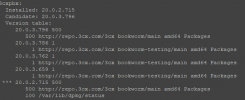
It looks like, that the "RC 2" has made it into the stable repo
Every update (manually via apt upgrade OR V20 update script) will bring your PBX to Update 3

1727777624508.png
 
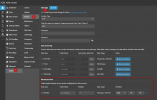
I am guessing 3CX is about to announce final release, because we just upgraded a couple v18 to v20 and ended up on v20 U3 build 796
1727836137091.png
 
I think you're right.

John
 
Hi All

We've just been upgraded from v18 to v20.0 Update 3 (Build 796). I'm getting used to the new management interface and sorting a few issues with departments and office hours but generally everything is ok. However the main pain point is reporting. The CSV reports that now get sent are just too messy, complicated and difficult to read for end users, they can also show different information to what is displayed on screen.

For example if you run an Agent Login History report it's presented on screen as you'd expect with the column 'Total logged in per day' showing exactly that. Clicking on the Print button also shows the same thing. However when you receive the csv it does not show this but rather the total time logged in for each row of data. The users that receive the reports then need to manually total this for each user.

For now I am having to manually run the reports each day for each department, click on Print and then save the page to PDF to then manually email to the departments. I cannot give the individuals access rights to run the reports themselves as they then have access to call recordings as well which I cannot allow. Is there any hope of being able to send out the reports as a PDF laid out as they are in the Print version? Or even go back to the links in the emails that will display the html print version for the end users?

Thanks,
 
Hi,

We've upgraded a few systems and ended up with Update 3 (build 796) as well.

Is anyone else not able to make the message "Attention Required" disappear for the Storage section in the Dashboard?
Even after making changes in System/Storage and saving, it will not go away.
 
Hi, this warning is shown when during the update the system realized it cannot fully preserve the existing storage configuration.
For example, when you had recordings & backups pointing to different remote storages, recordings' remote settings will be used and you'll need to adjust backup manually (i.e. assign a folder name and move the backups from the old place here).
This warning goes away when the user sets up both Backups and Recordings in the Storage page.
 
  • Like
Reactions: Evolute IT
  • Like
Reactions: Itel628
@rayt Based on various posts I've seen, apparently upgrades from v18 have been receiving .796 for the past few days. This is the first I've heard of .799.

Still no entry in the change log.
 
  • Like
Reactions: Evolute IT
Could someone from 3CX please let us know when or if the option to recored a greeting from a desk phone is going to be added back into the menu options for things like digital receptionists, Queues & configure holidays?

I still have a lot of existing customers that use desk phones and don't have a pc headset or microphone. And yes i know there is a work around but work arounds are not a good look and they take time to train customers which is time taken away from trying to sell 3CX to more customers ;-)

Thank you.
So much this!!!!!
 
  • Like
Reactions: PhoneMan123
Status
Not open for further replies.

Latest Posts

Forum statistics

Threads
111,973
Messages
590,074
Members
164,895
Latest member
jasonkkrause