V20 Update 8 Alpha - The AI Chapter

Hi All

Set-up the Open-AI API as pr. 3CX step by step guide.

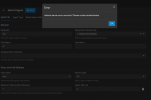
When adding the agent and try to save I get "Internal Server Error" please have a look at the screen shoot.

Clear web browser cache is also done.

Anyone having this issue?

Skærmbillede 2025-11-13 kl. 22.26.47.png
 
Hi All

Set-up the Open-AI API as pr. 3CX step by step guide.

When adding the agent and try to save I get "Internal Server Error" please have a look at the screen shoot.

Clear web browser cache is also done.

Anyone having this issue?

View attachment 50168
It could be something silly, like that you don't have a last name filled out.
Also, try changing it's first name and/or change the 'agent talk link'. Perhaps there is just some issue with it when you call it 'ai'.
Or try not making it a member of a department or a different department.
I'm having no issues adding multiple agents, so perhaps it's just something silly like any of these things.
 
It could be something silly, like that you don't have a last name filled out.
Also, try changing it's first name and/or change the 'agent talk link'. Perhaps there is just some issue with it when you call it 'ai'.
Or try not making it a member of a department or a different department.
I'm having no issues adding multiple agents, so perhaps it's just something silly like any of these things.
Just tried that, get internal server error with any different combination
 
Just tried that, get internal server error with any different combination
Let us know what exact PBX install you have - licence, OS etc. Also if you can enable Verbose logs and retry, to see if the actual cause is visible there.
 
Let us know what exact PBX install you have - licence, OS etc. Also if you can enable Verbose logs and retry, to see if the actual cause is visible there.
Our 3CX instance are running Linux, with static IP address/full cone NAT. Our licence is 8 SC/enterprise.
I have double checked pr configuration step by step guide that port 3478 is opend for OpenAI communications.

Also there are no entries in Verbose log capture.
 
Our 3CX instance are running Linux, with static IP address/full cone NAT. Our licence is 8 SC/enterprise.
I have double checked pr configuration step by step guide that port 3478 is opend for OpenAI communications.

Also there are no entries in Verbose log capture.
I will assume this is not a production system since we are talking Alpha release. Can you try restarting the services and see if it clears?
 
No this is a test system, and I have already restarted services and a server reboot.
 
No this is a test system, and I have already restarted services and a server reboot.
Can you do verbose, try adding an agent and then generate a Support Info package? If possible also take a full backup and send me a link to download them via Direct message.
 
Details will be released shortly on this.
There will be some generous pricing packages that are the cheapest in the world. Please bear with us until we organize this.
Thank you so much - sorry for chasing! :)
 
HI Team

Trying to get my head in to this AI update a bit more this afternoon.
I can see how the agent instructions seem to be formatted.

What I can't get my head around (and it may not exist yet) is the way to call an external API for instance from the agent.
Example would be, caller comes in, asks for support, agent asks if they have an existing ticket number and can do a lookup, or if not, then prompt for the relevant questions in order to open up a new ticket and do this via API back to the ticketing system.

I can see lots of use cases where an AI agent would be super useful, just trying to understand if there's anyone who had delved a bit deeper with this yet?

Best
Lance
 
HI Team

Trying to get my head in to this AI update a bit more this afternoon.
I can see how the agent instructions seem to be formatted.

What I can't get my head around (and it may not exist yet) is the way to call an external API for instance from the agent.
Example would be, caller comes in, asks for support, agent asks if they have an existing ticket number and can do a lookup, or if not, then prompt for the relevant questions in order to open up a new ticket and do this via API back to the ticketing system.

I can see lots of use cases where an AI agent would be super useful, just trying to understand if there's anyone who had delved a bit deeper with this yet?

Best
Lance
From what I understand, these kinds of functions are in the works, but not yet available.
It's 'just' a very advanced digital receptionist for the moment. It can transfer a call.
But it can also answer all kinds of questions (about opening hours, admission prices and anything else you include in the prompt). And it works really well. It's fast, it understands you perfectly and it already really works.
There are some bugs we discussed here, preventing a real roll-out (but that's what an alpha is for of course).
But despite all this, it's still a receptionist.

AI is still relatively new, MCP is really cutting edge (yes, there are 1000's of servers available but it's all so new yet), the LLMs keep getting better and better...

But in the end you would need an MCP-server for/from the service you want to use and connect that to your 3CX agent. The MCP server then exposes all of it's features to 3CX and you can include normal language instructions in the prompts. Something like 'if they ask for support, then ask then for their ticket #. Look up that number in the support database and increment it by one'
You wouldn't need anything 'difficult' like the CFD anymore and even a monkey can create very advanced scripts really easily.
Of course, this isn't ready for prime time yet and there are a lot of 'ifs'. And you would need some kind of interface / flow chart-like structure or another way to enter this because otherwise your prompts would get as long as my message.
But the possibilities are endless.... In a year or so, the way we sysadmins do things will change radically. Not only with 3CX but in general as well.
 
Hi All

Set-up the Open-AI API as pr. 3CX step by step guide.

When adding the agent and try to save I get "Internal Server Error" please have a look at the screen shoot.

Clear web browser cache is also done.

Anyone having this issue?

View attachment 50168
Was there a fix for this issue? We have the same problem occuring when adding the Agent.
 
No - we are waiting for a more mature release for test.
 
  • Like
Reactions: Sonal-MA
From what I understand, these kinds of functions are in the works, but not yet available.
It's 'just' a very advanced digital receptionist for the moment. It can transfer a call.
But it can also answer all kinds of questions (about opening hours, admission prices and anything else you include in the prompt). And it works really well. It's fast, it understands you perfectly and it already really works.
There are some bugs we discussed here, preventing a real roll-out (but that's what an alpha is for of course).
But despite all this, it's still a receptionist.

AI is still relatively new, MCP is really cutting edge (yes, there are 1000's of servers available but it's all so new yet), the LLMs keep getting better and better...

But in the end you would need an MCP-server for/from the service you want to use and connect that to your 3CX agent. The MCP server then exposes all of it's features to 3CX and you can include normal language instructions in the prompts. Something like 'if they ask for support, then ask then for their ticket #. Look up that number in the support database and increment it by one'
You wouldn't need anything 'difficult' like the CFD anymore and even a monkey can create very advanced scripts really easily.
Of course, this isn't ready for prime time yet and there are a lot of 'ifs'. And you would need some kind of interface / flow chart-like structure or another way to enter this because otherwise your prompts would get as long as my message.
But the possibilities are endless.... In a year or so, the way we sysadmins do things will change radically. Not only with 3CX but in general as well.
Nice insight, thank you
 
Is there some documentation to find on how to onboard multiple 3CX instances to the same 3CX transcription server?
Or do you basically, follow step 8 from the current documentation to onboard a new instance everytime? https://www.3cx.com/docs/transcription-engine-server/#h.rlpqsyngguz1
Hello,

The multiple PBX feature is not publicly enabled at this time, hence no reference in the documentation. Once it is possible to use that mode we will publish/update the guide for it.
 
A really exciting update and a sneak preview of what the future holds.

I'd already been playing around with integrating eleven labs with 3cx with some success but this is much easier 'out of the box'.

I do have one question through. What happens to the data the AI collects whilst first chatting with the caller.

i.e. someone rings up, the AI answers, it finds out their name and where they are from and that they are interested in purchasing a holiday to New York, based on that the AI then puts them through the the correct agent that covers North America, but how does the info it collects from the caller also get passed to the agent so the caller isn't repeating themselves all over again to the human?

I'm also interested in how in the future the AI can ben given access to external systems, i.e. an external database for the accounts department, so someone can ring up, verify themselves and then request and copy of an invoice to be emailed out.

It feels like there maybe some place in all these for the CFD to obtain the info and then do something with it?

Keep up the good work :-)

Dave.
Hi Dave,

We are working on 3CX SIP Trunk integration with Eleven Labs AI Voice BOT and Inbound from 3cx to Eleven Labs AI is working fine. But we are facing an issue outbound from Eleven Labs AI to 3CX. Eleven Labs AI is expecting us to use SIP Trunk with SIP Digest Username and Password for Outbound URI and we have used one of 3cx SIP Extension Auth ID and Auth Password, but we are getting this error “Credentials don't match, check that authorization-ID and password match the ones in extension settings”.

Kindly request you to help us to resolve this issue.
 
one of 3cx SIP Extension Auth ID and Auth Password, but we are getting this error “Credentials don't match, check that authorization-ID and password match the ones in extension settings”.
Extensions "Remote Tunnel block" is disabled?
 
  • Like
Reactions: David Forster
Hi Dave,

We are working on 3CX SIP Trunk integration with Eleven Labs AI Voice BOT and Inbound from 3cx to Eleven Labs AI is working fine. But we are facing an issue outbound from Eleven Labs AI to 3CX. Eleven Labs AI is expecting us to use SIP Trunk with SIP Digest Username and Password for Outbound URI and we have used one of 3cx SIP Extension Auth ID and Auth Password, but we are getting this error “Credentials don't match, check that authorization-ID and password match the ones in extension settings”.

Kindly request you to help us to resolve this issue.
Yes I'd agree with Patrick, most likely cause is Remote Tunnel block on the extension settings.
 
Hi Team
Im not sure because otherwise the message will be different I think.

Can you show the eleven labs UI so I understand what it needs?

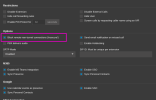
What Patrick and Dave were referring to is this option:
go to the extension > options tab and uncheck this.
For security all extensions come with this checked so only 3CX tunnel Clients will be allowed to connect from outside.
To get 11 labs to register, you would need to turn this off.

1782381182007.png

Something tells me that you need to make a trunk not an extension. But I can only know after you show me what eleven labs asks. Try to find a guide of how 11 labs is configured to work with twilio and we can map the requirements to 3CX.
 
  • Like
Reactions: accentlogic

Forum statistics

Threads
111,818
Messages
589,167
Members
164,642
Latest member
davids86