V20 Update 8 Release Candidate

nikolascx

Staff member
3CX Support
Joined
Jun 14, 2023
Messages
576
Reaction score
1,862

Auto IP Phone provisioning and timing info for call transcripts in stereo mode.​

Following the successful ALPHA, BETA and BETA 2 releases, we are now releasing a Release Candidate for V20 Update 8. This RC focuses on improving IP phone provisioning and making AI-generated call transcripts easier to follow, building on the featur...
Continue reading the Original Blog Post.
 
Last edited by a moderator:
I can't test it right now (I'm on the LAN of the BETA 3CX and don't have a new Yealink phone with the crippled factory firmware), so here's the question: does this also work with router phones?
I haven't found the option to activate it yet.

  • Fixed call scripts not being included in the Divert and Transfer dialogs.
nice :)
 
  • Like
Reactions: nikolascx
Phone > Options

Yes, routers work too. You may try other vendors actually
 
  • Like
Reactions: nikolascx
Hello,

Can this new provisionning firmware option open the door for a automatic firmware update like 3CX update ?

Thank you and merry Xmas to everyone.
 
One thing that would be great is scheduling firmware updates on phones, so you can do them after hours.

Also great release 3cx!!
 
Hi - Any idea how to go about purchasing AI Plus for our NFR internal license?
 
We are rolling it out staggered as we want to see the uptake and we are not sure about the available computing resources in case of large scale uptake.

Why don't you try the onboard AI feature using a GPU machine they are really not that expensive and its a very unique feature to promote.
 
We are rolling it out staggered as we want to see the uptake and we are not sure about the available computing resources in case of large scale uptake.

Why don't you try the onboard AI feature using a GPU machine they are really not that expensive and its a very unique feature to promote.
I am using a 16sc that option is not available. I was using the 3cx for the stereo feature and it recently stopped working due to the license requirement. Will the stereo function be available for the OpenAI integration?
 
  • Like
Reactions: nikolascx
On a 16SC ENT the onboard transcription is available. Stereo is not available via OpenAI it does not process stereo files.
 
1766939510664.png

I prefer to purchase credits rather than use the local GPU as that will require additional cloud resources more likely to have an issue that can effect the call performance, would rather keep them separate anyway
 
  • Like
Reactions: nikolascx
The transcription runs on a separate machine so does not effect call performance.
 
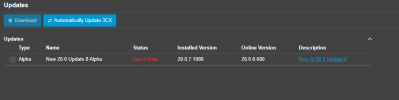
went to push the RC version but I'm only seeing the following when I go to upgrade. Does it need to be done in stages? or am I just not getting the upgrade. Mainly My client NEEDS DTMF in 3way calling with the App. And they need it yesterday. Any reason going to the RC Version just for this need only and all current functions of V7 would be fine? Please advise. Thank You1767030228408.png
 
  • Like
Reactions: nikolascx
anyone using the RC version, is there any issues/gotchas on it so I don't get screwed as I really need to get the DMTFs in Conference calling sorted asap.? need all the normal in place v7 features to stay working. nothing else fancy going on. Thanks
 
  • Like
Reactions: nikolascx
  • Like
Reactions: nikolascx
On a 16SC ENT the onboard transcription is available. Stereo is not available via OpenAI it does not process stereo files.
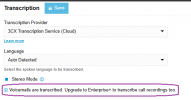
Does that include recording transcriptions? Recording transcriptions recently stopped working for us. Haven't been able to find any kind of error, but I noticed in the Admin > Integrations > Transcription area, it says an Enterprise+ license is required.

Thanks

Screenshot.png
 
  • Like
Reactions: nikolascx
Are you currently using the RC version to be able to tell me this?
I've already told you everything. It's not a version released for production purposes.
You are a 3CX partner. If you use such a version with a client, you have to expect non-obvious issues. That's your responsibility, both to the client and, in case of a problem, to 3CX as well.

Ultimately, you can do whatever you want.

being a Release Candidate version I would expect any thing that doesn't work yet to be a known issue by those releasing the RC version but also it being the Release Candidate I would expect it to work.
No one is saying that any released 3CX version doesn't work fundamentally. But just take a look at the changelog for all the U7 versions, there were so many fixes integrated even in the RC. The official changelog only gives a brief overview.
https://www.3cx.com/blog/change-log/phone-system-change-log-v20/

We are 3CX partners. We always use all the Alpha, Beta, and RC versions. We look for new things, sometimes find errors and then share them with the manufacturer. Those are our reasons for using them. Yes, we do sometimes have bad luck, but we expect that beforehand and we can handle it - because we have to, for ourselves.
 
Are you currently using the RC version to be able to tell me this? being a Release Candidate version I would expect any thing that doesn't work yet to be a known issue by those releasing the RC version but also it being the Release Candidate I would expect it to work. Hence it being the version they are testing as being the release. if not, don't shoot from the hip and let's get someone at 3cx to chime in on the current status of the RC version.

Dear @Alles tech

Thank you for your comments and for the comments of the others also. We appreciate all your help. Let me just say a few words from our point of view.

Normally, a Release Candidate (RC) is a version that is considered suitable for final release.
From the RC stage onward, we treat the software as production-ready.

It’s the Alpha and Beta versions that should not be used in production environments.

A professional and cautious way to approach this is as follows:
  1. Partners with a deep interest in 3CX
    Stay fully up to date with all releases; Alphas, Betas, and RCs. This is similar to how many of us follow software we heavily depend on: actively monitoring forums, testing new versions, and helping the community by reporting issues. In this case, visibility into all versions is essential.
  2. Partners who want stability without early-stage issues
    Start from RC versions and upwards. The RC label is a strong indicator that the software is production-ready. RCs are typically followed very closely by a major release and, in many cases, the final release may be the same build, simply renamed.
  3. Partners installing a new 3CX version for end users
    Make it a strict rule to deploy only final releases (major release versions) in customer production environments.
I hope this helps and may you all have a blessed new year 2026
 

Forum statistics

Threads
111,916
Messages
589,718
Members
164,785
Latest member
Texas Clay -