





Auto IP Phone provisioning and timing info for call transcripts in stereo mode.
Following the successful ALPHA, BETA and BETA 2 releases, we are now releasing a Release Candidate for V20 Update 8. This RC focuses on improving IP phone provisioning and making AI-generated call transcripts easier to follow, building on the features introduced in earlier releases with who said what and now - when!
If you’ve been testing Update 8 so far, this release is all about polishing the experience.
Easily Provision New Yealink Phones with Non 3CX Factory Firmware
IP phones are often delivered with factory firmware that doesn’t match the version tested and approved for use with 3CX. With Update 8 RC, newly created IP phones can now automatically download and install the 3CX-approved firmware version during provisioning!
Once enabled under Phones > Options, the phone upgrades its firmware before completing registration, ensuring it connects using a version validated by the 3CX interop team. This reduces manual setup steps, improves consistency across deployments and helps avoid issues caused by mismatched firmware versions. The option is currently in BETA, disabled by default and applies only to newly created IP phones.
3CX Call Transcripts with Timing Information in Stereo Mode
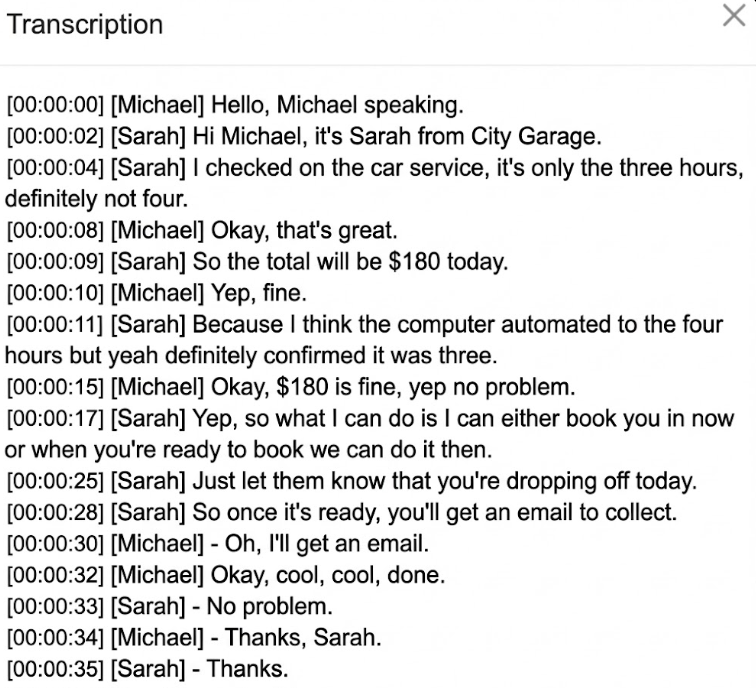
Call transcription - Stereo Mode has also been improved in this RC. In addition to identifying who said what, transcripts now include precise timing information for each utterance.
This significantly improves readability for longer calls, makes the conversation flow easier to follow, and allows users to quickly pinpoint specific moments in a call - particularly valuable for reviews, audits and training purposes.
View the complete changelog here.
Get Started with Update 8 RC
To try out these new features, upgrade to V20 Update 8 RC.
- Log in to the Admin Console
- Navigate to System > Updates
- Select Update 8 RC and click Download
⚠ Important: The RC version should be installed for evaluation purposes only. It is not recommended for production systems.
Join the Discussion
Join the 3CX discussion in our dedicated Partner or Customer Forums. Follow us on X and LinkedIn to stay-up-to date on latest news and feature releases.









 Copyright © 2026