V20 Update 9 Final: Redesigned Web Client & Smarter AI

Maybe we could set a parameter for the Yealink firmware url under "Phones > Options"? This way we could host a download server for our customers for this big firmwares ourself. Full control, no impact for customer PBX
You can upload custom firmwares no problem already and this functionality will be improved and increased
 
I really like V20 Update 9, especially the new skill-based routing options have been highly anticipated and are a great addition.

One usability issue I noticed though: in the Call Forwarding section it is very difficult to see which profile is currently being edited (Available / Away / DND, etc.). The selected tab/button is not clearly highlighted, and in general the elements do not look very clickable.

A stronger active-state indicator and clearer button styling would make this area much easier to use.

View attachment 51868
Thank you for the heads-up!! We will check it out
 
one more question on U9, on the dashboard it used to tell you if phones were out of date on firmware. is that ultimately going away and we just need to check the phones tab directly?
 
one more question on U9, on the dashboard it used to tell you if phones were out of date on firmware. is that ultimately going away and we just need to check the phones tab directly?

The mentioned behavior is correct.

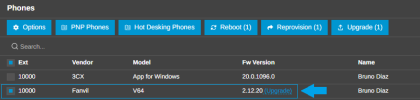
In order to review and confirm which IP Phones can be upgraded, you will need to navigate to Admin > Phones, where each phone will show it's current firmware version along with the (Upgrade) label attached on it's entry:
 

Attachments

  • Screenshot 2026-06-22 132115.png
    Screenshot 2026-06-22 132115.png
    22.2 KB · Views: 21
@Colorado VoIP There is still an Unsupported Firmware link on the admin Dashboard, but they moved it and there is no counter anymore. Click that to get a list of extensions - faster to do if you have a large system and don't want to scroll through a dozen or more phone screens.

1782155568143.png
 
yeah it was just super convenient to see on the dashboard. but those other two methods are just fine.
 
  • Like
Reactions: accentlogic
yeah it was just super convenient to see on the dashboard. but those other two methods are just fine.
Agreed - it was nice to see a more promintent notice. Note that the Unsupported Firmware notice only shows if there are devices with unuspported firmware.
 
Hi, great design change, fresh and modern but everything's still where you expect it. Just a quick question; you announced previously that you were planning to cut access to the PBX via the electron Desktop-App with Update 9. Has this change been made or documented somewhere? We are currently transitioning away from the old client and I am a little hesitant to update our PBX' due to the fact not everyone made the change yet.
 
Hi, great design change, fresh and modern but everything's still where you expect it. Just a quick question; you announced previously that you were planning to cut access to the PBX via the electron Desktop-App with Update 9. Has this change been made or documented somewhere? We are currently transitioning away from the old client and I am a little hesitant to update our PBX' due to the fact not everyone made the change yet.
Please see this post in relation to the desktop app: https://www.3cx.com/blog/releases/windows-desktop-app-eol/
 
  • Like
Reactions: Charles_3CX
Thanks, I know that original post and I'm not sure where I read a message that specifically stated the connection block would be scheduled for update 9 but fact of the matter is, the desktop app still works for the most part.
It is not recommended to use this application, as it has been deprecated and is no longer actively supported.

As a result, if you encounter any issues while using it, support may be limited or unavailable.

We recommend migrating to the new V20 Softphone, which is the supported solution and will receive ongoing updates, fixes, and support.
 
  • Like
Reactions: HAHNAUTOMATION
It is not recommended to use this application, as it has been deprecated and is no longer actively supported.

As a result, if you encounter any issues while using it, support may be limited or unavailable.

We recommend migrating to the new V20 Softphone, which is the supported solution and will receive ongoing updates, fixes, and support.
Yes I am painfully aware of that and I've been trying to get my userbase to move over to the Softphone for about a year, but since there are still some very valid issues with usability and UI/UX of the Softphone, I have only managed to get most to change over to the PWA. Anyways, thanks for letting me know, looking forward to future updates.
 
  • Like
Reactions: Charles_3CX
The old electron app still works in update 9. In update 10 no more..... You can use the new windows softphone as well?
 
Last edited:
Just a minor detail in the client - when UK English is selected, we have a few words which are not UK english like "favorite". I think there's another one but cant remember off top of my head.
 
The T58W is an Android model with 1 GIG firmware. It slipped in with the T56A and T58 models which are now end of life.

We have put it back for now. However we are working on a facility for customers to choose the Yealink firmware directly from the Yealink website. So we are going to make it much easier to deploy directly Yealink firmwares rather than having them be certified by 3CX.

In regards to the T58W in future releases of 3Cx you will be able to specify the firmware but it will take the 1 GIG firmware (!) from the Yealink website and also allow for faster updates from the phone vendors in case of security issues.
"We have put it back for now" Does this mean there is a hotfix coming, I don't see it in the list.

I have a new device to add, going forward we will have to supply a new model, although there are othe rmodel in the list that are EOL Yealink model, under generic.
 
Last edited:
Hello. Looks good. I noticed that the "Monitor Connection Quality" has disappeared from the drop down menu for team members. Has this moved somewhere else?
 
Hello. Looks good. I noticed that the "Monitor Connection Quality" has disappeared from the drop down menu for team members. Has this moved somewhere else?
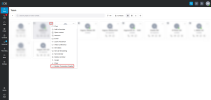
The Monitor Connection Quality should be in the Teams tab, as shown below, but you may need to scroll when you click the 3 dots, as it is at the bottom.

1782230369047.png
 
@NikolasA_3CX Thanks! So many new options I had to scroll down.
 
You can upload custom firmwares no problem already and this functionality will be improved and increased
Perfect, I actually managed to find another customer that had a slightly different update schedule, so managed to get a copy of yealinkT5x.ph.xml template and upload it to the customer in question with a custom name. Phone now configurable, tested and working.

Just not to sure what will happen to any existing phones, do I need to switch them to this XML? or will they just stay working for now.
 
existing phones will continue working.... and new ones we are uploading a new template very soon
 

Forum statistics

Threads
111,818
Messages
589,167
Members
164,642
Latest member
davids86