


- Joined
- Jul 19, 2024
- Messages
- 2
- Reaction score
- 0
We have made several attempts to perform the V18 to V20 upgrade on an on-prem server at one of our supported schools but keep running into the same error condition when we get to the 'restore from backup' stage.
We would appreciate it if you could take a look and help us figure out where it's going wrong.
I have summarised the steps taken below. TIA.
BTW We do have one other on-prem 3CX installation, also running the free version, and that one was successfully upgraded from v18 to v20 with only minor hiccups along the way.
I hope you can help to shed some light on this situation; if you need any additional information, please let me know.
We would appreciate it if you could take a look and help us figure out where it's going wrong.
I have summarised the steps taken below. TIA.
- PBX status on V18 prior to upgrade:-
- I backed up the V18 3CX system, selecting all backup options and encrypted it
- All the upgrade pre-requisites were checked, including...
- Outside school "nslookup ******.my3cx.co.uk" resolved to 80.94.****.****
- Inside school it resolved to the server IP 10.12.101.3
- System Owner defined on extension 100 with unique email 3cxadmin@********h.uk
- Checkpoint taken of the phone system server VM.
- Stopped the 3CX services, removed V18 and re-booted the server.
- Installed V20 and tried to restore from backup, resulting in:
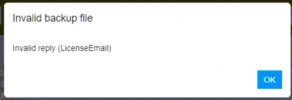
- With V20 installed but not working I noticed that the "nslookup *****.my3cx.co.uk" command was resolving to a different IP address now, i.e. 85.92.***.***. We have no idea how this change occurred during the upgrade.
- I reverted to the VM Checkpoint I took prior to the upgrade attempt after taking a Checkpoint post-upgrade.
BTW We do have one other on-prem 3CX installation, also running the free version, and that one was successfully upgraded from v18 to v20 with only minor hiccups along the way.
I hope you can help to shed some light on this situation; if you need any additional information, please let me know.
Last edited by a moderator:


