Version 18.0 U6 Backups to Google Buckets All Show Same Date

Status
Not open for further replies.

EddieW

Gold Partner
Joined
May 4, 2020
Messages
23
Reaction score
1
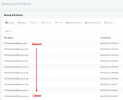
I just noticed that after upgrading to version 18.0.6.908 = Update 6 FINAL (February 2023) any backups to Google Buckets all show the same date. I noticed this for premise as well as hosted and only happens when backing up to Google Buckets, FTP shows the correct date. So if you have a rotation of 5 or 10 backups they will ALL show the same last backup date. Is this an issue with version 18.0.6.908 = Update 6 FINAL (February 2023)?
 
Hi Eddie,

I'm afraid there is limitation with Google Buckets in the way dates are handled.
 
  • Like
Reactions: Evolute IT
Hi JohnS_3CX, but this issue seems to have started after upgrading to version 18.0.6.908 = Update 6 FINAL as I have another client backing up to Google Storage and they are running version 18.0.5.418 = 18.0 Update 5 Hotfix and that shows all the dates correctly? Ed.
 
Hi Ed,

That's actually correct, in the past we would load up the backup files and read the data inside the backup to display it in the management console. While this could overcome the Google Bucket date reporting limitations, unfortunately this was not a good solution at all.

It only worked well for people with a few small size backups. If you have large backups and visit the backups page in the management console there will be issues. Imagine a big organization having 5 backups of 10GB each (which isn't even a lot to be honest). The system would not be able to quickly download 50GBs of data, decompress and look inside the files real quick just to populate the UI with the correct dates...

So for the time being we will handle the backups as you see now in order to allow them to be usable: we will display the names and whatever date Google provides. Meanwhile, we spoke with Google and they said they will make some changes regarding the limitations. Once they lift their limitations, we will be able to show the correct dates for both small and large backups alike and that will restore the old functionality without us having to resort to extreme workarounds.

For now, if you have let's say 5 rotating weekly backups, you are able to derive which week it is from the filename:
1678353943689.png
 
  • Like
Reactions: Evolute IT
Good afternoon, I would like to set up the backup on google bucket but when I enter the JSON key I also get the "Invalid key" error. I checked the pc time, but nothing has changed. What should I do?

PS
I have a 3cx cloud installed instance.

Thanks
 
Resolved. I recreated a new service account and it works. Thank you all the same.
 
Status
Not open for further replies.

Forum statistics

Threads
111,974
Messages
590,081
Members
164,899
Latest member
mazet