Is there a walk-through on how to get video calling to work on these phones? We are using siptrunk.com as the sip provider as well. The phones are STUN'd. All newest firmware, newest 3cx release.
When you mean video calling - external or internal.
If external, does siptrunk allow video calls ? If there do , is the correct codex that is supported on the phone (Video codec: H.264 High Profile, H.264, VP8).
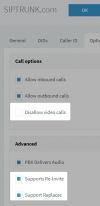
Then, regarding video calls through the provider you have remove the restriction from your trunk options where it says "Disallow video calls", and enable Reinvites and Replaces
NOTE: none of these options are actually supported by 3CX - this will call issues with your calls especially with music on hold
This should be sufficient to allow testing video calls over Siptrunk.com
As to whether this will be successful though, it depends on your provider allowing it, the destination provider also allowing it, and finally the destination PBX or Phone allowing it.
You can talk to them if you want and ask for more information to see if they support it but Our testing shows that Siptrunk.com did not allow video calling, we do not expect you will have any better luck either.
If you are based in the US, here is our list of supported providers in case you want to ask around and find one that supports video.
Just be aware that with the reinvites/replaces options enabled, there's a chance you might get some strange behavior with MoH. You might want to get a trial trunk if you can find one that suits your needs and do some testing with hold/unhold audio, hold/unhold video just to make sure everything is in order before you commit.
The usual problem faced with those options, is if the provider does not know what to do when we put the trunk on hold, and your callers might hear silence, or they might hear the providers own MoH, or they might hear their own PBXs MoH.
If they can handle it fine, the expected behavior is that the customer should hear your own custom MoH indicating that everything is ok.