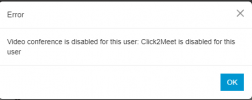
Video conferencing is disabled for this user: Click2Meet is disabled for this user.

Status
Not open for further replies.

Nickyflohr

Platinum Partner
Advanced Certified
Joined
Apr 21, 2022
Messages
14
Reaction score
1
Hello everyone,

I'm trying to set up a meeting, and when i want to invite a specific person, she gets the following message: Video conferencing is disabled for this user: Click2Meet is disabled for this user.


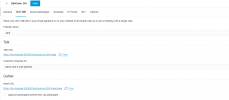
Also, when im logged in into the webclient > management > Users > The user who i want to invite > 3CX Talk > I have set a friendly name to sara.

But still it isnt working, any advice?1690976541571.png
Thanks
 
Hello, can you check that name, surname and email fields are properly filled?
 
Hello,

The Surname is empty., even when i have a Surname filled in, i still get the notification with videoconference is disabled for this user: click2meet is disables for this extension
 
You don't need to add the users you want to invite as 3CX users. Just create a meeting and invite them using email. Or share the public meeting link with them.
Only the meeting organizer is required to be a 3CX user: to invite others, you just need an email address or you can share the public meeting link with anyone.

More info here:
https://www.3cx.com/user-manual/video-conferencing/
 
Hey @MarcelloV

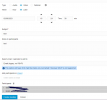
This issue is for a customer, and what they do is they create a meeting link, and then they add colleagues in " Add participants "
(see picture)

But then when they click on Create meeting then they get the following error.

A few months ago this was working untill a few weeks ago.
 
Thread can be closed :)

Reboot of the system seems to fix the problem
 
Status
Not open for further replies.

Forum statistics

Threads
111,973
Messages
590,076
Members
164,895
Latest member
jasonkkrause