Visual Call Reports in MS Excel & Google Sheets

Current Excel template has problems with the 3 digit dn system

When developing it was tested mostly with 3 digit (dn) phone-system data, and some 4 digit dn. Then there were some complications and in the latest version of the formulas the 4 digit distinction was not included in some of them. Sorry about that...

example of the error:
In Data-Output column -Y- you will find this formula:
=IF($C2<>"";IF(X2<>"0:00:00";IF(AC2<>"";"";IF(0+IF(AT2="line";1;0)+IF(AT2="dn";IF(ISNUMBER(VALUE(AR2));IF(VALUE(AR2)<800;1;0);0);0)>0;IF(VALUE(LEFT(X2;2))>0;VALUE(LEFT(X2;2))*3600;0)+IF(VALUE(LEFT(RIGHT(X2;5);2))>0;VALUE(LEFT(RIGHT(X2;5);2))*60;0)+IF(VALUE(RIGHT('Data-Input'!H2;2))>0;VALUE(RIGHT(X2;2));0);""));"");"")

It says on the beginning of the second line <800 which is the boundary between extension and system. In your case it is 8000. if you change this it changes immediately.

We will proceed to check the other formulas, and keep you posted
 
Generic correction to the 4 digit dn problem

In Data-Output column -Y- you will find this formula:
=IF($C2<>"";IF(X2<>"0:00:00";IF(AC2<>"";"";IF(0+IF(AT2="line";1;0)+IF(AT2="dn";IF(ISNUMBER(VALUE(AR2));IF(VALUE(AR2)<800;1;0);0);0)>0;IF(VALUE(LEFT(X2;2))>0;VALUE(LEFT(X2;2))*3600;0)+IF(VALUE(LEFT(RIGHT(X2;5);2))>0;VALUE(LEFT(RIGHT(X2;5);2))*60;0)+IF(VALUE(RIGHT('Data-Input'!H2;2))>0;VALUE(RIGHT(X2;2));0);""));"");"")

change the part
<800;1;0)
into
<800;1;IF(VALUE(AR2)<1000;IF(VALUE(AR2)<8000;1;0);0))

It states now that if the extracted dn is
smaller than 800 ==> 1
smaller than 1000 ==>0
larger than 1000 AND smaller than 8000 ==> 1
larger than 8000 ==> 0

The other formulas present no problem
 
  • Like
Reactions: KyriacosS_3CX
this is based on the data. Changes needed:

1) reset the T in the Timestamp
2) copy/paste trhough a txt editor
3) dot to comma for cost
4) <800 to <8000 copy down the formula to the bottom
 
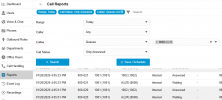
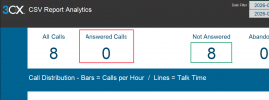
We filtered out the answered calls from the queue in the call logs, downloaded and copied them into the Excel template, but the dashboard shows 0 for Answered calls. Is this normal?
1770366925149.png

1770366986664.png
 
Hello,

The templates expect unfiltered Call Report data in order to have all the legs of each call available for processing - please try removing the filter and check if the issue goes away.

You can ofcourse limit the report dates, but this should be a bit wider than the period of interest to ensure calls that start/end slightly outside that period are captured in full (+/- 1 day would be more than enough).
 
  • Like
Reactions: Evolute IT
Hello,

The templates expect unfiltered Call Report data in order to have all the legs of each call available for processing - please try removing the filter and check if the issue goes away.

You can ofcourse limit the report dates, but this should be a bit wider than the period of interest to ensure calls that start/end slightly outside that period are captured in full (+/- 1 day would be more than enough).
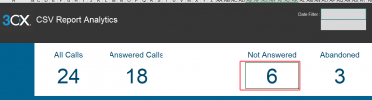
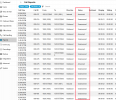
Hello @KyriacosS_3CX , we have just exported today's call logs and uploaded it to the Excel sample file. It shows 6 unanswered calls, but when we checked the status in the call logs, the number of unanswered calls exceeds 6:
1770370491282.png
1770370656367.png
 
Any chance the time zone offset is off, between what's shown online and the excell data? Local vs UTC?
 
  • Like
Reactions: VoIPTools

Members Online Now

Forum statistics

Threads
111,831
Messages
589,277
Members
164,660
Latest member
RJenkinsROCK