Solved Vodafone UK Predefined SIP Trunk 'Vodafone SIP Strategic' not working

Status
Not open for further replies.

TechyTim

Silver Partner
Basic Certified
Joined
Nov 4, 2020
Messages
13
Reaction score
5
Hello,

Unless I am doing something incredible wrong - which I hope not - the predefined SIP Trunk for 'Vodafone SIP Strategic' is not working.

I've redone firewall rules several times, change IPs, unlinked my FQDN and rebuilt my 3CX Debian VM 4 times now.

I've also tried v16 and v18 and neither are working...presumable regardless of the version it pulls down the latest predefined SIP Trunk list from the server as part of an update.

This has previously working back at the end of September, beginning of October as the box that was setup then is working with no problem.

The finally solution for me after wasting a day was to setup a Generic SIP Provider trunk - now, all okay. Note, this is using UDP registration with unencrypted RTP traffic.

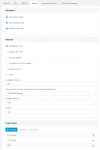
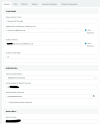
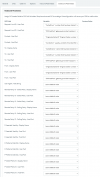
Here are the config. screens for your viewing pleasure.

Tim
 

Attachments

  • Screenshot 2022-01-05 102403_3CX_Vodafone-fix_3.png
    Screenshot 2022-01-05 102403_3CX_Vodafone-fix_3.png
    46.4 KB · Views: 25
  • Screenshot 2022-01-05 102403_3CX_Vodafone-fix_2.png
    Screenshot 2022-01-05 102403_3CX_Vodafone-fix_2.png
    25.1 KB · Views: 25
  • Screenshot 2022-01-05 102403_3CX_Vodafone-fix_1.png
    Screenshot 2022-01-05 102403_3CX_Vodafone-fix_1.png
    23.8 KB · Views: 23
Hi @TechyTim

So the predefined template would not work with neither TLS or UDP? When it was working was it working with TLS or UDP?

For TLS you may need to use a different registrar value as "entvoice.vodafone.co.uk" may not be part of the TLS handshake depending on your region.
 
Hi :)

I have only ever had this working with UDP and unencrypted RTP because at the time v18 wasn't supported for TLS.

I understand it now is but there is a problem with TLS and the Vodafone certificate chain is not trusted - you have to SSH on to the 3CX box and make a change to allow this. NOTE: This is nothing to do with any issues I've had, I just know this from sapeaking to the Vodafone support team.

So, I have only tried the predefined template with UDP and this originally worked back in Sept/Oct but not now.
 
To confirm I have just restored a v18 VM build and restored a backup with a non-working Vodafone predefined template, deleted the trunk, set it up as generic and it worked straight away.
 
The predefined templates are used to set the settings when you are creating a trunk so if your settings are the same in the Generic Trunk it should not make a difference. Especially during the registration process the template has little to do with that so that is very strange.
I just tried with our test accounts and it worked straight away to be honest so not sure why it does not work for you but I will look into it further.
If its working with the Generic trunk then I would leave it for now
 
I agree, it should not make a difference. I'd have expected it to have been me at fault would it not be for the fact I'd done extensive testing across both versions 16 & 18.

If others do have a problem hopefully I've documented something useful for them to try.
 
  • Like
Reactions: YiannisH_3CX
Just to confirm, I've just spun up another v18 VM, Debian 10 and used the predefined template again - it definately isn't working. Somethings seriously broken - it doesn't even attempt to register.
 

Attachments

  • Screenshot 2022-01-05 102403_3CX_Vodafone-symptom_1.png
    Screenshot 2022-01-05 102403_3CX_Vodafone-symptom_1.png
    9 KB · Views: 16
Working.
 

Attachments

  • Screenshot 2022-01-05 102403_3CX_Vodafone-fix_4.png
    Screenshot 2022-01-05 102403_3CX_Vodafone-fix_4.png
    10.3 KB · Views: 17
I think I know what is causing your issue.

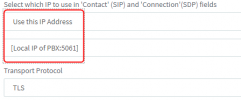
When you add the trunk using the default template the following value is set in the Options tab.
1641544840681.png

I suspect that you just switch it to "Use default Settings" without deleting the [Local IP of PBX:5061] which causes the issue as the invalid value is stored in the trunk when you press OK.

If you delete the value before switching it to "Use default Settings" then you will not face the issue. So once you create the trunk just go the option and delete the "[Local IP of PBX:5061]". Then switch the option to "Use default Settings" and then save the trunk.

Let me know if that resolves the problem .
 
Hello, I haven't yet had the opportunity test this yet but I can confirm I wouldn't have deleted this and would have just switched to the "Use default Settings" as you suggested.

If and when I get the opportunity I shall confirm.
 
  • Like
Reactions: YiannisH_3CX
Let us know of the results.
 
Hello!

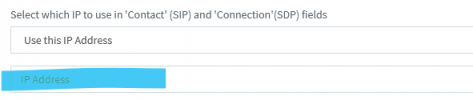
Finally I have confirmation - you must remove the content of the box highlighted in blue before switching the dropdown above to "Use Default Settings" and all works as intended.

1643722722216.png
 
Glad to see that the issue has been resolved and thank you for the update.
 
Status
Not open for further replies.

Latest Posts

Forum statistics

Threads
112,325
Messages
591,898
Members
165,477
Latest member
Mueller