Voicemail Issue

Status
Not open for further replies.

tommy04715

Forum User
Joined
Feb 23, 2023
Messages
11
Reaction score
0
What we want is to increase the voicemail limit from 2 minutes and it seems that as we're on 3CX Hosted System, the option isn't enabled for us. May I know what this means?

Also, When the voicemail cuts off at 2 minutes, it gives 4 options: Save, Review, Verify, & Exit. Could you let me know what each of these actually does?

Appreciate your help.
 
What we want is to increase the voicemail limit from 2 minutes and it seems that as we're on 3CX Hosted System, the option isn't enabled for us. May I know what this means?

A message longer than 2 minutes! wow!
It is not possible to change this setting but it is planned to offer “CallFlow App integration” for PBXs Hosted by 3CX. View post
Not to be confused with StartUP..
If hosted, You will be able to use CallFlow's "record audio file" feature and then email it to the user.

Also, When the voicemail cuts off at 2 minutes, it gives 4 options: Save, Review, Verify, & Exit. Could you let me know what each of these actually does?

Appreciate your help.

Save is the equivalent of hanging up before reaching the interactive menu.

Review is the equivalent of erasing and starting over. So “Retry”.

Verify is for to listen to his recording before send to user.

Exit is the equivalent of the "undo" and quit function
 
A message longer than 2 minutes! wow!
It is not possible to change this setting but it is planned to offer “CallFlow App integration” for PBXs Hosted by 3CX. View post
Not to be confused with StartUP..
If hosted, You will be able to use CallFlow's "record audio file" feature and then email it to the user.


Save is the equivalent of hanging up before reaching the interactive menu.

Review is the equivalent of erasing and starting over. So “Retry”.

Verify is for to listen to his recording before send to user.

Exit is the equivalent of the "undo" and quit function
I appreciate your help. Yes, more than 2 minutes, just in case someone needs it.

I had a question - Could we change the "To Verify Your Recording" to say "To Listen To Your Recording" Also could we change the "Exit" option to say "To Erase & Rerecord"?

It seems the current terms are confusing to people.
 
I appreciate your help. Yes, more than 2 minutes, just in case someone needs it.

I had a question - Could we change the "To Verify Your Recording" to say "To Listen To Your Recording" Also could we change the "Exit" option to say "To Erase & Rerecord"?

It seems the current terms are confusing to people.

Yes, custom your system prompts ;
https://www.3cx.com/docs/localize-promptsets/#h.9af8oae4z2mk

Replace " SaveMsgCnfrm.wav " with your custom audio file.


Warning : I share the solution with you but personally, I do not recommend it.
Do not complicate your installation for nothing. 3CX offers excellent solutions and takes care of "delivering" you the updates, enjoy this happiness :)

The prompts evolve and are added over time.
Features are improved or added. This requires new audio files for its features.

If you use "custom library" (custom prompts set), the new audios files will not be automatic "added" into your custom prompts set ... this is logical. It could therefore have errors, later, to user "new/updated" functionalities.

Example ;
I remember a version of 3CX where searching in the Call by name was only possible with first 3 letters of the last name.

Much to everyone's delight, 3CX has added a new feature; Call by name from the first 3 letters of the first name ! ( Ho yeah ! )
But .. Those who used custom prompt sets have encountered "issues". These did not contain the audio files necessary to give instructions to callers. Callers could no longer use this feature .

"Custom prompts set" to change only 1 audio file .. which bothered several callers .. until the system owner was informed of the problem.

The question, is it really worth it?


Hope this answers your question.
Have a good evening , I have to go because I have to take care of updating our 3CX phone system's non-custom "system prompts set" ;) :p ----> Unlike those that have custom system prompts set ; I only have one step to do.
I didn't even have time to finish my answer that 3CX has already finished updating my system prompts set files!

How beautiful is life !?

Thank you 3CX ! :cool:


1678330454119.png


------------------------------------------------

Question for fun * Question for all ! :)

ɪɴ ᴇɴɢʟɪsʜ, ᴅᴏ ʏᴏᴜ ᴛʜɪɴᴋ ᴛʜᴇ ᴠᴏɪᴄᴇ ᴏғ ᴄx ɪs ᴛʜᴇ ᴠᴏɪᴄᴇ ᴏғ sᴀʟʟʏ ɪɴ ᴀᴍᴀᴢᴏɴ ᴘᴏʟʟʏ ?

Information not very relevant but just for fun :)
 
Hi @tommy04715,

Please note that you cannot configure a Custom System Prompt set in 3CX StartUP solution or change the duration of the voicemail.
 
  • Like
Reactions: tommy04715
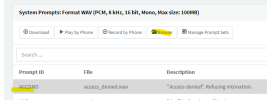
Yes, custom your system prompts ;
https://www.3cx.com/docs/localize-promptsets/#h.9af8oae4z2mk

Replace " SaveMsgCnfrm.wav " with your custom audio file.


Warning : I share the solution with you but personally, I do not recommend it.
Do not complicate your installation for nothing. 3CX offers excellent solutions and takes care of "delivering" you the updates, enjoy this happiness :)

The prompts evolve and are added over time.
Features are improved or added. This requires new audio files for its features.

If you use "custom library" (custom prompts set), the new audios files will not be automatic "added" into your custom prompts set ... this is logical. It could therefore have errors, later, to user "new/updated" functionalities.

Example ;
I remember a version of 3CX where searching in the Call by name was only possible with first 3 letters of the last name.

Much to everyone's delight, 3CX has added a new feature; Call by name from the first 3 letters of the first name ! ( Ho yeah ! )
But .. Those who used custom prompt sets have encountered "issues". These did not contain the audio files necessary to give instructions to callers. Callers could no longer use this feature .

"Custom prompts set" to change only 1 audio file .. which bothered several callers .. until the system owner was informed of the problem.

The question, is it really worth it?


Hope this answers your question.
Have a good evening , I have to go because I have to take care of updating our 3CX phone system's non-custom "system prompts set" ;) :p ----> Unlike those that have custom system prompts set ; I only have one step to do.

I didn't even have time to finish my answer that 3CX has already finished updating my system prompts set files!

How beautiful is life !?

Thank you 3CX ! :cool:


View attachment 34559


------------------------------------------------

Question for fun * Question for all ! :)

ɪɴ ᴇɴɢʟɪsʜ, ᴅᴏ ʏᴏᴜ ᴛʜɪɴᴋ ᴛʜᴇ ᴠᴏɪᴄᴇ ᴏғ ᴄx ɪs ᴛʜᴇ ᴠᴏɪᴄᴇ ᴏғ sᴀʟʟʏ ɪɴ ᴀᴍᴀᴢᴏɴ ᴘᴏʟʟʏ ?

Information not very relevant but just for fun :)


I apologize I am a little confused. Is it possible to customize the prompt lingo on the voice mails? Like changing "To Verify Your Recording" to "To Listen To Your Recording." I thought from this that it was possible, but another email you sent after this, sounded like it is not possible.

Also, an unrelated one - is it possible with 3CX to give another option at the end of the two minute message that says "To Continue This Recording Press 5 (or whatever number) and then if they press that, it will let them continue and leave an additional 2 minute message. I have seen other voice mails do this and this would solve our issue with the two minute voice mail.
 
I apologize I am a little confused. Is it possible to customize the prompt lingo on the voice mails? Like changing "To Verify Your Recording" to "To Listen To Your Recording." I thought from this that it was possible, but another email you sent after this, sounded like it is not possible.

Also, an unrelated one - is it possible with 3CX to give another option at the end of the two minute message that says "To Continue This Recording Press 5 (or whatever number) and then if they press that, it will let them continue and leave an additional 2 minute message. I have seen other voice mails do this and this would solve our issue with the two minute voice mail.
For question #1 - not in startup.
For question #2 - not at this time.
 
  • Like
Reactions: tommy04715
For question #1 - not in startup.
For question #2 - not at this time.
Sorry for the confusion but we are running on 3CX Hosted System, not StartUp plan. Keeping this in mind, would it be possible to edit the prompts (Q1)?

Thank you for clarifying regarding Q2! :)
 
Sorry for the confusion but we are running on 3CX Hosted System, not StartUp plan. Keeping this in mind, would it be possible to edit the prompts (Q1)?

Thank you for clarifying regarding Q2! :)
Sorry, I'm not sure about Hosted by 3CX.

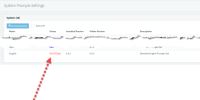
Can you browse to /#/app/settings/system_prompts and see the prompts? Can you select an item and do browse to overwrite one?
1678474082818.png
Normally I just replace the file on the backend directly, but that's not possible with Hosted by 3CX, so we must use the Management Console.
 
  • Like
Reactions: tommy04715
Sorry, I'm not sure about Hosted by 3CX.

Can you browse to /#/app/settings/system_prompts and see the prompts? Can you select an item and do browse to overwrite one?
View attachment 34607
Normally I just replace the file on the backend directly, but that's not possible with Hosted by 3CX, so we must use the Management Console.
Yes, the system prompt setting is available on the Management Console!

I understand the risks of tinkering the system prompts but this does mean we will be able to change the voicemail prompts to our liking?
 
Yes, the system prompt setting is available on the Management Console!

I understand the risks of tinkering the system prompts but this does mean we will be able to change the voicemail prompts to our liking?
If you can upload custom wav files then yes, you can change the prompt to say whatever you want.
 
  • Like
Reactions: tommy04715
Hi @tommy04715,

Please note that you cannot configure a Custom System Prompt set in 3CX StartUP solution or change the duration of the voicemail.
I also wanted to change the prompt but if we can't in StartUP then how can we get the "press * to contact the operator" to actually do something. The way it is now if the person presses "*" it says "to save recording ..." not useful.

Also, I only recently signed up and I received and email that says, 60 day trial of 3CX FREE Dedicated, so should I have the management console? I see a lot of solutions to issues I have are handled by the management console but that is not available to me and I can't tell if it will become available if I pay for a hosting package such as Sartup Pro.
 
I also wanted to change the prompt but if we can't in StartUP then how can we get the "press * to contact the operator" to actually do something. The way it is now if the person presses "*" it says "to save recording ..." not useful.

Also, I only recently signed up and I received and email that says, 60 day trial of 3CX FREE Dedicated, so should I have the management console? I see a lot of solutions to issues I have are handled by the management console but that is not available to me and I can't tell if it will become available if I pay for a hosting package such as Sartup Pro.
You should start a thread in the startup forum.

But the free 60 days trial of dedicated spins up a separate PBX (no "move" between startup and dedicated - it's a manual move over) and you will have a management console then. StartUP Pro is also not dedicated.
 
Thanks for the info on StartUP Pro. Now I just have to figure out how to buy it.
 
Status
Not open for further replies.

Members Online Now

Forum statistics

Threads
111,831
Messages
589,277
Members
164,660
Latest member
RJenkinsROCK