Voicemail usage reports

Status
Not open for further replies.

kseba77

Premier Customer
Joined
Feb 24, 2020
Messages
85
Reaction score
16
Is there a report an admin can run/use to find out much much storage or how many messages are in user mailboxes?
It seems like a basic information one would want to have when administering the system, yet it seems I am unable to locate it.
 
Hi @kseba77,

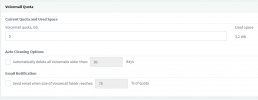
You can view the Voicemail quota by navigating to Settings >> Voicemail in the Management Console.

1622618049156.png
 
Hi @kseba77,

You can view the Voicemail quota by navigating to Settings >> Voicemail in the Management Console.

View attachment 22301
Thank you. That definitively helps but I would love to see a per extension report as well. This way I would know what users to contact to make sure they clean up their vm boxes.
 
Voicemails are just wav files. It would not be hard to write a program/script to scan the folder structure, count the number of files in each extension folder, and sum the disk space used in each folder.
 
Voicemails are just wav files. It would not be hard to write a program/script to scan the folder structure, count the number of files in each extension folder, and sum the disk space used in each folder.
I would love to write some scripts if I had time :-(
What would it cost for you to write something like that for us and could that report show as an option in the UI for scheduling reports?
 
Let's have the majority of this discussion via email/phone. However, for the benefit of others... there is no way in 3CX to add additional reports or to make changes to existing reports. So, no, it is not possible to make a custom report show up in the 3CX UI.
 
Status
Not open for further replies.