• We do not provide troubleshooting help for unsupported phones. Please try with a supported phone.
  • V20 Update 10 Alpha 2 Learn more

Solved VVX 450 Logo

Status
Not open for further replies.

WRSYSADMIN

New User
Basic Certified
Joined
Jun 17, 2021
Messages
9
Reaction score
0
could anyone help me get a logo onto a polycom vvx450?
we have the enterprise license,
i'v been able to get our logo onto some vvx411's with no issue but it will not work for 450's
 
Hi,

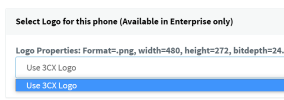
Did you add from here?
1623941300290.png
And is the file in the correct format for the phone to accept?
 
hello,
yeah i changed the resolution to 480x272 and it was a png file
 
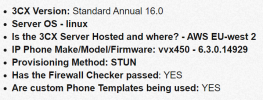
  • 3CX Version: Standard Annual 16.0
  • Server OS - linux
  • Is the 3CX Server Hosted and where? - AWS EU-west 2
  • IP Phone Make/Model/Firmware: vvx450 - 6.3.0.14929
  • Provisioning Method: STUN
  • Has the Firewall Checker passed: YES
  • Are custom Phone Templates being used: YES
 
Hi,

I just quickly created a png in mspaint at 480x272, then added it to the extension provisioning tab, and hit reprovision.

The phone rebooted and came up again with the new PNG as a background.

A few possibilities to consider in your case:

1. You are using custom templates, your first step in troubleshooting would be to factory reset one phone, and provision it using the default templates to see if the problem goes away

2. The PNG you are using is somehow not readable to the phone - try my method with mspaint and see if it accepts that PNG

3. The phone is not really provisioning, hence it cannot even download the image as a result, use my step 1. above and find out
 
hello,

i have tried the mspaint option and unfortunately that did not work,
I tried the factory reset option and that also did not work,
I believe the phone is provisioning as I can make and receive calls, its just the logo that isn't appearing

thankyou
 
Just to be sure, did you use the custom template after factory reset?

You need to delete the phone from the extension, press OK to save.

Then factory reset the phone and re-add it using the default 3CX template.

1624008836567.png
 
yeah i did do that
 
Ok, if you did that, and the default 3CX logo appeared, then clearly the phone is able to download an image from the PBX.

We have a couple of possibilities left:

1. Your image file is still incompatible with the phone - you have to try a different one until you get it right

2. The image file is not downloadable from the PBX - you can easily verify this using the following method:

- Ensure the phone is registered
- Go to your management console >> Phones tab
- Tick the phone in question, and then click "Config" button to reveal the configuration
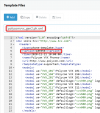
- Click inside the config box, then Ctrl+F to search in it for bg.color.bm.1.name
- This will reveal your private URL for provisioning that image on the phone, Copy this specific URL
- Now have someone who is at the actual phone site, to try and download that file from their PC. Their PC must be on the same subnet as the phones. This test should reveal if that phone, from that internet connection, can download the image file as we expect
 
hi mate,
i was able to download the file, upon opening it it is still the 3cx logo even though the file name is the one of my company logo
 
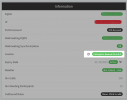
Ok we're on to something now. You mentioned that your system has an Enterprise license, can you please go here and confirm this, by clicking the refresh button and see if it is still indeed Enterprise?


1624012938101.png
 
;
i can confirm it is:
1624013229433.png
 
On message #6 you said its a standard annual, so I'm wondering if there was a recent key or fqdn change on your system. If it reverted to standard, then it would make perfect sense that the logo cannot be replaced.

1624013307243.png

Can we confirm please?
 
I can confirm it is enterprise annual
and the logo still does not appear when re-provisioning
 
Ok I will send you a private message shortly so we can take a look
 
  • Like
Reactions: WRSYSADMIN
As per our conversation, there was an issue causing this that has been corrected in V18.

Since we already confirmed the solution, I will mark this one as solved for now.
 
Status
Not open for further replies.

Forum statistics

Threads
112,147
Messages
590,960
Members
165,167
Latest member
Finatra.us