


- Joined
- Jun 6, 2023
- Messages
- 11
- Reaction score
- 3
Hi,
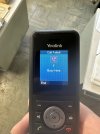
Has anyone experience the speed dials on W59R handsets not working when linked to W80DM base stations? we have 14 of these handsets which have just replaced the exact same model (due to the rubber surround peeling off them). The new handsets are using our existing W80DM base stations (On the latest firmware 103.85.0.26) and are not allowing Speed Dials to work. Basically if you manually add a number to the speed dial or select one from the phone book, if you try to dial it by pushing and holding the required key, you get a message which says "Call Failed - Busy Here" as show in the pic below. The original handsets worked fine on these base stations so not sure what's changed, can't see any settings for it - the handsets are also on the latest firmware. We also have two replacements running on a W60B base and their speed dials work fine. Every phone on multiple different W80DM bases is not allowing sped dial. Are we missing something obvious? If I select the number from the phonebook list it dials it fine, just not if I press and hold a button to dial it.
Any help appreciated.
Has anyone experience the speed dials on W59R handsets not working when linked to W80DM base stations? we have 14 of these handsets which have just replaced the exact same model (due to the rubber surround peeling off them). The new handsets are using our existing W80DM base stations (On the latest firmware 103.85.0.26) and are not allowing Speed Dials to work. Basically if you manually add a number to the speed dial or select one from the phone book, if you try to dial it by pushing and holding the required key, you get a message which says "Call Failed - Busy Here" as show in the pic below. The original handsets worked fine on these base stations so not sure what's changed, can't see any settings for it - the handsets are also on the latest firmware. We also have two replacements running on a W60B base and their speed dials work fine. Every phone on multiple different W80DM bases is not allowing sped dial. Are we missing something obvious? If I select the number from the phonebook list it dials it fine, just not if I press and hold a button to dial it.
Any help appreciated.


