Solved Wallpaper for Fanvil X4G

Status
Not open for further replies.

nvroom

Free User
Joined
Aug 4, 2021
Messages
13
Reaction score
0
Hi,

I bought a Fanvil X4G to use with my Enterprise 3CX install, but when I provisioned it, the wallpaper disappeared and now it's just a black screen with a time. Apparently, there's a setting under phone provisioning to add a wallpaper but that box isn't there on my install.

I would really like to change it to something other than a black screen.

Before I provisioned it there was a White FANVIL background - I'd settle for this, but I'd like a custom picture.

Thanks
 
You can find the file requirements for each supported phone at https://www.3cx.com/docs/ip-phone-background-logo/

You would then upload/choose the custom background on the phone provisioning tab.

Since I haven't used Fanvil phones I am not sure what the default background is supposed to be.
 
I just realized you said X4G and not X4U.

What template are you using for that phone? I don't believe X4G is supported.

**EDIT** I mean for custom logos. Link shows X4U but not X4G.
 
I just realized you said X4G and not X4U.

What template are you using for that phone? I don't believe X4G is supported.

**EDIT** I mean for custom logos. Link shows X4U but not X4G.
https://www.3cx.com/sip-phones/fanvil-x3-x5/
  • Fanvil X4/ X4G/ X4U
EDIT: Oh LOL.

I can upload a logo on the phone web page but I don't think that sticks after reboot or reprovision
 
When I pretend to add a phone to my system here is what I see depending on template/model chosen:

Fanvil X4: I don't have the option to set the custom logo
Fanvil X4U: I do have the option to set the custom logo

The logo is overridden by the phone template. That is why it doesn't stay after reboot or re-provision.
 
When I pretend to add a phone to my system here is what I see depending on template/model chosen:

Fanvil X4: I don't have the option to set the custom logo
Fanvil X4U: I do have the option to set the custom logo

The logo is overridden by the phone template. That is why it doesn't stay after reboot or re-provision.
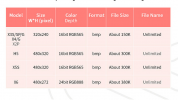
On the fanvil site they say this: Screenshot 2021-08-16 204550.png

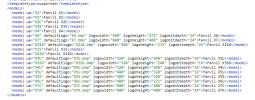
Can I not just go into the template and edit it to match the x3u?
Screenshot 2021-08-16 204704.png
 
Hi @nvroom

We will look into it and see if we can add it in our next update to V18.

Since we do not currently set a logo to the X4G, if you add one manually via the phone UI it should stick for now.
 
The change has been scheduled for V18 U1
 
Status
Not open for further replies.

Members Online Now

Forum statistics

Threads
111,832
Messages
589,282
Members
164,662
Latest member
DejanMDS